

A Field Guide to Querying and Report Computations with SPL - 10 Order-based computations on sets of strings
10 Order-based computations on sets of strings
This type of task refers to computations within or between string sequences, commonly used for organizing irregular data. The fundamental data type in SQL (result set) is unordered set, which poses inherent obstacles to implementing such computations. When dealing with record-level or field-level sequences, SQL often requires converting data into record sets for computation, resulting in lengthy and complex code. While embedding regular expressions can shorten the code, they increase the difficulty of understanding and debugging, further exacerbating this complexity.
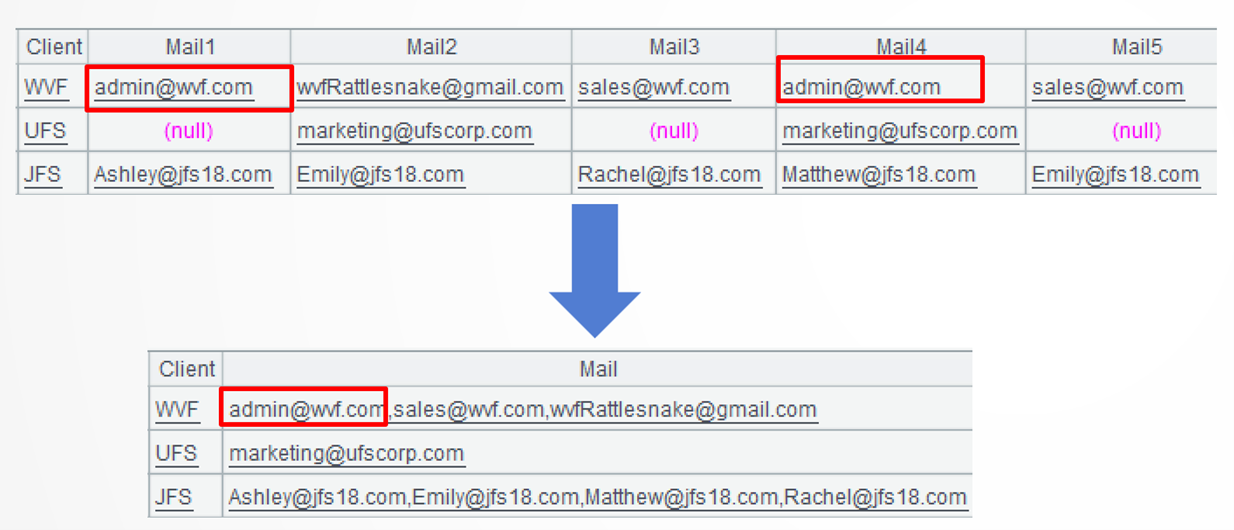
Example 1: Remove duplicate values in an indefinite number of mail1, 2, 3… columns and combine the rest of the values
Source data: Client mail table (10/MailCollected.txt) stores client information in one client field and an indefinite number of mail fields. One client may have null and duplicate email address.
Target: Rearrange the table as a regular two-dimensional table by removing null email addresses and duplicate addresses and combining address values into a single mail field.
SPL code:
A |
|
1 |
$select * from 10/MailCollected.txt |
2 |
=A1.new(Client,~.array().m(2:).id@0().concat@c():Mail) |
A1: Load data.
A2: =A1.new(Client,~.array().m(2:):Mail)creates a new two-dimensional table based on A1. It copies Client field and computes Mail field values in several steps – array() function converts records to a sequence and m() function gets members of the sequence from the 2nd to the last. Below is the first record:
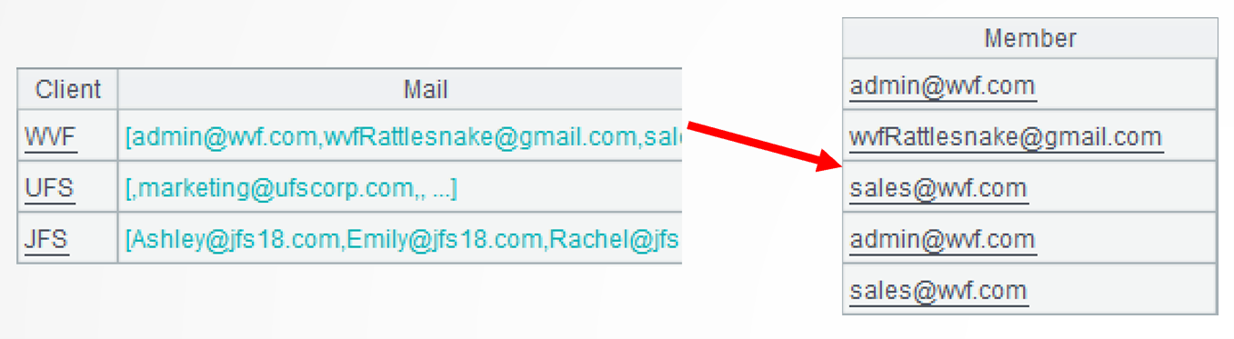
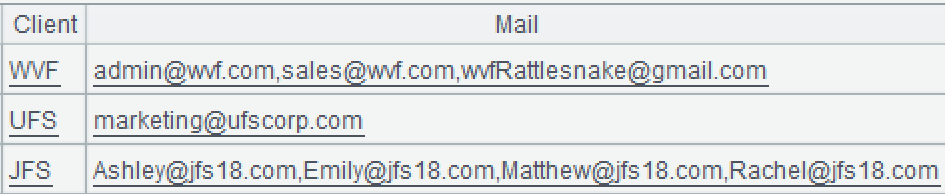
.id@0() performs a further computation to get the unique values. @0 option enables removing the null values. Below shows details of the first record:

.concat@c() furthers the computation to concatenate members of the sequence into a string. @c option enables using comma as the separator.
Example 2: Extract phone numbers of NANP format
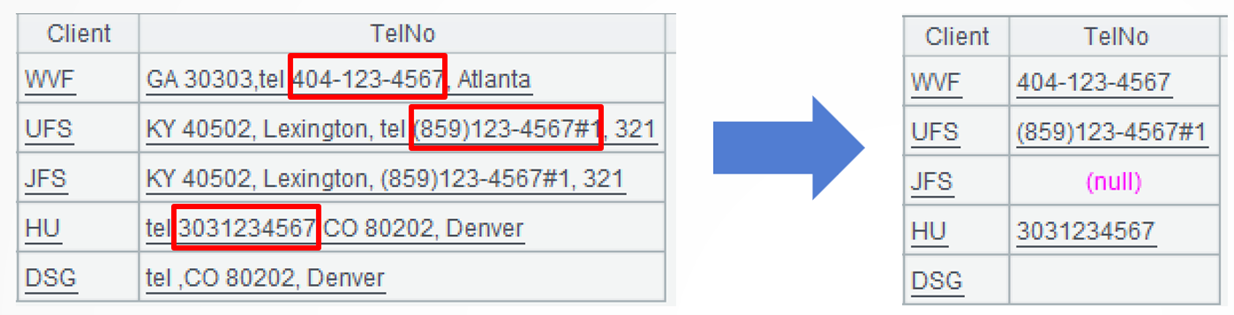
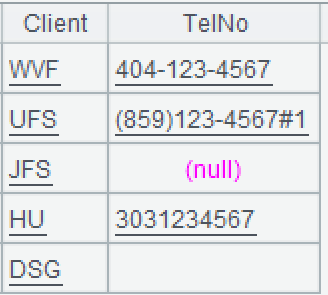
Source data: Client phone number table (10/TelCollected.txt)stores relative information. Each phone number consists of numbers and one or some of the characters "()*#+-" basically in the NANP format. Some phone numbers have the country code and some are made up of continuous numbers, but all of them are mixed into large strings.
Target: 3. Extract the phone number and organize the data into a regular two-dimensional table according to the following rule: 1. Each telNo field value consists of only one phone number; 2. "tel" may or may not has a phone number after it, but if there isn’t the "tel", there isn’t any phone number; 3. Each phone number exists as a continuous string, and once a new character appears, the phone number ends.
SPL code:
A |
|
1 |
$select * from 10/TelCollected.txt |
2 |
=A1.run(TelNo=substr(TelNo,"tel").split().select@c(pos("0123456789()*#+-",~)).concat()) |
A1: Load data.
A2: =A1.run(TelNo=substr(TelNo,"tel")) modifies TelNo field in several steps: first, substr() function retrieves the substring after the marker "tel".
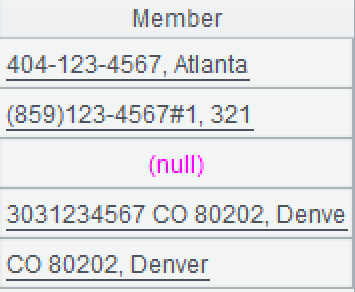
.split() computes furtherly to split the current string into a sequence of characters. Below shows the first sequence of characters:
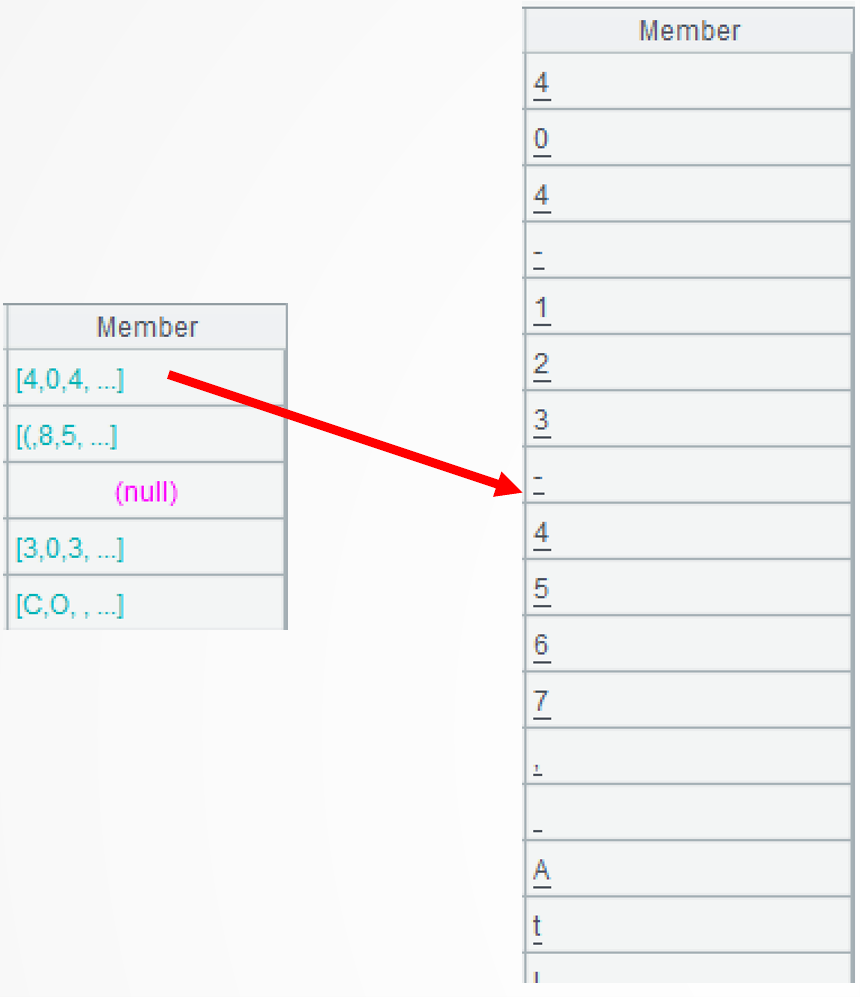
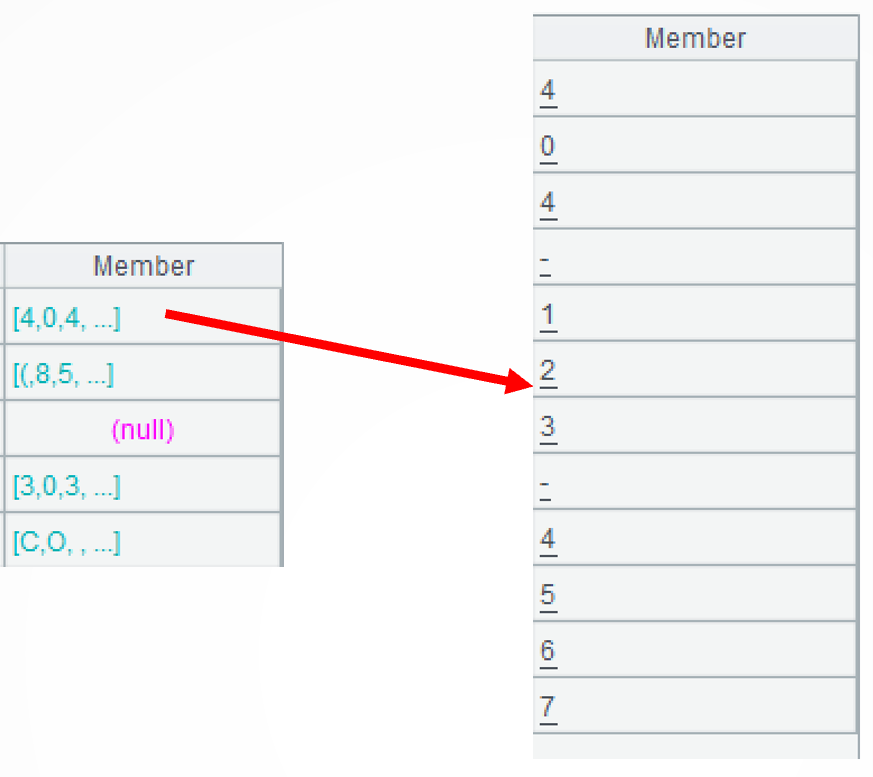
.select@c(pos(“0123456789()*#+-”,~))performs a further computation to retrieve members of the sequence from the first until a character that isn’t included in “0123456789()*#+-” appears. The select()function performs filtering operation to select certain members; @c option enables getting member from the first one and stopping the retrieval until the member making the specified condition false. The pos() function judges whether a character is contained in a string.
.concat() continues the computation to concatenate members of the sequence into a string.
Example 3: Find strings that contain at least 5 continuous, alphabetically ordered letters
Source data: A database table (10/consecutive_5_str.txt) consists only one string column that may contain any characters.
Target: Find every substring whose length is greater or equal to 5 from continuous substrings where letters are alphabetically arranged in ascending order. Note that the alphabetical order is A-Z/a-z and that letter Z is directly followed by letter a.
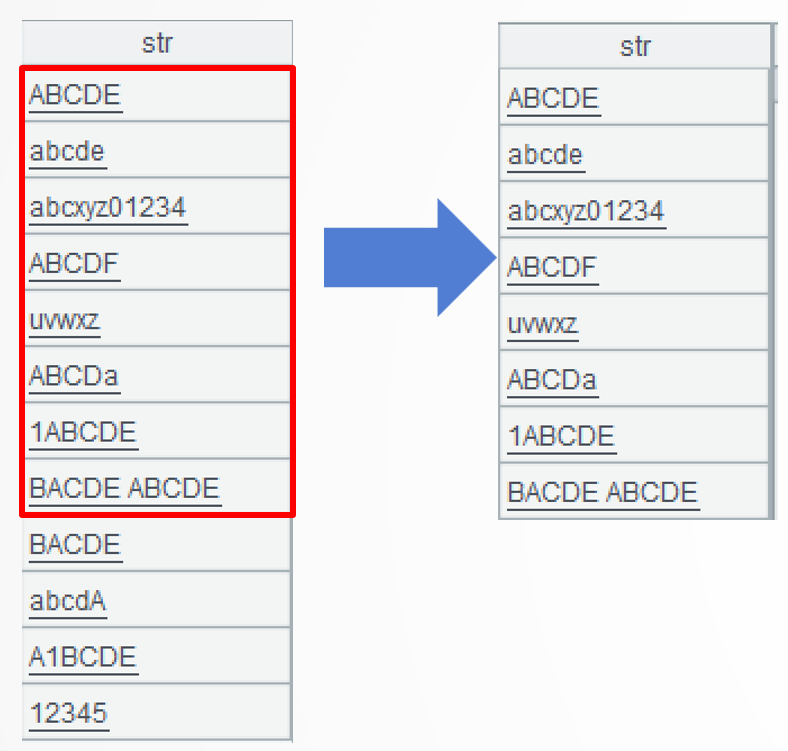
SPL code:
A |
|
1 |
$select * from 10/consecutive_5_str.txt |
2 |
=A1.select(str.split().group@i(~<=~[-1] || !isalpha(~[-1])).max(~.len())>=5)\n |
A1: Load data.
A2: =A1.select(str.split()) selects strings meeting the specified condition. The process involves several steps. First, each string is split into a sequence of characters. Here are the 6th, the 7th, and the 8th strings:
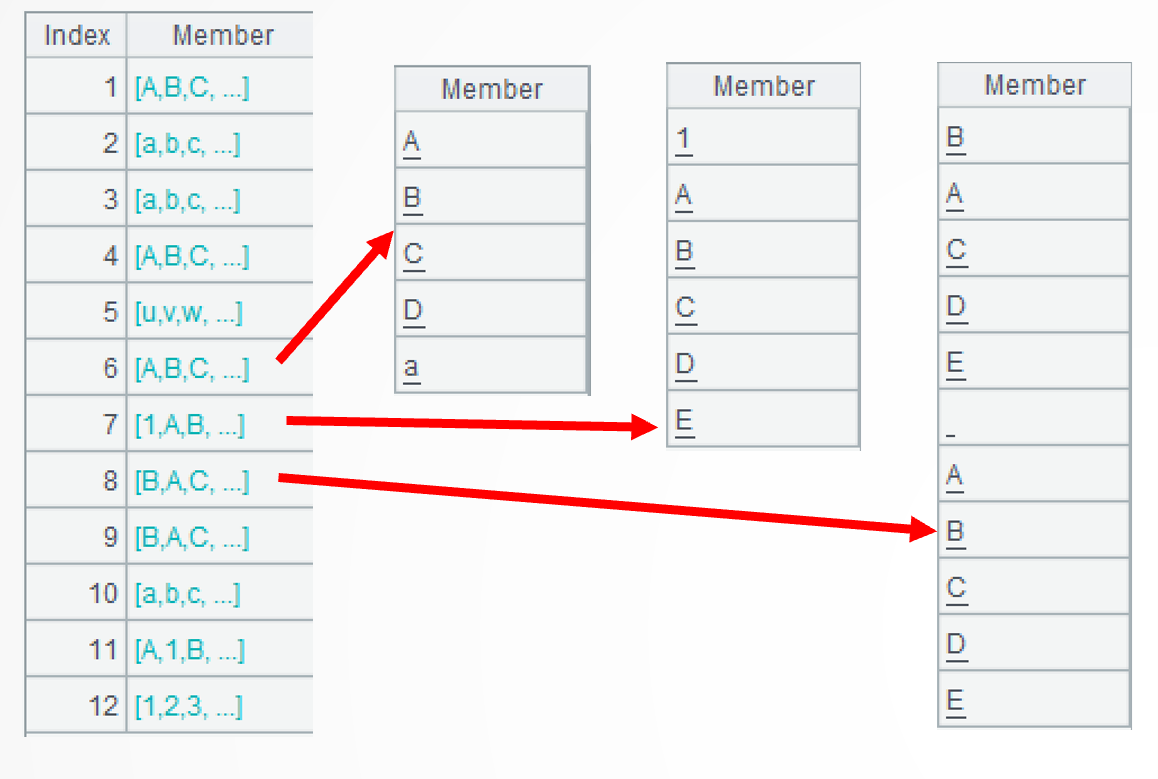
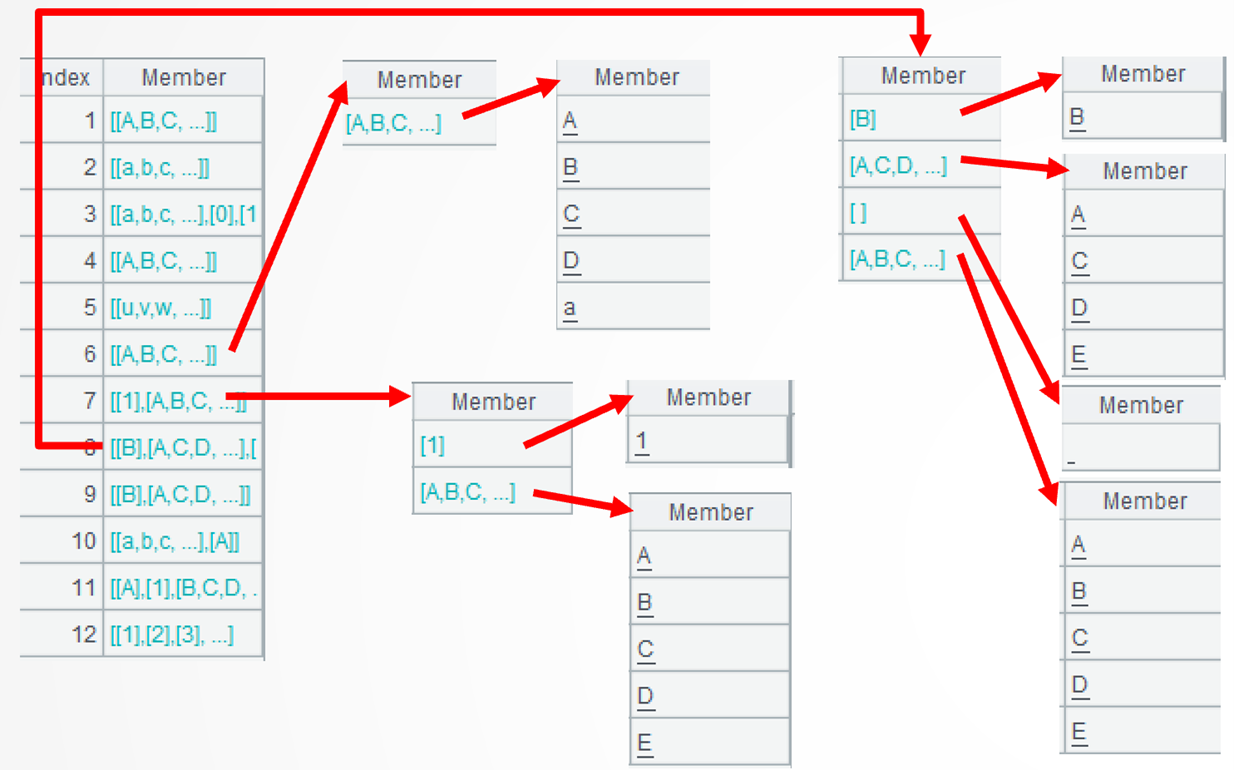
.group@i(~<=~[-1] || !isalpha(~[-1])) performs a further operation to group each sequence according to the specified condition – put alphabetically ordered characters and non-letter characters into different groups. The group()function performs grouping without aggregation. @i option enables grouping by the specified condition. ~<=~[-1] creates a new group when the current character is before the preceding one or in the alphabet; !isalpha(~[-1]) creates a new group when the preceding character isn’t a letter; || denotes the OR relationship. Here are details of the 6th, the 7th, and the 8th strings:
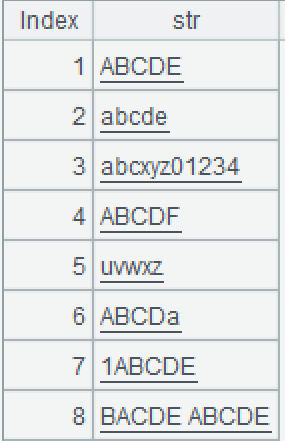
.max(~.len())>=5 continues the computation to select strings corresponding to at least one subgroup that has at least 5 members. Strings from the 1st to the 8th are the eligible ones.
Extended reading
From SQL to SPL: Find consecutive alphabetical characters in string
From SQL to SPL: Substring from a column of strings
From SQL to SPL: Deduplicate between an uncertain number of columns
From SQL to SPL: Getting values from multiple format strings to multiple records
https://c.raqsoft.com.cn/article/1553131062284
https://c.raqsoft.com.cn/article/1553852557407
SPL Official Website 👉 https://www.esproc.com
SPL Feedback and Help 👉 https://www.reddit.com/r/esProcSPL
SPL Learning Material 👉 https://c.esproc.com
SPL Source Code and Package 👉 https://github.com/SPLWare/esProc
Discord 👉 https://discord.gg/sxd59A8F2W
Youtube 👉 https://www.youtube.com/@esProc_SPL