

A Field Guide to Querying and Report Computations with SPL - 9 Post-grouping set operations
This type of tasks refers to set operations, including intersection, union, difference, concatenation, etc., performed after a grouping operation. SQL does not support explicit sets, making the language only fit for handling set operations in simple contexts. For those with complex contexts, particularly intra- or inter-group set operations, the code becomes difficult to write.
Example 1: Find salespeople who rank top3 every month
Source data: The orders table (9/Orders_TopnByMonth.txt) storing sales amount per salesperson per month in the year 2022.
Target: Group records by month, find the set of top3 salespeople in terms of sales amount in each group, and compute intersection of all such sets.
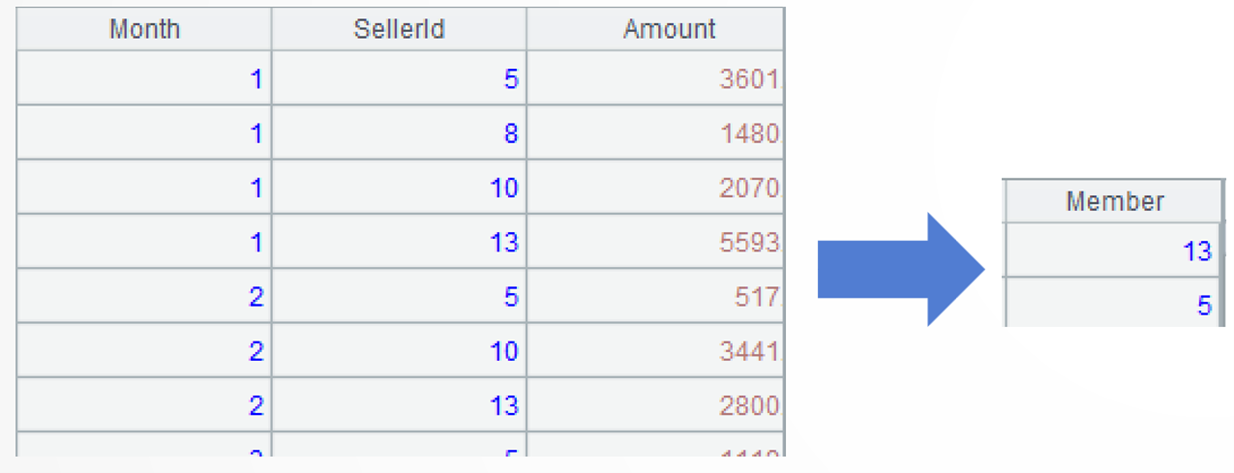
SPL code:
A |
|
1 |
$select month(OrderDate) as Month,SellerId,sum(Amount) as Amount from 9/Orders_TopnByMonth.txt where year(OrderDate)=2022 group by month(OrderDate),SellerId |
2 |
=A1.group(Month) |
3 |
=A2.(~.top(-3; Amount).(SellerId)) |
4 |
=A3.isect() |
A1: Load data.
A2: Group records by month; each group consists of a set. Below shows the sets of the first two months:
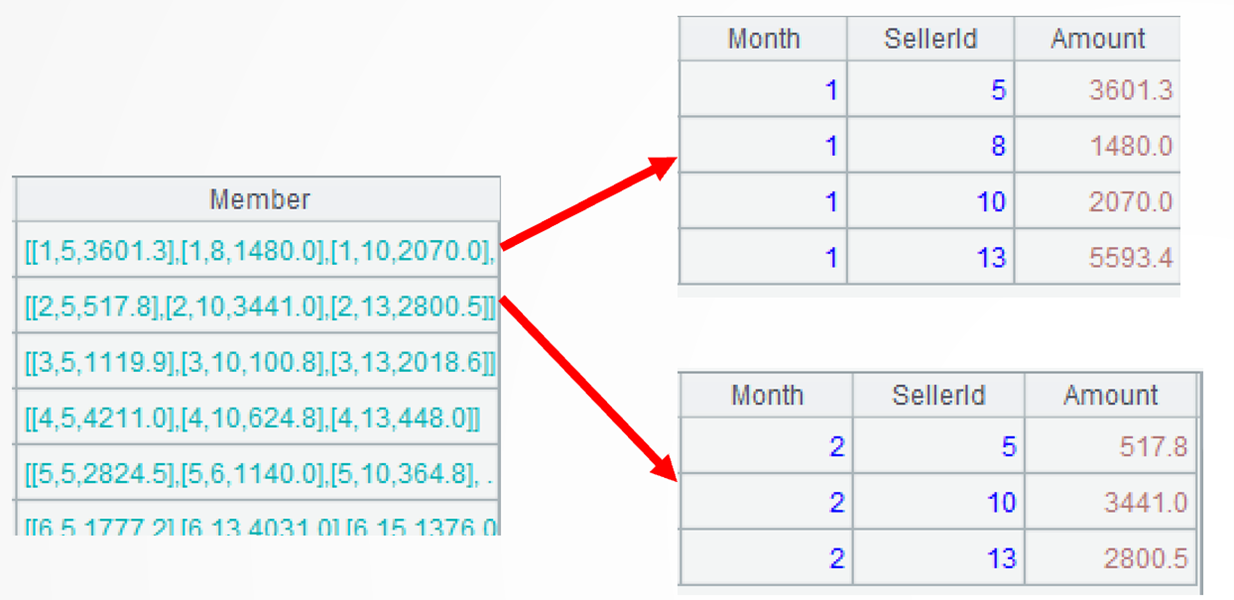
A3: =A2.(~.top(-3; Amount)…)processes each of A2’s group. It first uses top() function to get records, where sales amounts rank top 3 for each group; ~ represents the current group. Here are sets for the first two months:

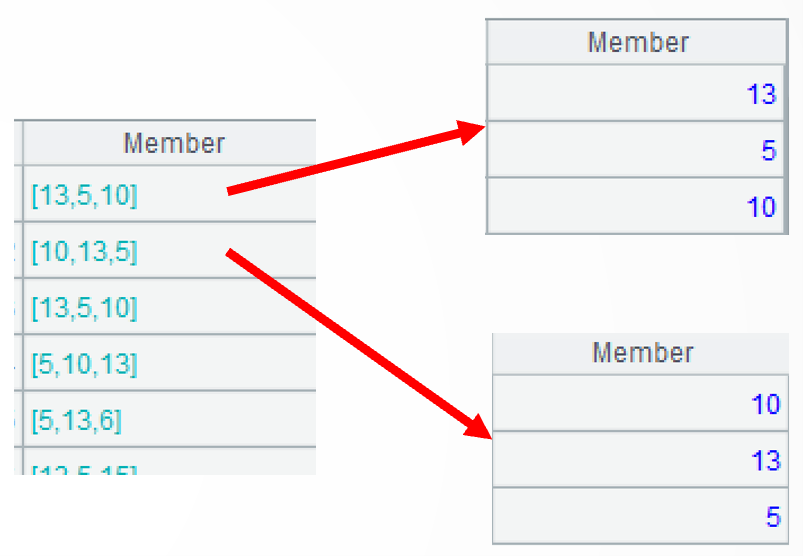
…(SellerId) then retrieves SelleriId field values, that is, a set of salespeople, from each group of records. Below shows the sets of salespeople in the first two months:
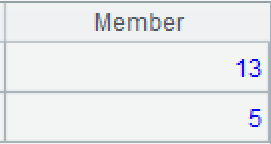
A4: Compute intersection of members of A3. The isect()function computes intersection of subsets in a set. Similar functions are union(), diff(), and conj().
Example 2: Copy a table’s order total record to the end of each year’s subtotal records
Source data: An orders table-based, two-dimensional table made up of each year’s subtotal per month and total, where the year field and month field of the total record is null and where the record count is not fixed.
Target: Generate data for report creation: keep the order of subtotal records, copy the total record to the end of each year’s subtotal records, and change the total record’s year to the corresponding subtotal record’s year.
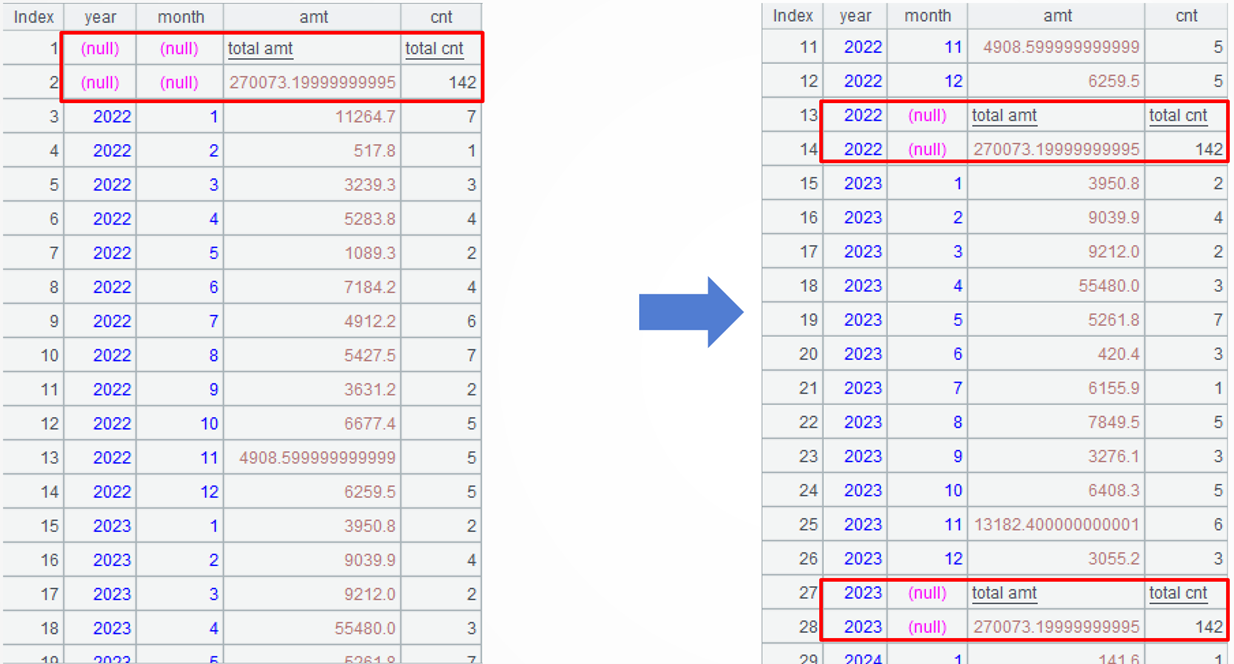
SPL code:
A |
|
1 |
$ with detail as (select year(OrderDate) year, month(OrderDate) month,sum(Amount) amt, count(1) cnt from Orders.txt group by year(OrderDate) , month(OrderDate) ) select * from {create(year,month,amt,cnt).record([null,null,"total amt","total cnt"])} union select null as year, null as month,sum(amt) amt, sum(cnt) cnt from detail union select * from detail |
2 |
=A1.select(!year) |
3 |
=(A1\A2).group@u(year) |
4 |
=A3.conj(~|A2.new(A3.year,month,amt,cnt)) |
A1: Load data.
A2: Perform filtering to get a set of total records. The filtering condition !year in select() function is equivalent to year==null.

A3: Use the diff operation to get details records, and then group them by year while maintaining their order. The group() function works with @u option to retain the original order of members when performing grouping. Below shows details of the first group of records:
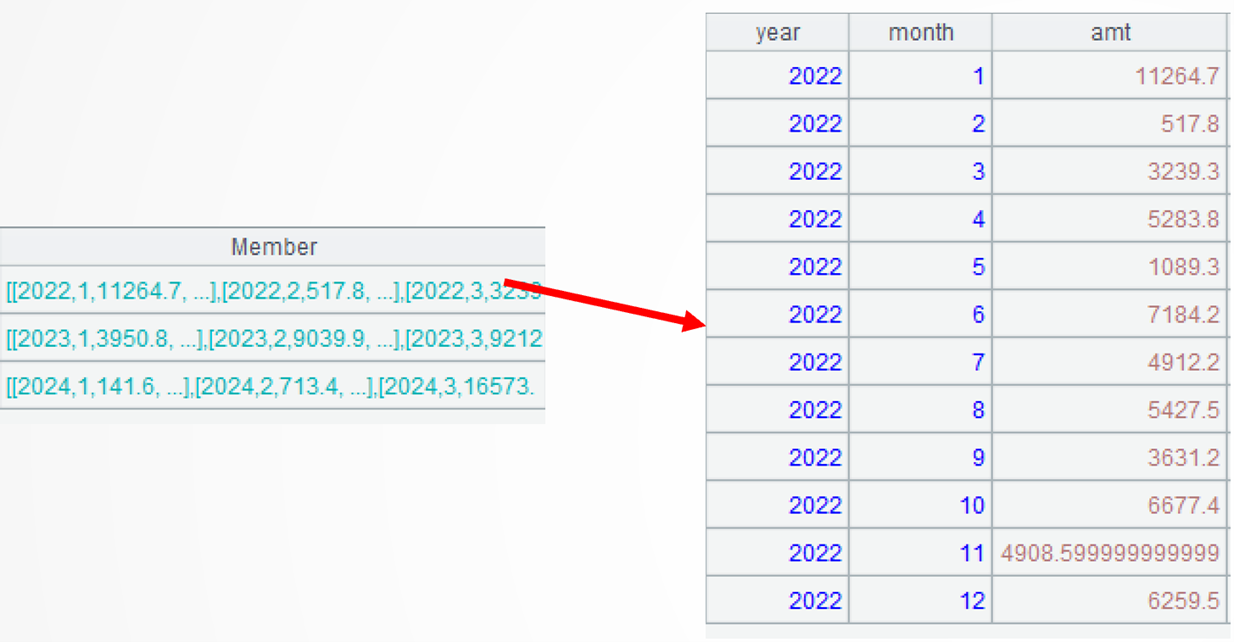
A1\A2 computes difference between two sets of records, A1 and A2. Similar operators are ^ (intersection), union (&), and concatenation (|). The diff()function can compute difference, too, so A3 can be written as =[A1,A2].diff().group@u(year).
Learning point: Set operators and set functions
Both operators and function can be used to perform set operations. But, the computing objects of a set operator can only be two sets while a set function has more and a wider range of computing objects, which can be two or more sets or larges sets whose members are also sets.
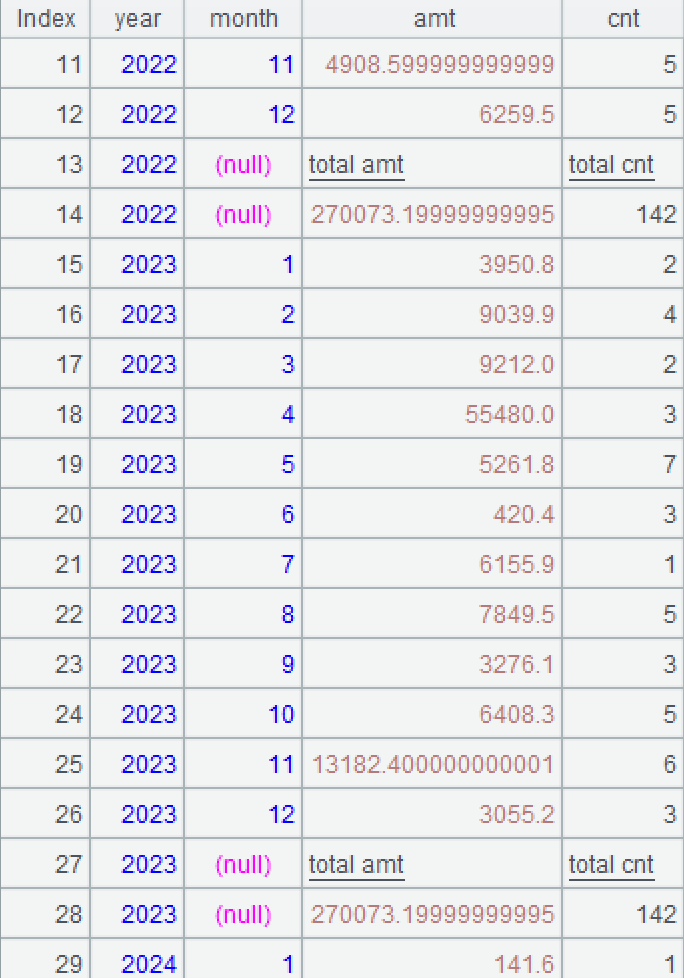
A4: =A3.(~|A2.new(A3.year,month,amt,cnt)) processes data in each group (year): first generate a new table sequence based on A2’s set of total records and then concatenate with the current group. Note that the new table sequence’s year field will be changed to the year field of the current group. Operator | computes concatenation and can be replaced by conj() function. Here are details of the first group:
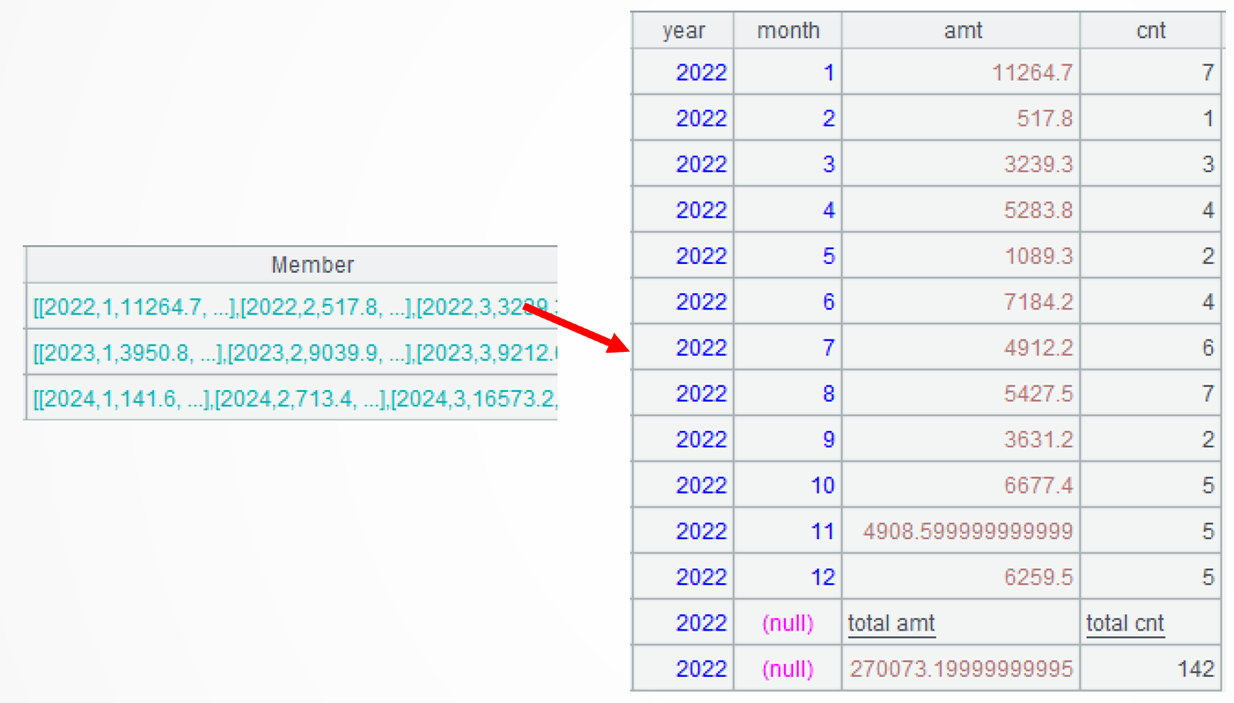
A3.conj(…) concatenates members of all groups. The conj() function concatenates subsets of A3’s set by combining members of subsets in order.
Example 3: Compute the current inventory based on the batch inbound and outbound stock tables
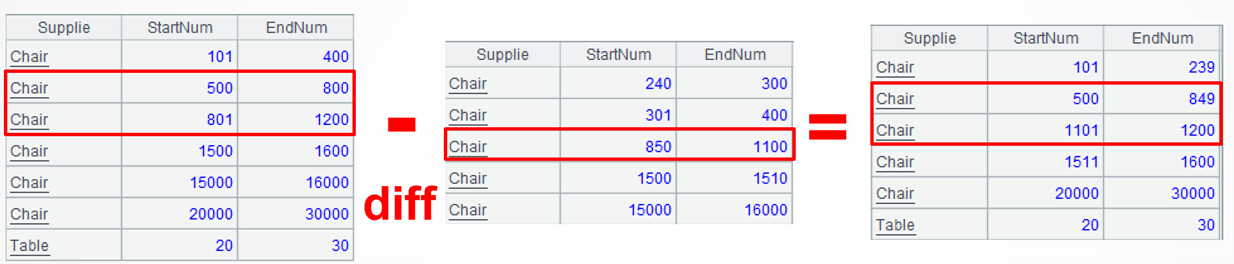
Source data: 9/Stock_BatchIn.txt, the batch inbound stock table, or the original stock table, stores multi-batch inbound information of various materials. Each batch records the start and end numbers of a continuous interval for the material. For example, the third record indicates that the chair’s inbound interval is [801:1200], totaling 399. 9/Stock_BatchOut.txt, the batch outbound stock table, or consumption table, stores multi-batch outbound information of various materials. Its field descriptions are similar to those in the batch inbound stock table. Each batch records the start and end numbers of a continuous interval for the outbound material. For example, the third record indicates that the outbound interval of chairs (coming from the original stock interval [801:1200]) is [850:1100].
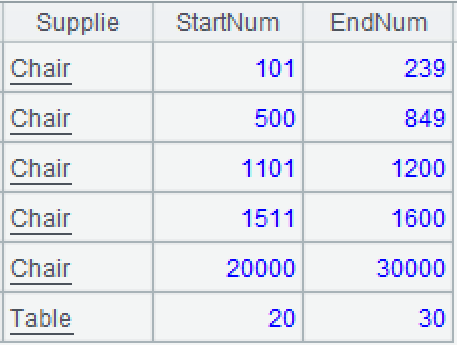
Target: Compute the current inventory based on the batch inbound and outbound stock tables, and represent it by the start and end numbers of continuous intervals for material in the current inventory. Note that the intervals in the inbound table may be consumed into multiple discontinuous segments. In such cases, multiple records are automatically generated and each corresponds to a continuous interval. For example, after the outbound operation of [850:1100] from the original stock interval [801:1200], it becomes two continuous intervals: [801:849] and [1101:1200] in the current inventory.
SPL code:
A |
B |
|
1 |
$select * from 9/Stock_BatchIn.txt |
$select * from 9/Stock_BatchOut.txt |
2 |
=A1.group(Supplie; ~.conj(to(StartNum,EndNum)):ini) |
=B1.group(Supplie; ~.conj(to(StartNum,EndNum)):used) |
3 |
=A2.join(Supplie,B2,used) |
|
4 |
=A3.derive([ini, used].merge@d().group@i(~!=~[-1]+1):current) |
|
5 |
=A4.news(current; Supplie, ~1:StartNum, ~.m(-1):EndNum) |
|
A1, A2: Load data.
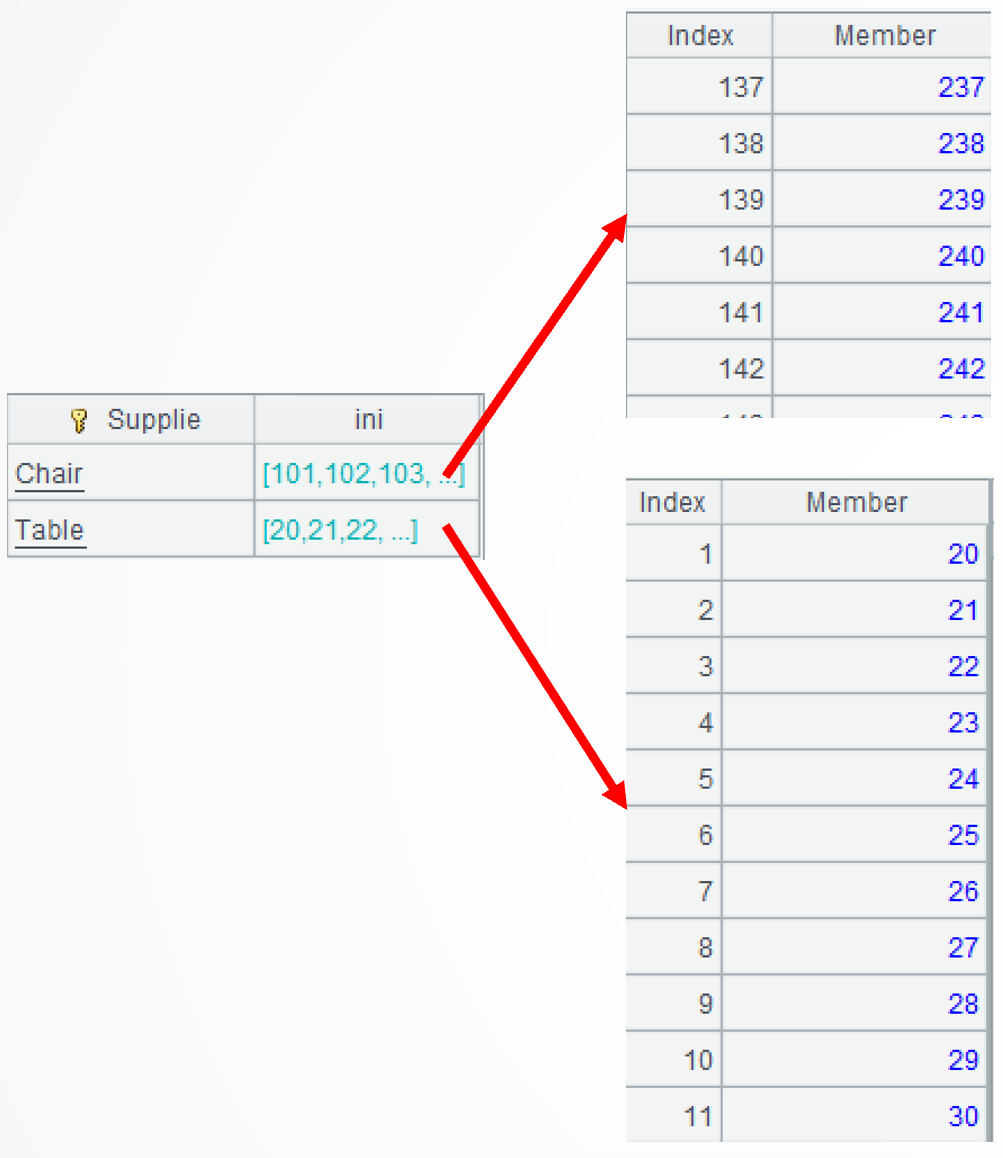
A2: The group()function categorizes records of the original stock) by material without aggregation. Each interval is transformed to a small set of continuous sequences, and those small sets are then concatenated into an ordered, discontinuous, large set. ~ represents the current group. The to()function generates a continuous sequence according to the specified start and end numbers. The conj() function performs concatenation on subsets of a set.
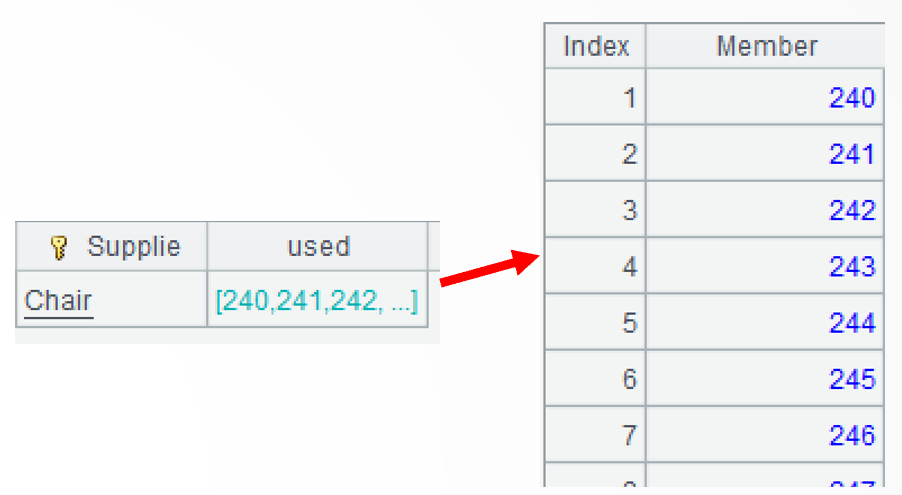
B2: Perform same operations on the outbound stock table.
A3: Use join() function to perform a left join between the inbound stock table and the outbound stock table according to the material.
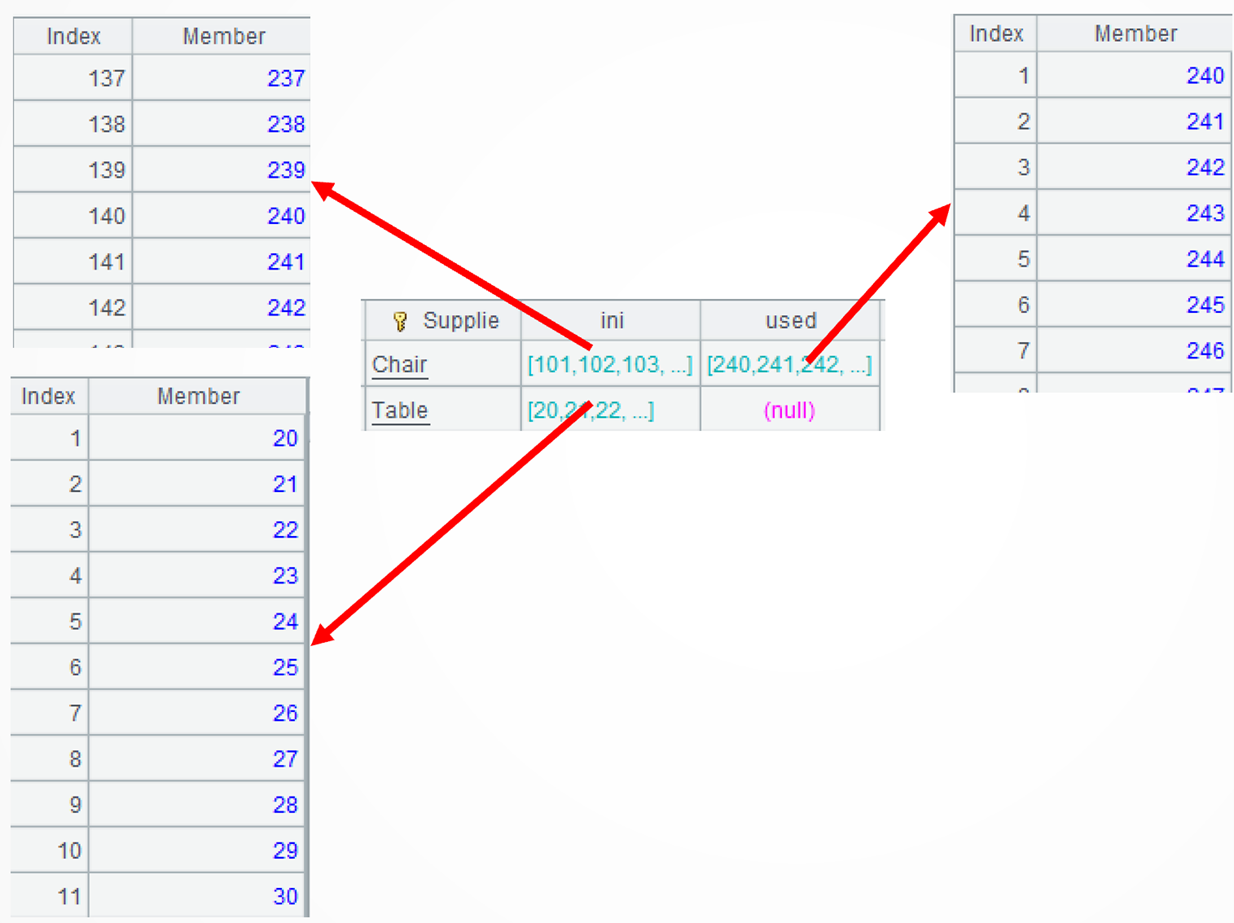
A4: =A3.derive([ini, used].merge@d()…) adds a new computed column. It finds the difference between each type of material’s inbound records and its outbound records. The merge()function merges members of an ordered set and returns an ordered result. @d option enables performing the difference operation during the merge; it is an optimized function of the difference operation. Note that the sequence returned by the difference operation is ordered but discontinuous. For example, the continuous original stock sequence […238,239,240,241…] becomes […238,239,500,501…] after the outbound operation.
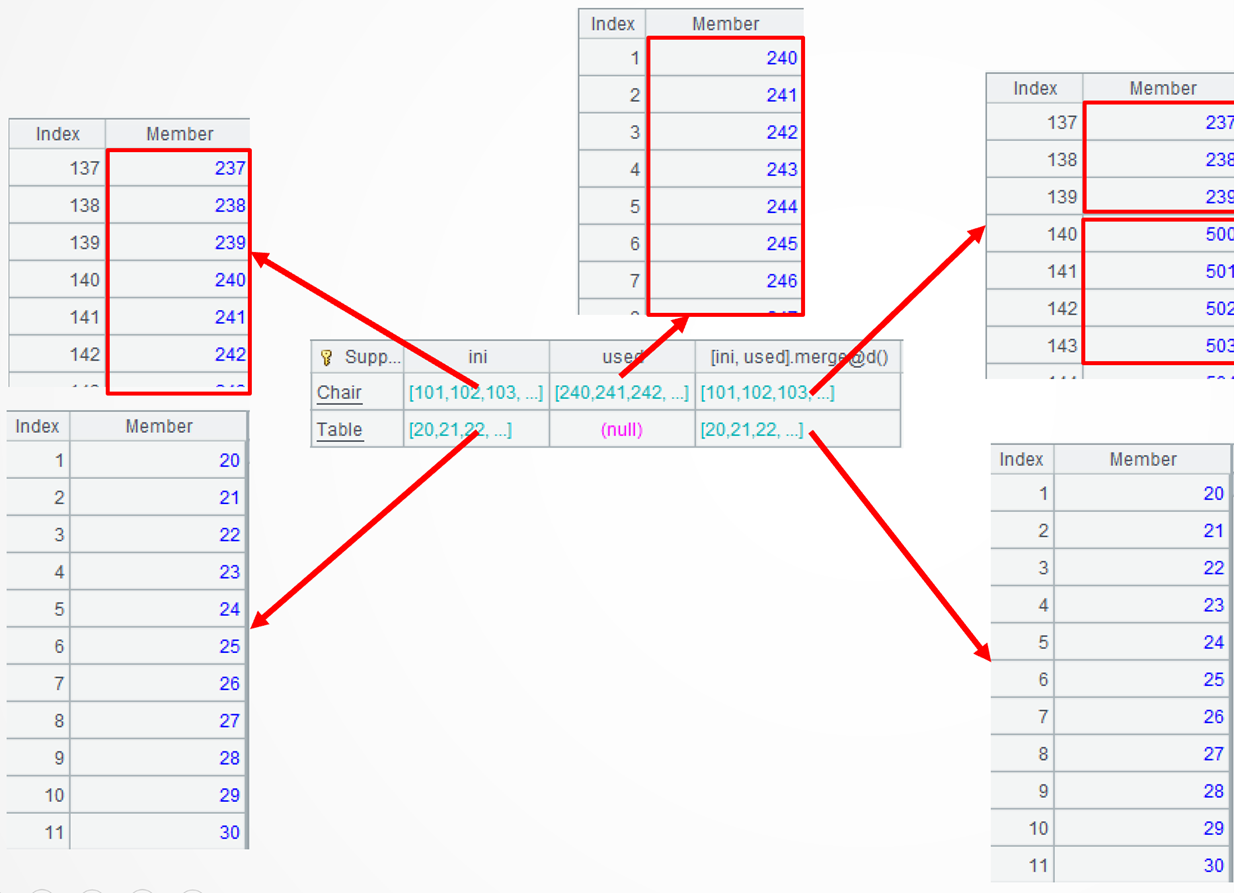
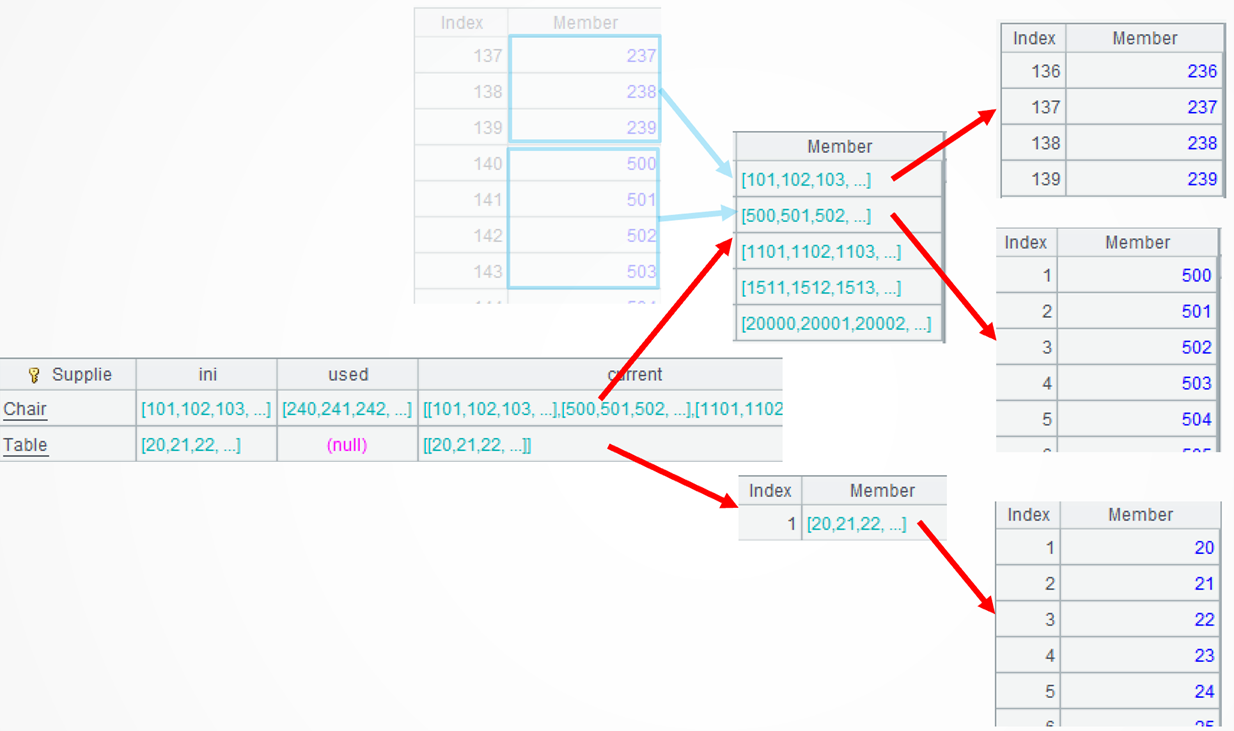
..group@i(!=[-1]+1):current performs conditional grouping on each difference and put continuous sequences to the same group. For example, […238,239] and [500,501..] are put into the first group and the second group respectively. The group()function performs grouping operation; it, by default, performs an equi-grouping. @i option enables grouping by the specified condition; and ~[-1] represents the preceding member.
A5: Generate a new record using every sequence of the “current” field in A4’s each record. The start number and the end number of the new interval are obtained from the start and end of each sequence. The news()function expands every member of a set into a record. ~.m(-1) denotes the last member of ~; and ~.m(1), abbreviated as ~1, is the first member of ~.
Extended reading
From SQL to SPL: Getting the available ranges from two tables
From SQL to SPL: Find the superset from the relationship table
From SQL to SPL: Calculate the number of intersections between adjacent subsets after grouping
From SQL to SPL: Add records that meet the criteria before each group after grouping
SPL Official Website 👉 https://www.esproc.com
SPL Feedback and Help 👉 https://www.reddit.com/r/esProcSPL
SPL Learning Material 👉 https://c.esproc.com
SPL Source Code and Package 👉 https://github.com/SPLWare/esProc
Discord 👉 https://discord.gg/sxd59A8F2W
Youtube 👉 https://www.youtube.com/@esProc_SPL