

7.10 Calculate using adjacent row/interval when data of the same group is continuous (link relative ratio and YOY)
Here below is an annual and quarterly sales data table:
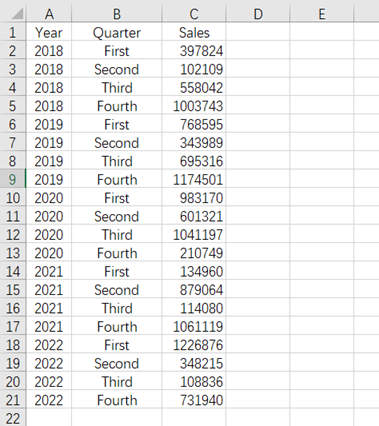
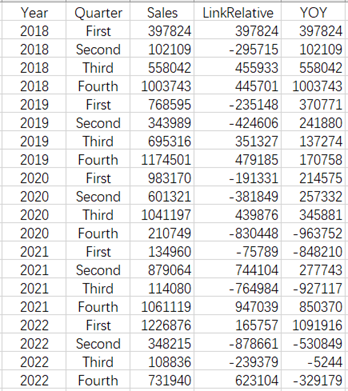
Now we want to calculate LRR and YOY (calculate in cell D1):
| A | |
|---|---|
| 1 | =E(‘A1:C21’) |
| 2 | =A1.(Sales-Sales[-1]) |
| 3 | =A1.group(Year) |
| 4 | =A3.(~.(Sales-A3.~[-1](#).Sales)).conj() |
| 5 | return A2.new(~:LinkRelative,A4(#):YOY) |
A2: Calculate LRR, [-1] represents the previous row.
A3: Group by Year.
A4: Calculate YOY. The symbol ~ represents the current member in the loop function, and # represents the sequence number of current member in loop function.
esProc Desktop and Excel Processing
7.9 Accumulation for continuous occurrence of a certain condition
7.11 Calculate using adjacent row/interval when data of the same group is discontinuous (LRR/YOY in the case of missing data)
SPL Official Website 👉 https://www.esproc.com
SPL Feedback and Help 👉 https://www.reddit.com/r/esProc_Desktop/
SPL Learning Material 👉 https://c.esproc.com
Discord 👉 https://discord.gg/sxd59A8F2W
Youtube 👉 https://www.youtube.com/@esProcDesktop
Linkedin Group 👉 https://www.linkedin.com/groups/14419406/