

Start and End Dates of the Longest Rising Period
Problem Description
The stock table records the daily closing prices of many stocks, with the fields CODE (stock code), DT (trading date) and CL (closing price). For a given target stock, find the period during which it rose for the largest number of consecutive days, and give the start date and end date of that period.
Source Data
stock table (only the records of the target stock CODE = 100046 are listed, in ascending DT order):
CODE |
DT |
CL |
100046 |
2009-01-01 00:00:00 |
3.89 |
100046 |
2009-01-02 00:00:00 |
3.93 |
100046 |
2009-01-05 00:00:00 |
3.78 |
100046 |
2009-01-06 00:00:00 |
4.04 |
100046 |
2009-01-07 00:00:00 |
3.77 |
100046 |
2009-01-08 00:00:00 |
4.02 |
100046 |
2009-01-09 00:00:00 |
4.42 |
100046 |
2009-01-12 00:00:00 |
4.86 |
100046 |
2009-01-13 00:00:00 |
4.44 |
100046 |
2009-01-14 00:00:00 |
4.88 |
100046 |
2009-01-15 00:00:00 |
4.98 |
100046 |
2009-01-16 00:00:00 |
4.99 |
Expected Result
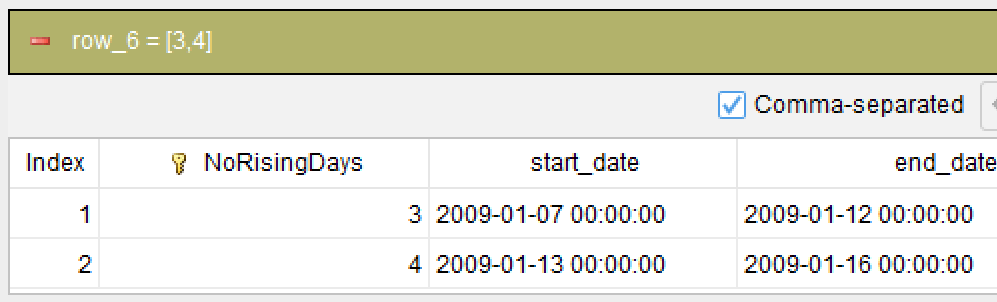
NoRisingDays is the interval number:
NoRisingDays |
start_date |
end_date |
2 |
2009-01-07 00:00:00 |
2009-01-12 00:00:00 |
3 |
2009-01-13 00:00:00 |
2009-01-16 00:00:00 |
On 01-02 the closing price rose from 3.89 to 3.93, a continuous rise; on 01-05 it fell from 3.93 to 3.78, which breaks the rise. The interval number starts at 1 and increments at each break, so a new interval begins there.
Interval 2 covers 2009-01-07 to 2009-01-12, 4 trading days in total. Its starting point 01-07 closed at 3.77, below the 4.04 of 01-06, and then 4.02, 4.42 and 4.86 climbed steadily, without a single down day in between.
Interval 3 covers 2009-01-13 to 2009-01-16, also 4 trading days. Its starting point 01-13 closed at 4.44, below the 4.86 of 01-12, and then 4.88, 4.98 and 4.99 rose consecutively, tying with interval 2 for the longest run.
SQLazy Step-by-Step Implementation
Core idea: A continuous rise is simply a run of days that does not fall. Sort the data by date first, then use the segment action to watch the closing price: as soon as the closing price drops, the previous rise has ended, the group number increments and a new interval starts. Every record then carries the number of the rising interval it belongs to. Next, group by interval number and count the rows; that count is the number of consecutive rising days in the interval. Finally pick the interval with the largest count and take its first date and last date, which is the answer.
[Click to run this example online]
The steps are explained below.
Name |
Anchor |
Statement |
t1 |
stock |
filter CODE = 100046 |
t2 |
t1 |
sort DT asc |
t3 |
t2 |
segment CL down as NoRisingDays |
t4 |
t3 |
compute count DT as ContinuousDays; partition NoRisingDays |
t5 |
t4 |
rank ContinuousDays max |
t5 |
summarize min DT as start_date, max DT as end_date; group NoRisingDays |
Step 1: Take the target stock
filter CODE = 100046
Filter the stock table for the records whose CODE equals 100046; the rest of the calculation works on this stock only. The comparison uses the symbol "=", not "==" as in SQL.
Step 2: Sort by date in ascending order
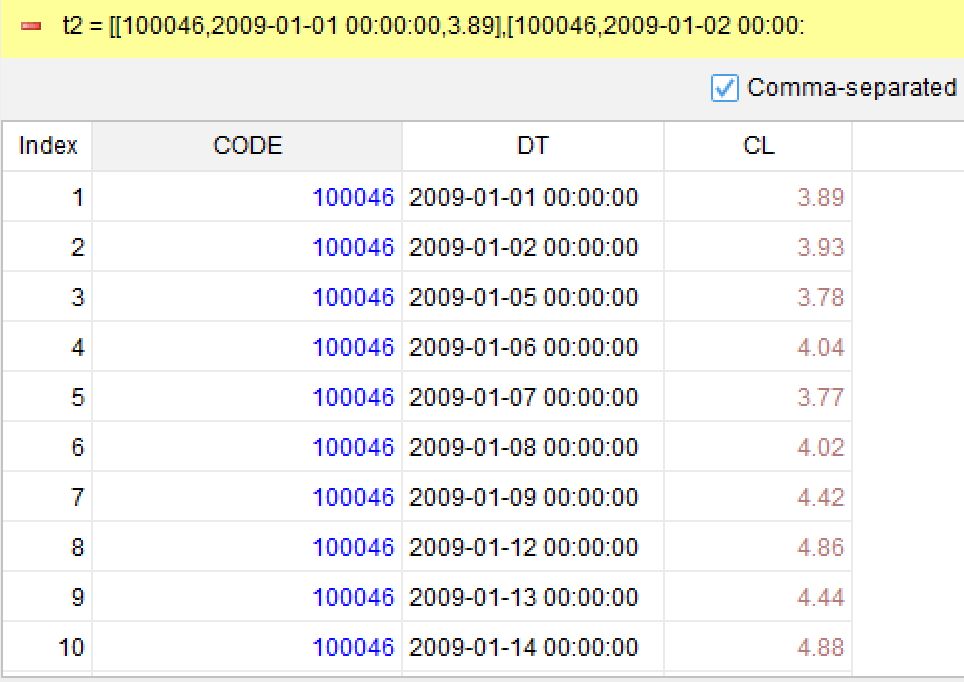
sort DT asc
Sort the filtered records by trading date DT in ascending order. Segmentation walks through the records in order; if the order is wrong, the intervals it produces are meaningless.
Step 3: Start a new interval when the closing price drops
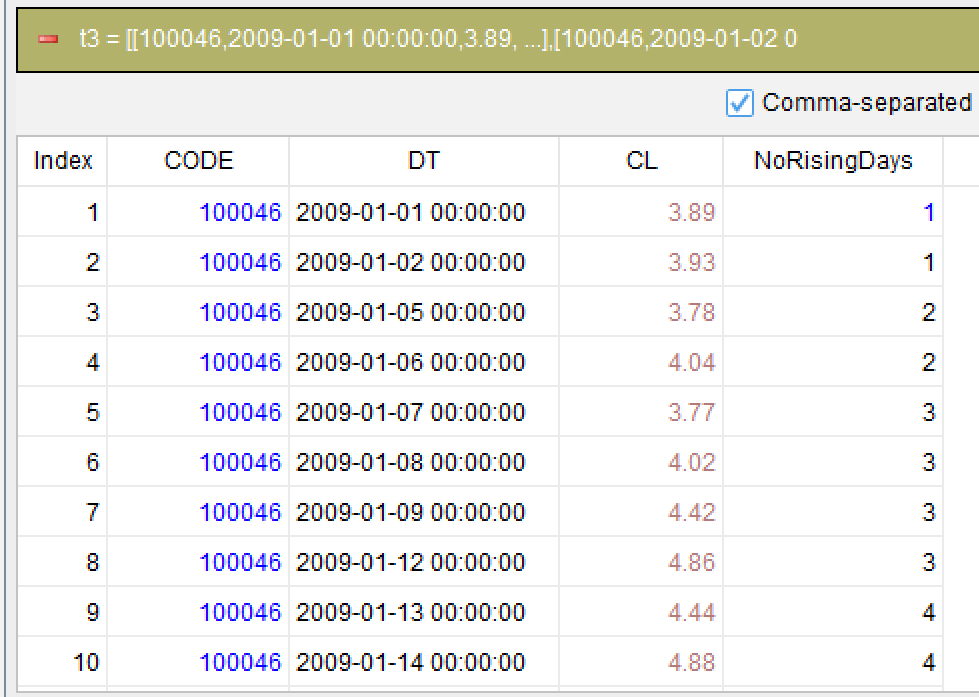
segment CL down as NoRisingDays
This is the core step of the problem. The segment action uses the fixed condition “down” on the closing price CL: when a day closes lower than the previous day, the group number increments; when it does not (a rise or a flat day), the group number stays the same. The generated group numbers are written into the new column NoRisingDays. Records in the same interval share the same group number, and a batch of records with the same group number is exactly one continuous rising run.
There is no need to write a cross-row comparison such as CL < CL[-1], and no need to worry about the first record having no previous day. The “down” condition itself expresses the business meaning of “a drop starts a new interval”.
Step 4: Count how many days each interval has
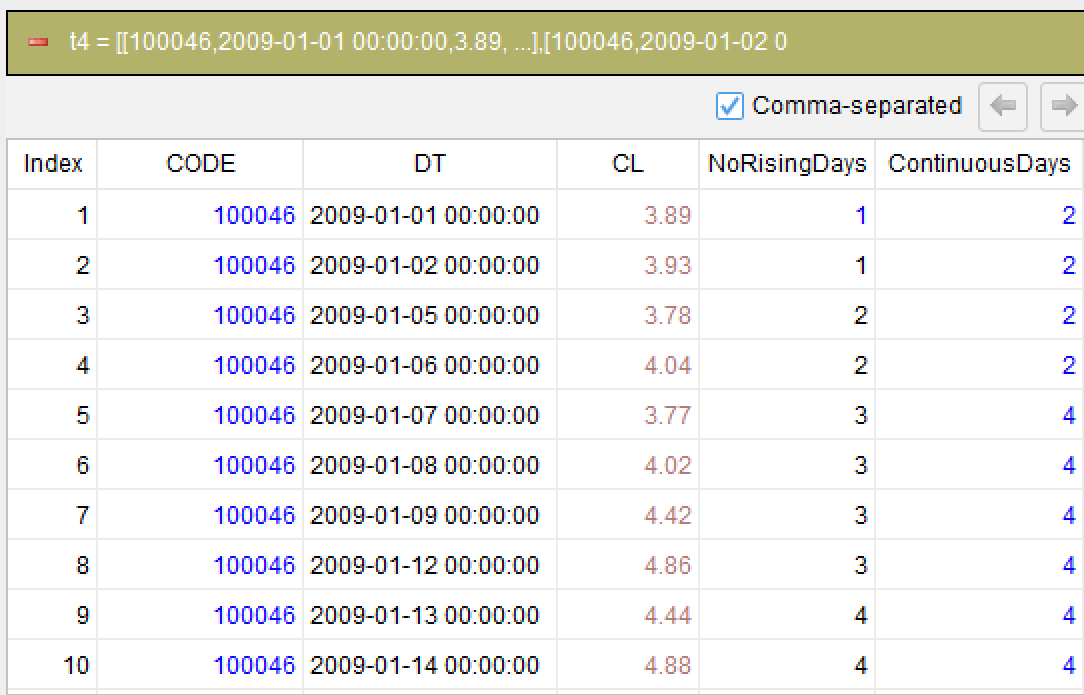
compute count DT as ContinuousDays; partition NoRisingDays
The compute action counts the records within each NoRisingDays partition: the aggregation count comes before the aggregated item DT, and the result goes into the new column ContinuousDays. Every row in a partition is filled with the total number of days of that interval, so after this step each record carries “how many days my interval rose”. Because partition has already grouped the rows by interval number, taking the maximum of ContinuousDays afterwards is equivalent to “find the longest rising interval”.
Step 5: Pick out the longest interval
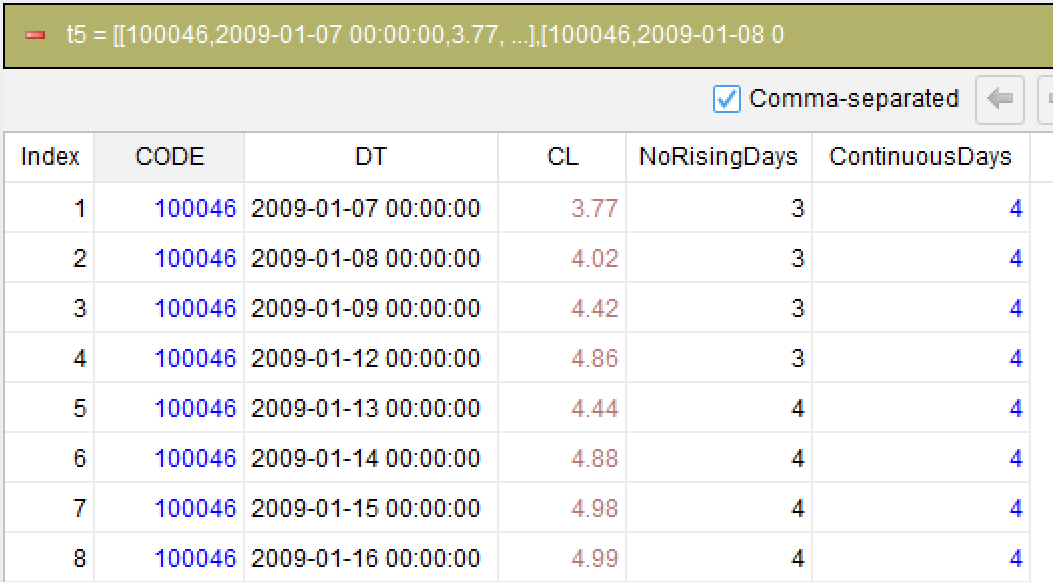
rank ContinuousDays max
The rank action takes the records whose ContinuousDays is the maximum. There may be more than one such record, in which case all tied records are returned, so every interval that ties for the longest is kept and none is lost to a tie. This step only filters records and does not change their order.
Step 6: Take the start and end dates of each interval
summarize min DT as start_date, max DT as end_date; group NoRisingDays
The summarize action groups by NoRisingDays, names the minimum DT of each group start_date and the maximum DT end_date. Since the previous step has already limited the records to the longest interval (or the intervals tied for longest), what is computed here is exactly the start date and end date of the longest rising period. The aggregation algorithm of summarize comes before the aggregated item, written as min DT and max DT.
Generated SQL
After confirming the logic of the above 6 steps, SQLazy compiler automatically generates native SQL (MySQL syntax used here):
WITH t2 AS (
  SELECT CODE, DT, CL
  FROM stock
  WHERE CODE = 100046
),
t3 AS (
  SELECT CODE, DT, CL
    , SUM(CASE
      WHEN CL < col__1 THEN 1
      ELSE 0
    END) OVER (ORDER BY CASE
      WHEN DT IS NULL THEN 1
      ELSE 0
    END, DT ASC ROWS UNBOUNDED PRECEDING) + 1 AS NoRisingDays
  FROM (
    SELECT t2.*, LAG(CL, 1) OVER (ORDER BY CASE
        WHEN DT IS NULL THEN 1
        ELSE 0
      END, DT ASC) AS col__1
    FROM t2
  ) sub__2
),
t4 AS (
  SELECT CODE, DT, CL, NoRisingDays
    , COUNT(DT) OVER (PARTITION BY NoRisingDays ) AS ContinuousDays
  FROM t3
),
sub__6 AS (
  SELECT sub__5.*, RANK() OVER (ORDER BY ContinuousDays DESC) AS col_4
  FROM t4 sub__5
)
SELECT CODE, DT, CL, NoRisingDays, ContinuousDays
FROM sub__6
WHERE col_4 = 1
SQLazy lets you describe logic in business language instead of writing nested SQL queries. For this "longest rising period" problem the core is a single sentence: start a new interval when the closing price drops. SQLazy expresses "a drop starts a new interval" directly with segment CL down, whereas hand-written SQL has to build a LAG comparison for the up/down flag first, then accumulate the interval number with SUM, nesting two window functions and handling the boundaries and NULL values by itself.
SQLazy is valuable because it works step by step. The whole calculation is split into six steps: fetch, sort, segment, count, take the longest and summarize. Each step is an intermediate result table you can inspect directly: after step 3 you can see the interval numbers, after step 4 you can see how many days each interval has, and which interval is the longest is obvious. There is no need to run the whole SQL query and then guess whether something went wrong in the middle.
SQLazy also writes the natural business order of "count the days of each interval first, then pick the largest, then take the dates" directly as the code order: compute counts within a partition, rank takes the records with the maximum value, and summarize takes the minimum and maximum dates within a group. In the aggregation actions the aggregation algorithm is written before the aggregated item (count DT, min DT, max DT), so reading the code matches the way the business describes it.
Partitioning and segmentation make problems of the "measure each interval, then pick one" kind solvable without a self-join: partition puts the records of one interval into one group, and counting within a group and taking its first and last dates are ready-made actions. SQLazy compiles this logic into SQL that the target database can run, so the same code needs no rewrite when you switch databases.
Official Links
SQLazy Online Experience: sqlazy.com (free, no registration required)
SQLazy Repository: github.com/SPLWare/SQLazy
SPL Official Website 👉 https://www.esproc.com
SPL Feedback and Help 👉 https://www.reddit.com/r/esProcSPL
SPL Learning Material 👉 https://c.esproc.com
SPL Source Code and Package 👉 https://github.com/SPLWare/esProc
Discord 👉 https://discord.gg/sxd59A8F2W
Youtube 👉 https://www.youtube.com/@esProc_SPL


chinese version:https://c.raqsoft.com.cn/article/1790745869083