

I Stopped Trusting AI-Generated SQL – Here’s the Approach I Trust Instead
Approach I Trust Instead
Why I no longer trust AI-generated SQL: not because it fails to run, but because it runs too smoothly. It passes syntax checks. It runs. But it can be riddled with errors in places nobody’s watching.
Have you ever had AI-generated SQL that passed syntax checks, ran without errors – but silently got a row wrong?
Runs ≠ Trustworthy
Here’s a seemingly simple requirement: In a status history table, the NewStatus field records the status of each ID. Each ID has a ConfirmationStarted row and multiple Closed rows. We need to retrieve the most recent Closed row before the ConfirmationStarted row.
CreatedAt |
ID |
NewStatus |
2022-05-25 23:17:44 |
147 |
Active |
2022-05-28 05:59:02 |
147 |
Closed |
2022-06-18 05:59:01 |
147 |
Closed |
2022-06-25 05:59:01 |
147 |
Closed |
2022-07-13 00:02:47 |
147 |
ConfirmationStarted |
2022-08-25 05:59:01 |
147 |
Closed |
2023-04-29 05:59:02 |
1645 |
Closed |
2023-05-08 14:53:34 |
1645 |
ConfirmationStarted |
The expected result:
ID |
CreatedAt |
147 |
2022-06-25 05:59:01 |
1645 |
2023-04-29 05:59:02 |
Take ID=147 as an example. It has three Closed rows before ConfirmationStarted; and the last one – dated 06-25 – is “the most recent”. The Closed row dated 08-25 doesn’t count because it comes after ConfirmationsStarted.
The expected output contains only two rows: "147→2022-06-25"、"1645→2023-04-29". The other Closed rows are either too early or come after ConfirmationStarted – none of them count.
You throw the requirement at an AI, and seconds later, get a beautiful block of SQL – CTEs stacked with window functions. Even the code review turns up nothing wrong. It’s not until two weeks after going live that you discover ID 147 was matched to 05-28. One row is wrong, yet the SQL runs fine.
The bug is hard to spot at first glance: the segmentation logic is correct, but the final aggregation uses MIN instead of MAX. As a result, the query returns the earliest Closed row before ConfirmationStarted instead of the one closest to it, quietly shifting the result by one row for boundary cases.
Here’s the buggy AI-generated SQL:
WITH t2 AS (
        SELECT CreatedAt, ID, NewStatus
            , 1 + SUM(CASE WHEN NewStatus='ConfirmationStarted' THEN 1 ELSE 0 END)
                OVER (PARTITION BY ID ORDER BY ID ASC, CreatedAt ASC ROWS UNBOUNDED PRECEDING) AS seg
        FROM mytable
    )
SELECT ID, MIN(CreatedAt) AS CreatedAt -- This is one of the several errors – the correct function should be MAX, to get the most recent row
FROM (
    SELECT CreatedAt, ID, NewStatus, seg
    FROM t2
    WHERE NewStatus='Closed' AND seg=1
) t_3
GROUP BY ID
ORDER BY ID
This is the most dangerous part of having AI generate the final SQL: AI can rewrite a block of code, but catching a subtle one-row logical error is a different story.
We asked AI to do exactly what it shouldn’t
AI is good at breaking down the plain-language requirements into steps, but it isn’t good at giving a 100% guarantee for every boundary condition in the final SQL. It’s a probabilistic model, not a compiler.
Public benchmarks show that even leading large language models often achieve only around 60% execution accuracy on complex queries when translating natural language directly into executable SQL. That’s nowhere near reliable enough for direct sign-off – on average, one attempt in every three or four can be wrong.
The old paradigm is “prompt → AI → non-deterministic final SQL”. It’s a black-box delivery model: where the only option is to have AI re-guess the whole block from scratch.
What we need is a new paradigm: prompt → AI → standardized steps → compiler → deterministic SQL, with every step independently verifiable.
“It runs” doesn’t count. “You’d sign off on it” does.
SQLazy is that confidence to sign off. It is the compiler for standardized steps – and the tool that actually turns the new paradigm into reality.
In SQLazy: This takes just 4 steps
The same “most recent Closed row” task takes just 4 steps in SQLazy. The key is that you can click any step and inspect the intermediate result.
Name |
Anchor |
Statement |
t1 |
mytable |
sort ID, CreatedAt asc |
t2 |
segment condition (NewStatus = "ConfirmationStarted") partition ID as seg |
|
t3 |
filter (NewStatus = "Closed" and seg = 1) |
|
t4 |
summarize CreatedAt max as CreatedAt; group ID |
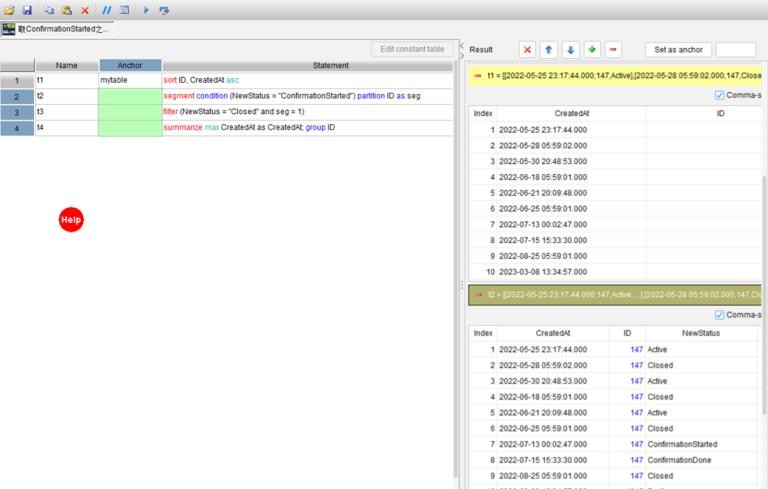
Step 1: sort ID, CreatedAt asc – puts the rows in the correct chronological order first.
Step 2: segment condition (NewStatus ="ConfirmationStarted") partition ID as seg – segments rows by ConfirmationStarted; partition ID ensures that each ID is segmented independently. The segmentation column is seg, where seg=1 is the target segment. There’s no need to hand-write SUM(CASE WHEN ...) OVER.
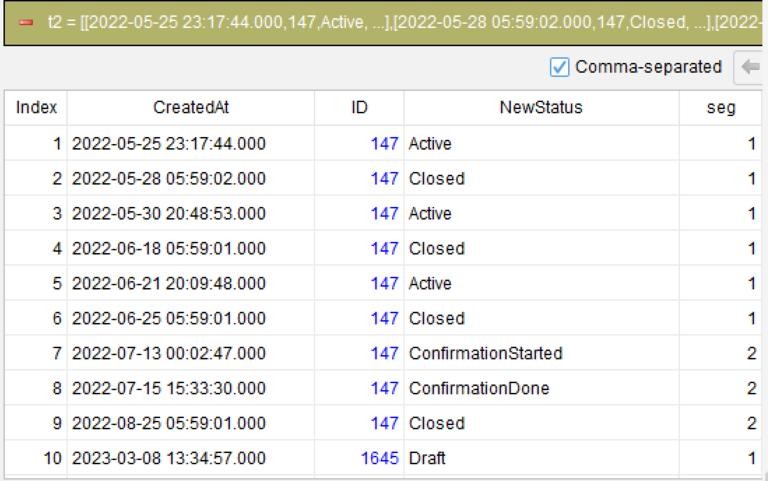
Step 3: filter (NewStatus ="Closed"and seg = 1) – keeps only the Closed rows in the target segment.
Step 4: summarize CreatedAt max as CreatedAt; group ID – takes the row with the largest timestamp for each ID: that’s the most recent one.
To check whether the segmentation is correct, click t2 and check the seg column. Fix whichever step is wrong – if the error is in step 2, you only fix that step. There’s no need to start over from scratch. Whether you compile for MySQL or Snowflake, the same input always produces the same output. It doesn’t invent fields.
WITH t2 AS (
        SELECT CreatedAt, ID, NewStatus
            , 1 + SUM(CASE
                WHEN (NewStatus = 'ConfirmationStarted') THEN 1
                ELSE 0
            END) OVER (PARTITION BY ID ORDER BY ID ASC, CreatedAt ASC ROWS UNBOUNDED PRECEDING) AS seg
        FROM mytable
    )
SELECT ID, MAX(CreatedAt) AS CreatedAt
FROM (
    SELECT CreatedAt, ID, NewStatus, seg
    FROM t2
    WHERE (NewStatus = 'Closed'
        AND seg = 1)
) t_3
GROUP BY ID
ORDER BY ID
This SQL isn’t guessed by AI. It’s what the compiler produces by translating the four steps according to fixed rules. It’s guaranteed correct. No need to review it.
Of course, there’s no need to use SQLazy for simple CRUD queries. It’s intended for complex logic that takes 30+ lines of SQL, such as logic involving time sequence, segmentation, and relative positions.
Paste your most suspicious AI-generated SQL here
What’s the most typical kind of hallucination? Fabricating fields or tables that don’t exist, applying a filter condition to the wrong column, or getting the join key or aggregation logic wrong. The SQL still runs, but the result is already off. It’s the kind of thing we’ve all seen before.
Stop cycling through “rewrite prompt → rerun → try your luck”. Just hand the part of your business logic you trust least to SQLazy, and let it break the logic down into a step-by-step workflow that can be validated stepwise. Then share your AI hallucination cases in the comments.
AI provides the logic; the compiler makes it real – with zero hallucinations.
SPL Official Website 👉 https://www.esproc.com
SPL Feedback and Help 👉 https://www.reddit.com/r/esProcSPL
SPL Learning Material 👉 https://c.esproc.com
SPL Source Code and Package 👉 https://github.com/SPLWare/esProc
Discord 👉 https://discord.gg/sxd59A8F2W
Youtube 👉 https://www.youtube.com/@esProc_SPL


中文版 https://c.raqsoft.com.cn/article/1787735584786