

Is SQLazy Something Missing from Your dbt Workflow?
dbt is good – but it has blind spots
If you’re working in analytics engineering, dbt is probably already part of your workflow. Hand it the T in ELT, and SQL becomes testable, documentable, collaborative code. For simple transformations such as JOIN, CASE and GROUP BY, it handles them with ease.
But once the analytical logic gets more complex – for example, when it involves multiple levels of window operations, conditional segmentation, sessionization, cumulative-value/running-total resets, and the like – the SQL in a dbt model balloons. Pile up enough nesting, and the code turns into a wall: no one can read it, no one dares to touch it, and no one knows whether a change will actually fix things or make them worse. Three months later, the requirement changes. You open that model and stare blankly at five CTEs and three window functions –change it, and you risk breaking something; leave it alone, and no one may notice when the data goes wrong. In the end, you either work around it, or simply drop the requirement.
dbt solves the “pipeline” problem in SQL engineering, but it doesn’t address the “design process” for complex analytical logic. What’s needed is a way to work out and validate that complex logic outside dbt first, and then embed the clean SQL into the model.
A real-world sessionization example
Business logic: There is a user behavior event table, where session IDs needs to rest based on a time interval – start a new session whenever there has been no activity for more than one hour. This is the foundation of user behavior analysis – session duration, conversion rate, and retention funnels all depend on it. In the dbt community, almost every analytics engineer has encountered this kind of sessionization or event-based query.
Implementing this logic in SQL usually takes three layers of nested CTEs: use LAG to retrieve the previous timestamp, CASE WHEN to run a cumulative check for session breaks, and finally ROW_NUMBER to generate sequence numbers.
WITH lagged AS (
  SELECT *, LAG(dt) OVER (PARTITION BY account_number ORDER BY dt) AS prev_time
  FROM event_tb
), grouped AS (
  SELECT *,
    SUM(CASE WHEN TIMESTAMPDIFF(SECOND, prev_time, dt) > 3600 THEN 1 ELSE 0 END)
    OVER (PARTITION BY account_number ORDER BY dt) AS grp
  FROM lagged
)
SELECT *, ROW_NUMBER() OVER (PARTITION BY account_number, grp ORDER BY dt) AS seq
FROM grouped
With so many levels of nesting, any change requires validation layer by layer, from innermost CTE outward. The SQL runs – but no one wants to maintain it. Then, three months later, new logic comes along, for example, sessions that cross midnight now count as new. You have to start by understanding the code from the innermost LAG, verify the logic layer by layer to make sure everything still holds. The whole query amounts to a rewrite.
SQLazy’s approach: Design in steps, compile and embed
SQLazy decomposes complex analytical logic into clear, step-by-step operations, validates them one by one, then compiles them into SQL and embeds it in dbt.
Back to the sessionization example. Here’s how SQLazy implements it, step by step:
Name |
Anchor |
Statement |
T1 |
event_tb |
sort account_number asc dt asc |
T2 |
segment condition ((dt[-1] elapse 3600 second)<= dt) partition account_number as grp |
|
T3 |
compute # as seq partition account_number grp |
Run the code online: https://www.sqlazy.com/?4M4
Three steps, in exactly the same logical order as humans would think through them.
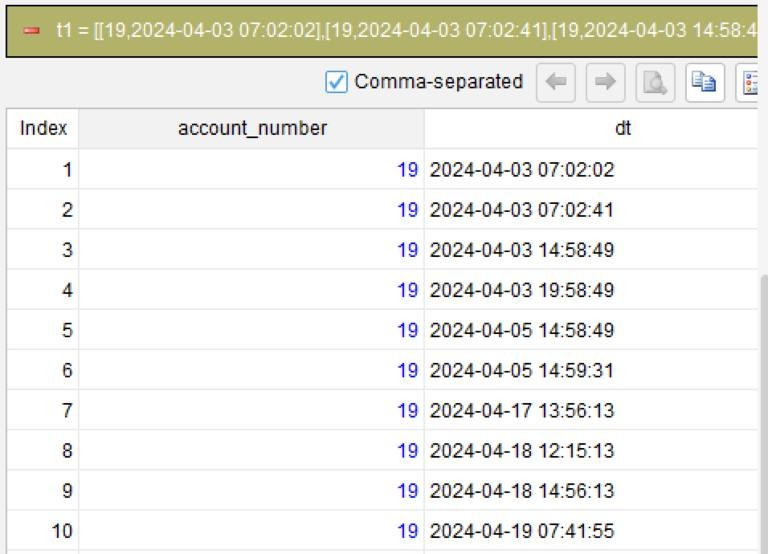
Step 1: Sort by user and timestamp, ensuring that events are handled in chronological order.
sort account_number asc dt asc
Step 2: Segment by time interval and assign session ID.
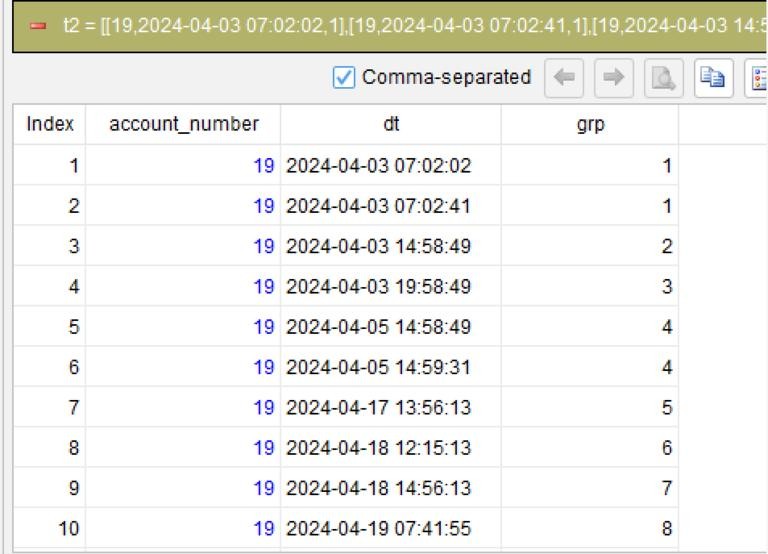
segment condition ((dt[-1] elapse 3600 second)<= dt) partition account_number as grp
This is the critical step. segment handles grouping – it traverses through each user’s data, and when the interval between the current event and the previous one exceeds one hour, start a new group. dt[-1] elapse 3600 second means “add 3,600 seconds to the previous row’s timestamp”. If this value is less than or equal to the current row’s timestamp, the interval is within one hour, and the row stays in the current group; otherwise, a new group starts. account_number ensures that each user’s data is segmented independently.
Once this step is executed, the intermediate table gets a new column, grp – where the same number represents the same session. You can immediately see whether the segmentation is correct.
Step 3: Generate incrementing sequence nubers within each session.
compute # as seq partition account_number grp
compute is used to create a computed column; # is the row number, generating incrementing sequence numbers starting from 1 within each account_number + grp combination. partition specifies the partition or grouping dimension, ensuring the sequence numbers are numbered independently within each session.
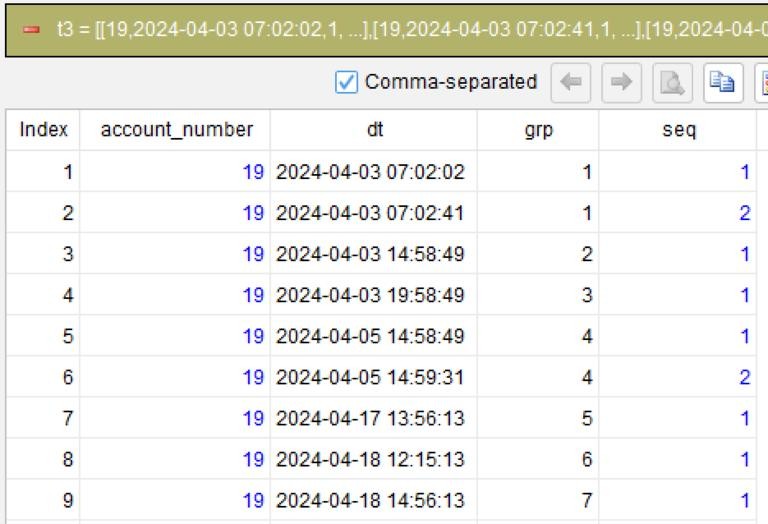
You can run each step separately and preview the intermediate result. To change the interval threshold, you only need to modify the one-line step T2 while keeping the other steps unchanged. Once T2 is executed, you can immediately see how grp changes and whether the segmentation is correct. There’s no need to mentally unravel the nested logic or reason about whether “changing one layer breaks the one above it”.
Once the workflow (SQLazy steps) is designed and its logic is validated, click “Compile”. SQLazy’s compiler deterministically converts the workflow into native SQL for the target database – MySQL, PostgreSQL, Snowflake, or BigQuery – just switch the database option. Then paste the compiled SQL into a dbt model’s .sql file, and let dbt handle materialization, testing, documentation, and lineage.
SQLazy doesn’t replace dbt – it fills the gap that dbt doesn’t cover: designing and validating complex analytical logic.
The SQLazy workflow is a living document. When requirements change three months later, you open the workflow, understand the logic from each step, and modify the relevant steps. The compiler guarantees correct SQL – not generated through AI guesswork, but produced through deterministic compilation: the same workflow always generates the same SQL.
Why SQLazy over writing SQL by hand
Some users might think: I’ll just hand-write it. It’s only a little more complicated, so what.
The problem is that in SQL, the cost of becoming “a little more complicated” doesn’t scale linearly. Typically, going from two levels of nested window functions to four increases the maintenance burden by an order of magnitude. And analytical requirements tend to get more complex over time.
Once you embed SQLazy into your dbt workflow, it brings the following changes:
Step-level debugging. Inspect every intermediate table just as you would when debugging code – no need to add a debug field in dbt and repeatedly run dbt run. Say step 2 segments data wrong – fix it on the spot, and every subsequent step recalculates automatically.
Logic as documentation. The workflow itself is a readable description of the logic. A new team member can open it and understand what the analysis does within minutes – no need to dig through dbt’s docs or ask the person who wrote the code.
Cross-dialect portability. The same workflow can be compiled into MySQL, PostgreSQL, Snowflake, and BigQuery dialects at will. When a dbt project is migrated from PostgreSQL to Snowflake, there’s no need to rewrite the analytical logic – the compiler adapts to the target database automatically.
LLM-assisted design. Converting plain-language step descriptions into a standardized workflow lowers the barrier to designing complex logic. AI only translates; it does not make decisions. The final SQL is generated deterministically by the compiler, with zero hallucinations.
Of course, SQLazy has its limits. You don’t need it for simple CRUD queries – using it for SQL queries that can be written in just a few lines is overkill. Where it really shines is exactly where dbt users feel the most pain: analytical logic complex enough to need step-by-step decomposition.
Final thoughts
dbt controls the transformation pipeline, while SQLazy designs the analytical logic. The two aren’t a replacement for each other – they are complementary. dbt handles materializing, testing, documenting, and tracking lineage for the analytical output, while SQLazy helps you design and validate complex analytical logic before turning it into SQL.
If there’s a chunk of analytical SQL running over 30 lines in your dbt model, try decomposing it into steps in SQLazy first.
Try SQLazy online: sqlazy.com (Free to use, signup not required)
Installer download link: https://www.raqsoft.com.cn/download-NaturalSPL
Project repository: github.com/SPLWare/SQLazy
Case collection: github.com/SPLWare/sqlazy/tree/master/examples
SPL Official Website 👉 https://www.esproc.com
SPL Feedback and Help 👉 https://www.reddit.com/r/esProcSPL
SPL Learning Material 👉 https://c.esproc.com
SPL Source Code and Package 👉 https://github.com/SPLWare/esProc
Discord 👉 https://discord.gg/sxd59A8F2W
Youtube 👉 https://www.youtube.com/@esProc_SPL


Chinese Version: https://c.raqsoft.com.cn/article/1787187473949