

SQLazy: Group-based Cumulative Sums
Problem description
Only retain invoiced rows; reset the cumulative amount at each invoiced row
A business transaction table consists of four fields: ID, Date, Invoiced, and Amount. Each record represents one month, and Invoiced=1 indicates that an invoice was issued for that month.
The query goal: Return every invoiced month for each ID, where the invoice amount equals the sum of all amounts from the previous invoiced month (exclusive), or the beginning of the table, to the current invoiced month (inclusive).
Source data:
ID |
Date |
Invoiced |
Amount |
AAA |
2023-01 |
0 |
10 |
AAA |
2023-02 |
0 |
15 |
AAA |
2023-03 |
1 |
15 |
AAA |
2023-04 |
0 |
10 |
AAA |
2023-05 |
0 |
10 |
AAA |
2023-06 |
1 |
10 |
BBB |
2022-05 |
0 |
40 |
BBB |
2022-06 |
1 |
20 |
BBB |
2022-07 |
0 |
30 |
BBB |
2022-08 |
1 |
30 |
Expected output: Only retain invoiced rows, where each Amount is the cumulative sum since the previous invoiced row (exclusive).
ID |
Date |
Invoiced |
Amount |
AAA |
2023-03 |
1 |
40 |
AAA |
2023-06 |
1 |
30 |
BBB |
2022-06 |
1 |
60 |
BBB |
2022-08 |
1 |
60 |
Take ID: AAA as an example:
The first invoice - 2023-03: earlier January (10) + earlier February (15) + current (15) = 40
The second invoice - 2023-06: Since the previous invoice: April (10) + May (10) + current (10) = 30
Same for ID: BBB.
Step-by-step implementation with SQLazy
Value |
Anchor |
Statement |
t1 |
invoice |
sort id,dt desc |
t2 |
compute invoiced cum as grp partition id |
|
t3 |
summarize dt max as dt invoiced max as invoiced amount sum as amount group id grp |
|
t4 |
derive id dt invoiced amount |
Let me walk through each step below:
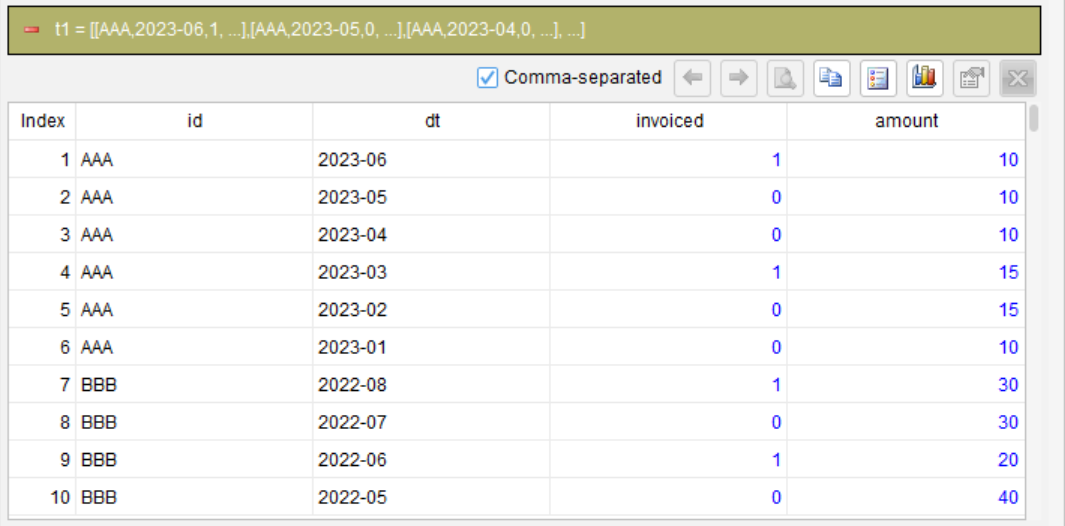
Step 1: Sort rows by ID and Date (descending)
sort id,dt desc
This step prepares for the subsequent grouping. Once sorted in descending order, each invoiced row and the earlier non-invoiced rows after it are grouped together for cumulative summation.
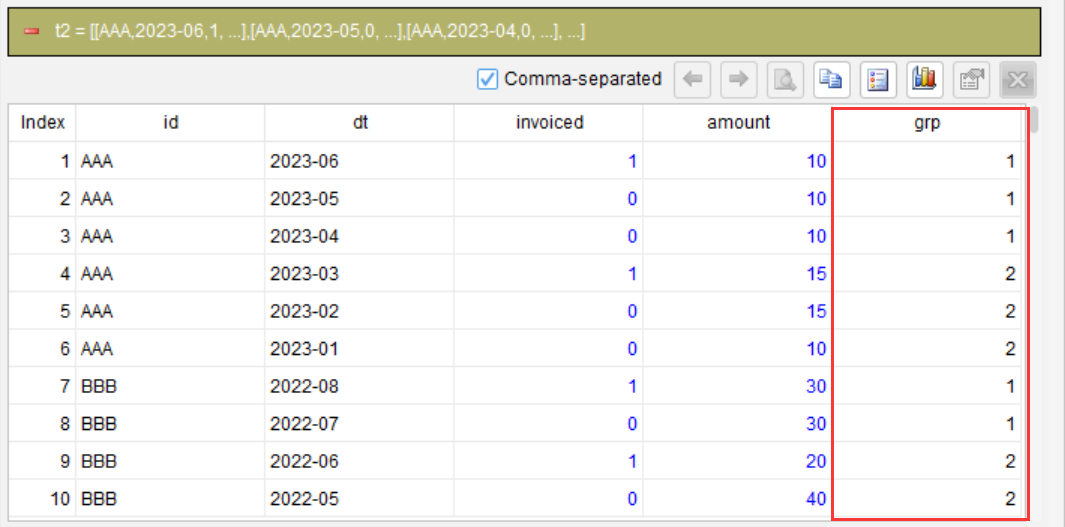
Step 2: Perform a cumulative sum on the Invoiced field to generate group numbers
compute invoiced cum as grp partition id
Within each ID partition, perform a cumulative sum on the Invoiced field in the current (descending) order, including the current row. The result is as follows:
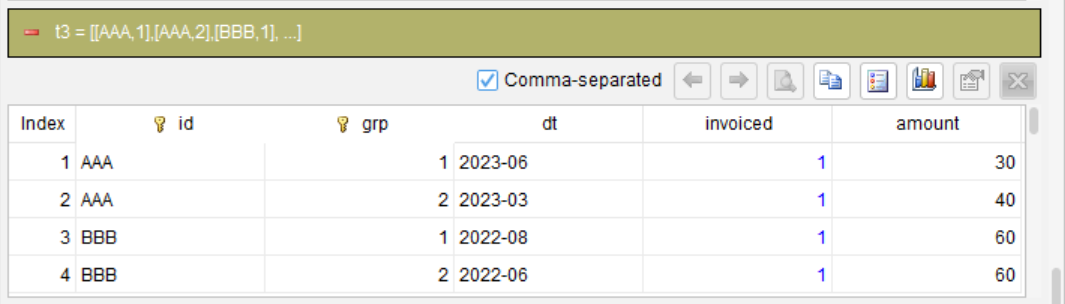
Step 3: Group and aggregate by ID and grp
summarize dt max as dt invoiced max as invoiced amount sum as amount group id grp
dt max: Since rows are sorted in descending order, the largest date within each group corresponds to the invoiced month (i.e., the date of the invoiced row).
invoiced max: Each group contains at least one row where Invoiced = 1, so the maximum Invoiced value within each group is 1.
amount sum: Sum all amounts within each group, i.e., the total amount since the invoiced row (inclusive).
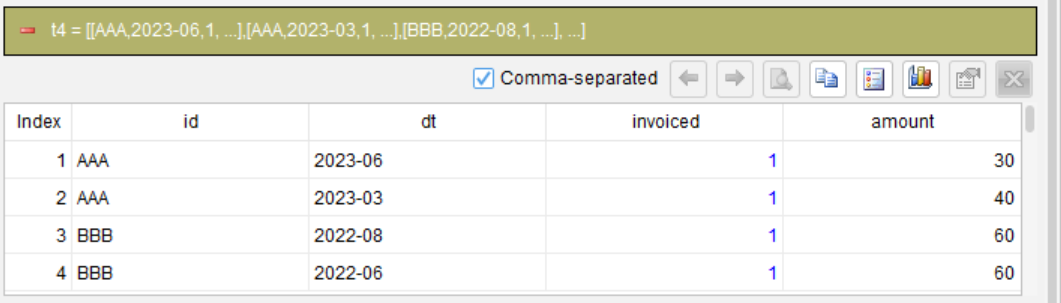
Step 4: Select the required columns
derive id dt invoiced amount
This step only cleans up the output by removing the helper column grp.
Compile the steps into SQL
Once the above steps are complete, SQLazy’s compiler can generate the equivalent native SQL, without the need to write it manually.
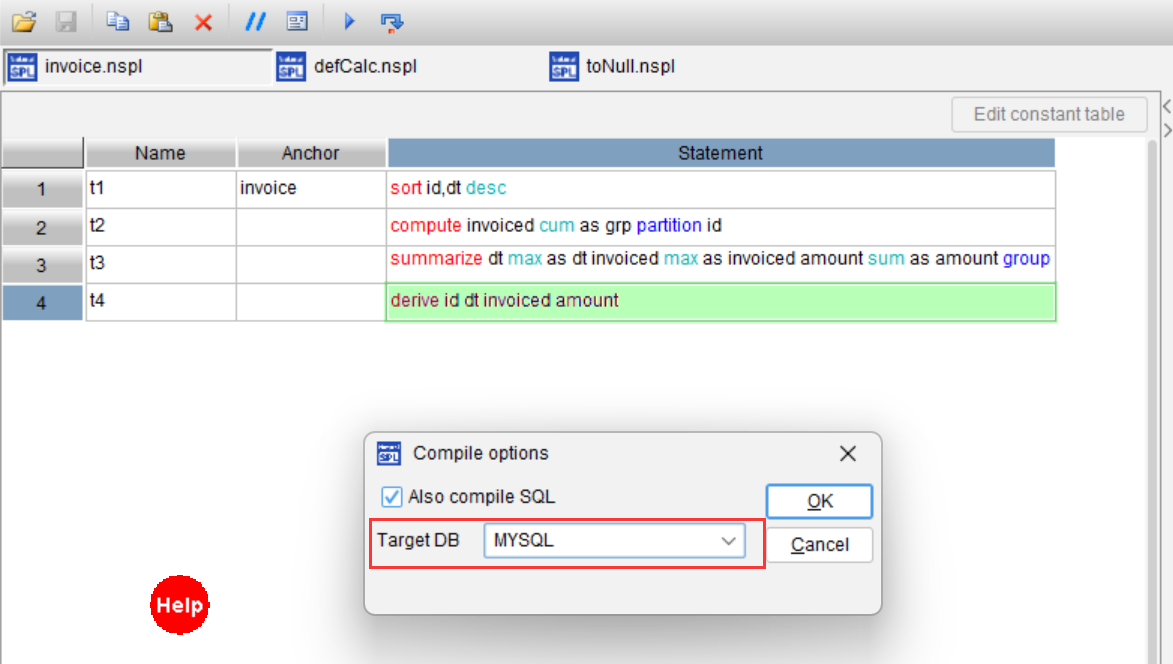
To generate MySQL SQL:
WITH t3 AS (
  SELECT
    id,
    grp,
    MAX(dt) AS dt,
    MAX(invoiced) AS invoiced,
    SUM(amount) AS amount
  FROM
    (
      SELECT
        id,
        dt,
        invoiced,
        amount,
        SUM(invoiced) OVER (
          PARTITION BY id
          ORDER BY
            CASE
              WHEN id IS NULL THEN 1
              ELSE 0
            END,
            id ASC,
            CASE
              WHEN dt IS NULL THEN 1
              ELSE 0
            END,
            dt DESC ROWS UNBOUNDED PRECEDING
        ) AS grp
      FROM
        invoice
    ) t2
  GROUP BY
    id,
    grp
)
SELECT
  id,
  dt,
  invoiced,
  amount
FROM
  t3
ORDER BY
  id,
  grp
You only need to verify the logic of each of the four steps – no need to understand or debug the SQL – and the compiler will generate the production-ready code.
Let’s compare SQL and SQLazy in a table:
Conventional SQL |
SQLazy |
|
Steps |
Multi-level CTE + window function frame |
Four steps (sort→ calculate cumulative sum → aggregate → select columns) |
Core technique |
Unintuitive “ROWS BETWEEN UNBOUNDED PRECEDING AND 1 PRECEDING” |
Intuitive “sort in descending order + cumulative summation” |
Readability |
Low – need to understand the offset window |
High – steps reflect the thought process |
Debug approach |
Manually break down CTEs and run them repeatedly |
Step-by-step execution with visible intermediate results at each step |
Cross-database portability |
Manually adapt code for different SQL dialects |
The compiler automatically generates code in the target SQL dialect |
This example demonstrates how naturally SQLazy handles the “event-based cumulative reset” problem – breaking down complex grouping logic into clear steps with a simple sorting trick and a cumulative sum.
Try SQLazy online: sqlazy.com (Free to use, signup not required)
SQLazy project repository: github.com/SPLWare/SQLazy
SPL Official Website 👉 https://www.esproc.com
SPL Feedback and Help 👉 https://www.reddit.com/r/esProcSPL
SPL Learning Material 👉 https://c.esproc.com
SPL Source Code and Package 👉 https://github.com/SPLWare/esProc
Discord 👉 https://discord.gg/sxd59A8F2W
Youtube 👉 https://www.youtube.com/@esProc_SPL


Chinese version