

SQLazy: Account-based Grouping with Sequence Number Reset on Gaps Exceeding 1 Hour
Problem description
Group by account and reset the sequence number when the time interval between events exceeds 1 hour
A table consists of two fields: account_number and dt. Records within each account are ordered by time, and sequence numbers (Seq) need to be generated according to the following rules:
Group records by account and order them by datetime in ascending order.
If the interval between the current event time and the previous one exceeds 1 hour, reset the sequence number to 1.
Otherwise (the interval ≤ 1 hour), add 1 to the sequence number.
Source data:
account_number dt
19 2024-04-03 07:02:02
19 2024-04-03 07:02:41
19 2024-04-03 14:58:49
19 2024-04-03 19:58:49
19 2024-04-05 14:58:49
19 2024-04-05 14:59:31
19 2024-04-17 23:56:13
20 2024-04-17 23:59:13
19 2024-04-18 00:15:13
19 2024-04-18 14:56:13
20 2024-04-18 07:41:55
20 2024-04-18 19:41:55
20 2024-04-18 19:56:55
19 2024-04-19 07:41:55
19 2024-04-19 07:42:20
19 2024-04-19 08:41:20
Expected output:
19 2024-04-03 07:02:02 1
19 2024-04-03 07:02:41 2
19 2024-04-03 14:58:49 1
19 2024-04-03 19:58:49 1
19 2024-04-05 14:58:49 1
19 2024-04-05 14:59:31 2
19 2024-04-17 23:56:13 1
19 2024-04-18 00:15:13 2
19 2024-04-18 14:56:13 1
19 2024-04-19 07:41:55 1
19 2024-04-19 07:42:20 2
19 2024-04-19 08:41:20 3
20 2024-04-17 23:59:13 1
20 2024-04-18 07:41:55 1
20 2024-04-18 19:41:55 1
20 2024-04-18 19:56:55 2
Step-by-step implementation with SQLazy
Value |
Anchor |
Statement |
t2 |
numEvents |
sort account_number asc, dt asc |
t3 |
segment condition ((dt[-1] elapse 3600 second)<= dt) partition account_number as grp |
|
compute # as seq partition account_number, grp |
Let me walk through each step below:
Step 1: Sort rows by account and datetime in ascending order
sort account_number asc, dt asc
Sort the original data by account_number and dt in ascending order. This step ensures that records within each account are processed in chronological order.
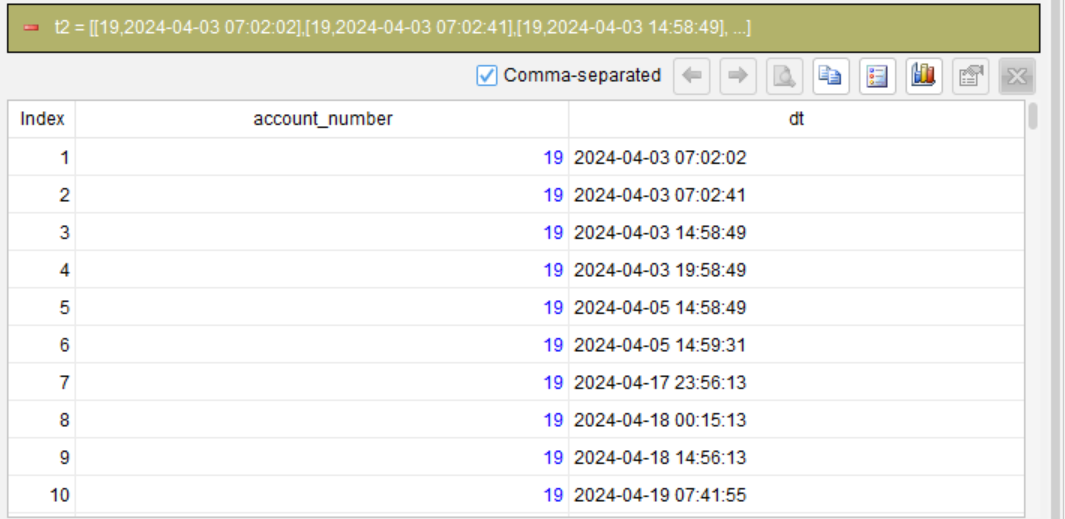
Step 2: Partition records, check whether the time interval exceeds 1 hour, and generate the group number
segment condition ((dt[-1] elapse 3600 second)<= dt) partition account_number as grp
Within each partition of account, check whether the interval between the current row’s dt and the previous row’s dt exceeds 1 hour (3,600 seconds). The condition (dt[-1] elapse 3600 second)<= dt means that after adding 3,600 seconds to the previous row’s timestamp, it is less than or equal to the current row’s timestamp. If so, the interval is greater than or equal to 1 hour, and a new group begins; otherwise, the current row remains in the same group as the previous row. In the end, a group number (grp) is assigned to each record.
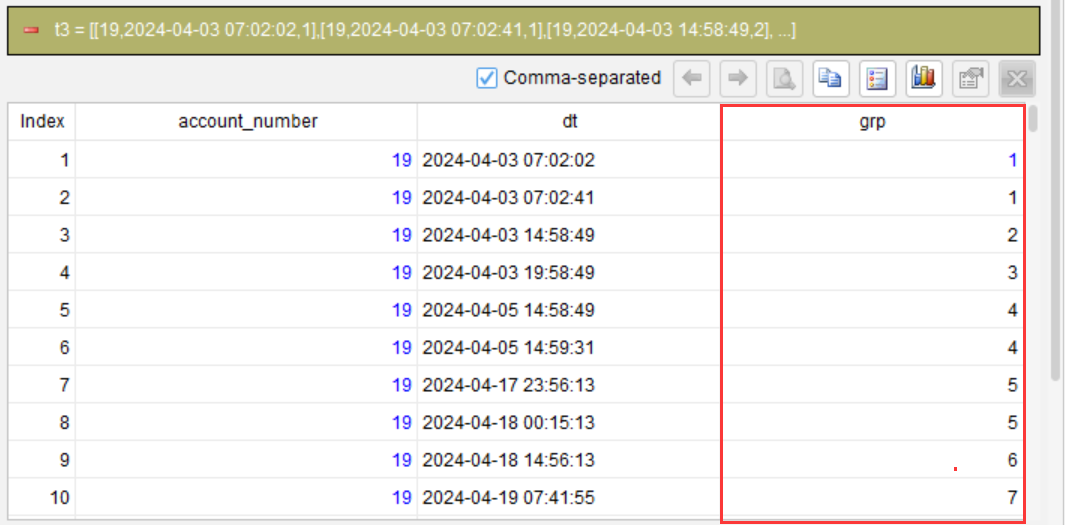
Step 3: Generate sequence numbers within each subgroup, partitioned by account_number, grp
compute # as seq partition account_number, grp
# represents a sequence number automatically generated in order within each subgroup, starting from 1. Records are partitioned by account number and group number, and within each subgroup, sequence numbers (seq) are assigned in the existing order of the records (which have already been sorted).
Running this step produces the following output:
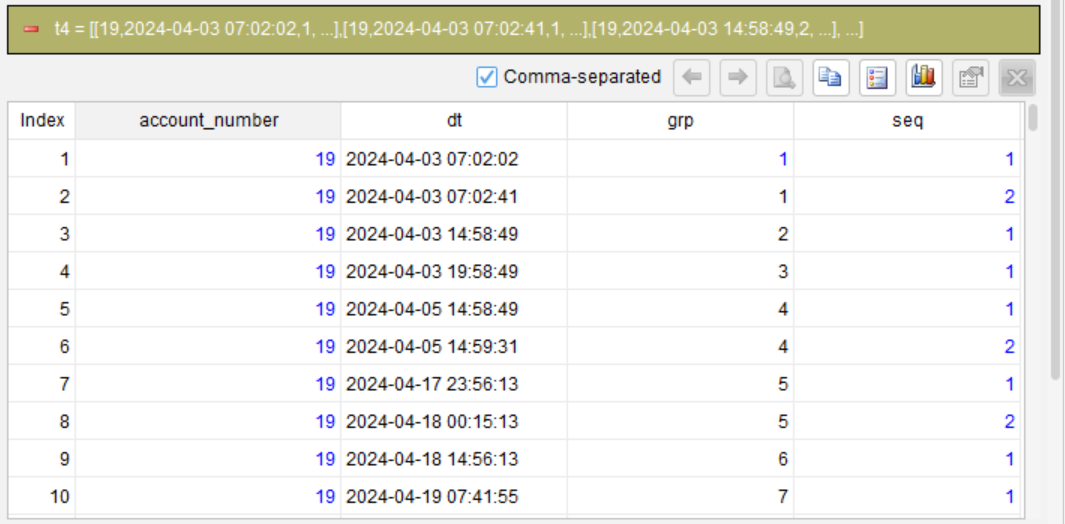
Finally, remove the helper column grp, or simply export the required columns, to obtain the final output.
Compile the steps into SQL
Once the above steps are complete, SQLazy’s compiler can generate the equivalent native SQL, without the need to write it manually.
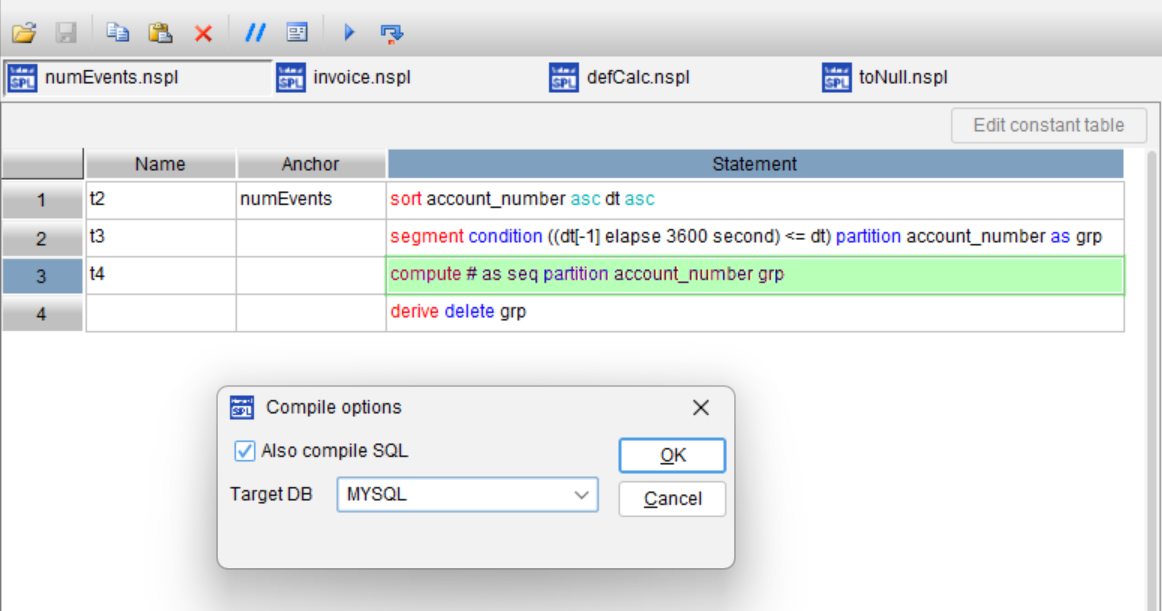
Below is the generated SQL statement written in the target database dialect (MySQL in this example):
WITH t2 AS (
  SELECT
    account_number,
    dt
  FROM
    numEvents
),
t3 AS (
  SELECT
    account_number,
    dt,
    SUM(
      CASE
        WHEN (col__5 + INTERVAL 3600 SECOND <= dt) THEN 1
        ELSE 0
      END
    ) OVER (
      PARTITION BY account_number
      ORDER BY
        CASE
          WHEN account_number IS NULL THEN 1
          ELSE 0
        END,
        account_number ASC,
        CASE
          WHEN dt IS NULL THEN 1
          ELSE 0
        END,
        dt ASC
    ) + 1 AS grp
  FROM
    (
      SELECT
        t2.*,
        LAG(dt) OVER (
          PARTITION BY account_number
          ORDER BY
            CASE
              WHEN account_number IS NULL THEN 1
              ELSE 0
            END,
            account_number ASC,
            CASE
              WHEN dt IS NULL THEN 1
              ELSE 0
            END,
            dt ASC
        ) AS col__5
      FROM
        t2
    ) sub__6
)
SELECT
  account_number,
  dt,
  grp,
  ROW_NUMBER() OVER (
    PARTITION BY account_number,
    grp
    ORDER BY
      account_number,
      CASE
        WHEN account_number IS NULL THEN 1
        ELSE 0
      END,
      account_number ASC,
      CASE
        WHEN dt IS NULL THEN 1
        ELSE 0
      END,
      dt ASC
  ) AS seq
FROM
  t3
ORDER BY
  account_number,
  CASE
    WHEN account_number IS NULL THEN 1
    ELSE 0
  END,
  account_number ASC,
  CASE
    WHEN dt IS NULL THEN 1
    ELSE 0
  END,
  dt ASC
You only need to verify the logic of each of the three steps – no need to understand or debug the SQL – and the compiler will generate the production-ready code.
Let’s compare SQL and SQLazy in a table:
Dimension |
Conventional SQL |
SQLazy |
Steps |
Multi-level CTE + window functions + timestamp difference calculation |
Three steps (sort→ partition → generate sequence numbers) |
Core technique |
Use LAG to calculate timestamp difference, and perform cumulative sum to mark records in each subgroup |
Directly use “segment condition” to describe the interval rule |
Readability |
Low – need to understand the offset window and boundary condition |
High – The condition expression directly maps to the business logic |
Debug approach |
Manually break down CTEs, and run and verify them repeatedly |
Step-by-step execution with visible intermediate results at each step |
Cross-database portability |
Require manually adjusting datetime syntax (e.g., using DATEADD for SQL Server) |
The compiler automatically generates code in the target SQL dialect |
This example demonstrates how concisely SQLazy handles “time-interval-based session segmentation” problem – using a segment condition to directly express the rule “start a new group when the gap exceeds 1 hour”, combined with row numbers within each sub-partition. The method precisely maps to the business requirement.
Try SQLazy online: sqlazy.com (Free to use, signup not required)
SQLazy project repository: github.com/SPLWare/SQLazy
SPL Official Website 👉 https://www.esproc.com
SPL Feedback and Help 👉 https://www.reddit.com/r/esProcSPL
SPL Learning Material 👉 https://c.esproc.com
SPL Source Code and Package 👉 https://github.com/SPLWare/esProc
Discord 👉 https://discord.gg/sxd59A8F2W
Youtube 👉 https://www.youtube.com/@esProc_SPL


Chinese version