

Debugging SQL Should Be Just Like Debugging Code
Debugging SQL is still mostly guesswork
Suppose you run an 80-line SQL query and discover that one of the result columns contains incorrect numbers. What’s your first instinct? Run it again.
At this point, a programmer would open the debugger, set breakpoints, and step through the code. They could see exactly how each variable changes and what value it holds at every step. What about SQL developers? They can only stare at the final result and guess: Is the join condition wrong? Does a window function miss a partition? You want to see the result of an intermediate step? You can’t. You have to split the CTEs and even the nested queries, one by one, turn them into standalone SELECT statements, run them individually, and then piece everything back together.
This isn’t debugging – this is archeology.
SQL debugging is still stuck at “run it, then stare at the output and guess.”
You’d never accept this way of debugging when write code – so why do you put up with it when you write SQL?
A real-world scenario: finding a neighboring record by offset
That’s all abstract. Let’s look a concrete example.
A workshop scan log table records, in each row, the cardboard sheet number scanned at a certain moment on a certain production line. The requirement: group by production line and sort by time within each group. Then find the records whose number equals a given string (for example, spL1ml82N4o), together with the 2 records before and the 2 records after each one, and finally remove duplicates by id.
Written in traditional SQL (MySQL), it looks like this:
SELECT id,
  MAX(Cardboard_Number) AS Cardboard_Number,
  MAX(date_Time) AS date_Time,
  MAX(ProductionLine_Number) AS ProductionLine_Number,
  MAX(flag) AS flag,
  MAX(in_range) AS in_range
FROM (
  SELECT id, Cardboard_Number, date_Time, ProductionLine_Number, flag, in_range
  FROM (
    SELECT id, Cardboard_Number, date_Time, ProductionLine_Number,
      MAX(flag) OVER (
        PARTITION BY ProductionLine_Number
        ORDER BY ProductionLine_Number ASC, date_Time ASC
        ROWS BETWEEN 2 PRECEDING AND 2 FOLLOWING) AS in_range
    FROM (
      SELECT id, Cardboard_Number, date_Time, ProductionLine_Number,
        CASE WHEN Cardboard_Number = 'spL1ml82N4o' THEN 1 END AS flag
      FROM table1
    ) AS flagged
  ) AS marked
  WHERE in_range = 1
) AS filtered
GROUP BY id;.
We won’t explain this code line by line, only what it looks like: three layers of nested derived tables, with flagging, window frame, filtering, and distinct all crammed into one query. Every layer has to list the fields all over again, and to see an intermediate result, all you can do is keep breaking it apart from the inside.
The real problem isn’t that the SQL is hard to read. It’s that it’s hard to debug. The most fragile part of this SQL is the window frame: ROWS BETWEEN 2 PRECEDING AND 2 FOLLOWING. If you get the offsets wrong, it won’t throw an error. If you leave out a segmentation key, it won’t throw an error either. It will simply produce slightly incorrect results, silently. The output looks almost right, but not quite – the kind of result that makes your palms sweat just before deployment. And the intermediate flag columns and window-match indicator columns aren’t included in the final output at all. If you can’t see them, you can’t validate whether they’re correct.
SQLazy: Write step by step, debug one step at a time
What if we took a different approach? Instead of delivering a single SQL query as the final product, we break the logic into steps, each of which can be executed and its result inspected.
That’s exactly what SQLazy does. SQLazy is an intuitive, easy-to-understand language for structured data processing. It breaks logic into clear steps, produces deterministic output, and makes the entire process easy to audit. The same task takes just five steps in SQLazy:
Name |
Anchor |
Statement |
t1 |
table1 |
sort ProductionLine_Number, date_Time asc |
t2 |
compute if (Cardboard_Number = "spL1ml82N4o" then 1), as flag; partition ProductionLine_Number |
|
t3 |
compute max, flag[-2:2], as in_range; partition ProductionLine_Number |
|
t4 |
filter in_range = 1 |
|
t5 |
distinct id |
It also has a dedicated debugging feature: single-step execution. Click once and it runs one step. and the result tables of the current step and all the steps before it are there for you to browse at any time. This is the same thing as the single-stepping you use when debugging Python or Java. The only difference is that SQLazy’s code structure is simpler, with no branches, loops or subroutines, so you don’t need breakpoints, step in and step out routine. Every statement is already one step.
Back to the task above, here’s what the debugging experience looks like:
* Step 1: Sorting: click a group and check whether the order is right;
* Step 2: Flag the target rows and check whether any have been missed.
* Step 3: Retrieve the two preceding and two following rows. This is the most error-prone part of the entire query, where both the window frame and segmentation keys come into play. Step through the query to this point and inspect the in_range column. You can see at a glance which rows matched and which didn’t.
* Step 4: Filter the rows.
* Step 5: Remove duplicates. Just click each step to inspect its result.
In SQL, a mistake in the window frame leaves you guessing. In SQLazy, just step through to Step 3 and inspect the results.
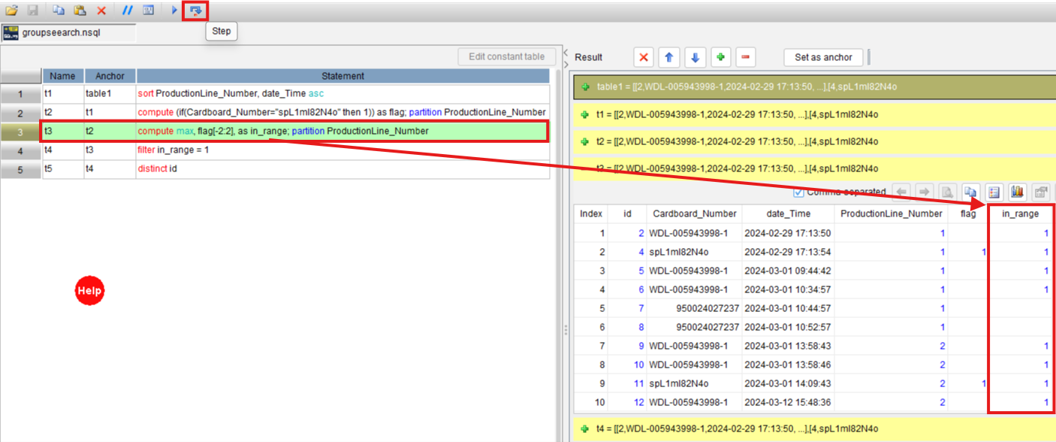
If something goes wrong, just fix the step where the error occurs – there’s no need to rewrite the entire query from scratch. Once you’ve verified that the logic is correct, you can also execute all the steps with a single click, letting them run in sequence to produce the final result.
It’s a change in form, not just syntax
Someone might argue, “Can’t I just run a SELECT on each CTE in SQL to inspect the intermediate results?” Yes, you can. But that’s manual, makeshift step-by-step debugging. Every time the logic changes, you have to split the query again. Those steps aren’t saved for you. AI can’t fix this either. What AI writes for you is still one final SQL statement. If something goes wrong, you’re back to guessing from scratch.
AI writes the logic. A compiler writes the SQL.
In SQLazy, AI plans the business logic as a sequence of steps, and the compiler compiles these steps into native SQL. The steps are for human to read and debug, and the SQL is for machines to run. Each has its own job.
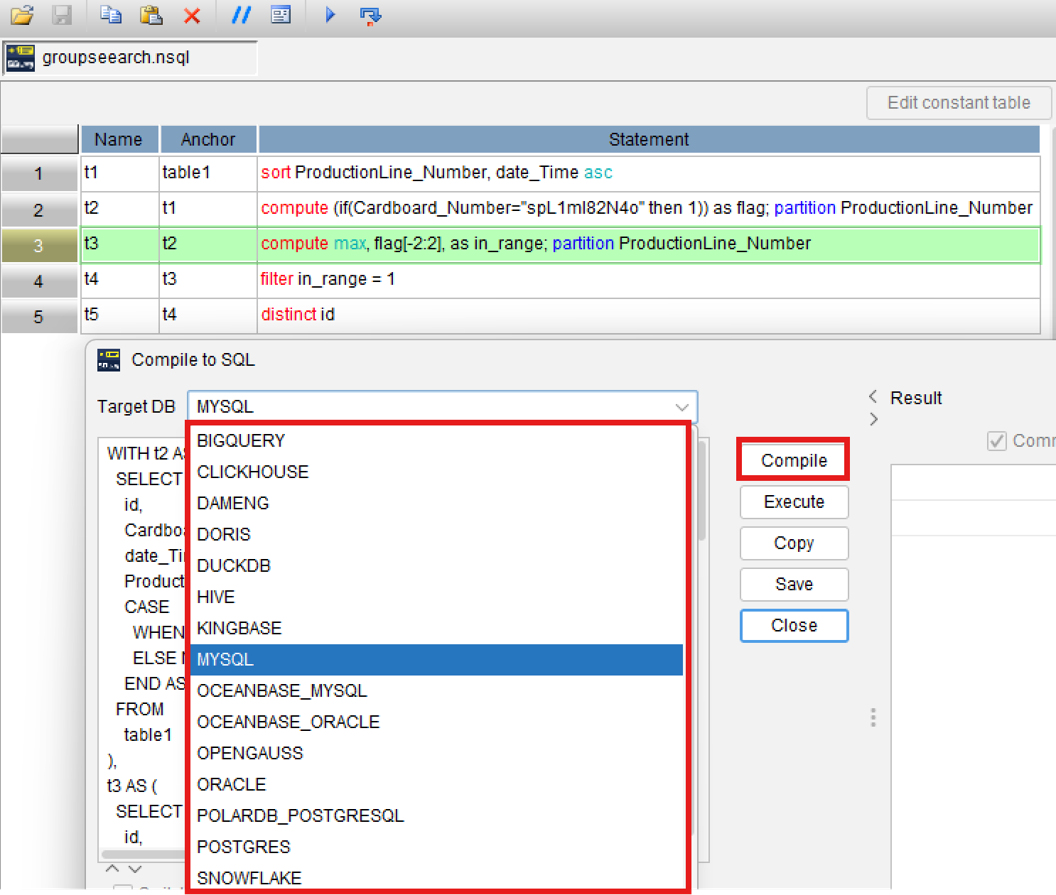
The compiled SQL is equivalent to what you’d write by hand. There’s no extra abstraction layer – j you can copy it and use it as is, and it isn’t tied to any particular database.
To be honest, for simple CRUD, just write the SQL directly. You don’t need SQLazy for that. What really deserves step-by-step debugging is logic where one wrong step spoils everything – things like grouping records to find the neighbor, condition-based resets, and segment-based alignment.
A different approach to debugging
Want to try the step-by-step execution? Visit https://www.sqlazy.com/?2Qk to run this example of searching for adjacent records by offset.
You can also visit our example library (https://github.com/SPLWare/SQLazy/tree/master/examples) to find more examples about sessionization, continuous interval, and dynamic grouped reports.
How do you usually find errors when you debug SQL? Break the CTEs apart and run them one by one, or stare at the output and think hard? Either way, it’s more tiring than clicking single-step execution.
SPL Official Website 👉 https://www.esproc.com
SPL Feedback and Help 👉 https://www.reddit.com/r/esProcSPL
SPL Learning Material 👉 https://c.esproc.com
SPL Source Code and Package 👉 https://github.com/SPLWare/esProc
Discord 👉 https://discord.gg/sxd59A8F2W
Youtube 👉 https://www.youtube.com/@esProc_SPL


chinese version: https://c.raqsoft.com.cn/article/1790230152716