

LLM Plans, Compiler Generates – A Deterministic SQL Generator with the Workflow as Its Contract
AI can already produce SQL that runs – but runnable isn’t the same as auditable.
On complex queries, public evaluations show that even the most advanced models often hover around 60% execution accuracy on benchmarks such as BIRD-bench, far short of what it takes to pass review as is. The typical errors are not in syntax but in more complex logic: window boundaries, partition keys, and aggregation definitions, especially in sessionization, time-series gaps, and dynamic pivots. This kind of SQL needs multiple layers of nested CTEs and cumulative window calculations, with hidden join conditions, so a change in one place has to be checked layer by layer, starting from the innermost, to see whether it affects the outer ones.
The consequence is a triple cost: it’s hard to review, hard to debug step by step, and hard to migrate across databases. The code does run, but to know whether the logic is right, you have to replay the whole nesting in your head.
Why having an LLM write SQL directly isn’t deterministic
The root of the problem isn’t AI capability, but the paradigm. Making a probabilistic model responsible for generating the final SQL directly binds planning and generation together in a single sampling pass, so determinism can’t be guaranteed.
Here’s an example. A status log table records, in each row, the status (NewStatus) of an ID at a certain time point. The requirement is to retrieve, for each ID, the most recent Closed row before ConfirmationStarted.
If you ask AI to generate this SQL directly, the typical result is a multi-layer nested query:
WITH t2 AS (
		SELECT CreatedAt, ID, NewStatus
			, 1 + SUM(CASE
				WHEN NewStatus = 'ConfirmationStarted' THEN 1
				ELSE 0
			END) OVER (PARTITION BY ID ORDER BY ID ASC, CreatedAt ASC ROWS UNBOUNDED PRECEDING) AS seg
		FROM mytable
	)
SELECT ID, MAX(CreatedAt) AS CreatedAt
FROM (
	SELECT CreatedAt, ID, NewStatus, seg
	FROM (
		SELECT CreatedAt, ID, NewStatus, seg
		FROM (
			SELECT CreatedAt, ID, NewStatus, seg
			FROM t2
			WHERE NewStatus = 'Closed'
		) t_1
		WHERE seg = 1
	) t_2
	WHERE ID IN (
		SELECT ID
		FROM (
			SELECT ID
			FROM t2
			WHERE NewStatus = 'Closed'
				AND seg = 1
		) t_3
		GROUP BY ID
	)
) t_4
GROUP BY ID
ORDER BY ID
This SQL does run correctly, but you have to unfold it layer by layer to check whether the logic is right. That’s the cost of having AI produce the final SQL directly: every step is buried inside the nesting, and none of them can be audited on its own.
To restore determinism, planning needs to be separated from generation.
Architecture overview: separating planning from generation
Break down the one-shot Prompt→SQL black box into a Prompt→Workflow→SQL white box, with the Workflow as the contract.
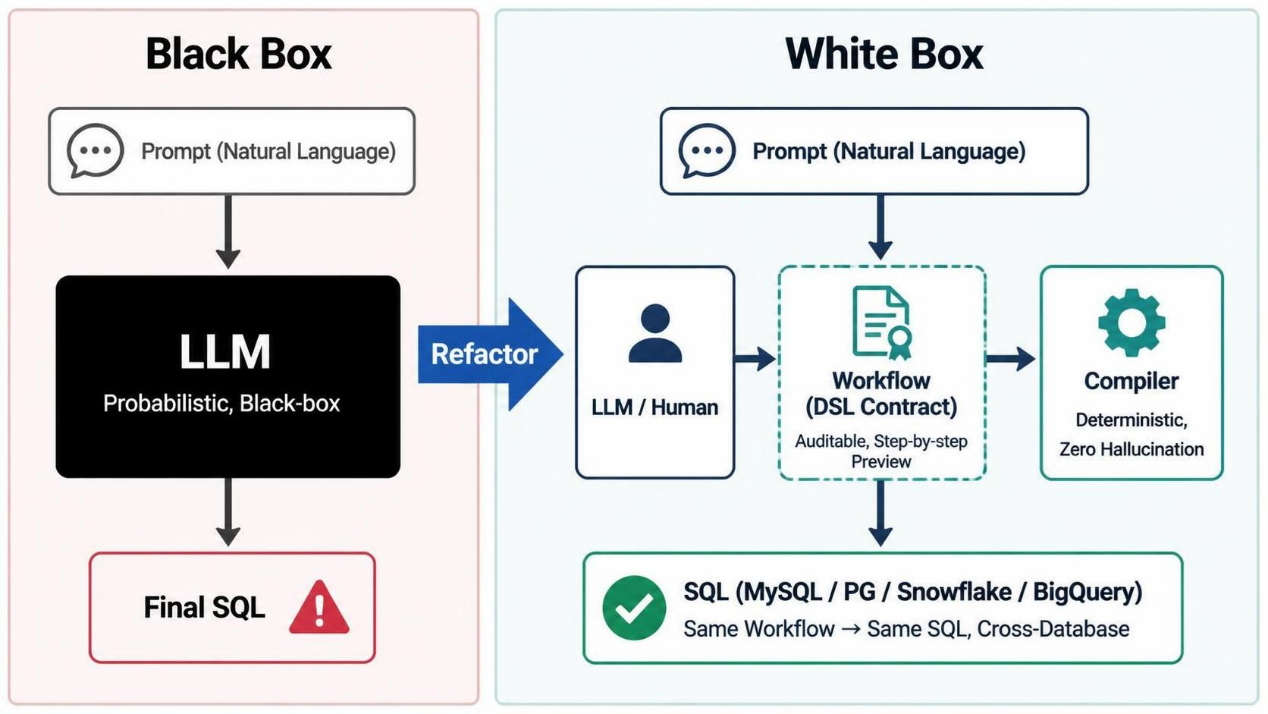
The three components:
Planner: A person or an LLM produces a set of natural-language steps, breaking a plain-language requirement down into a sequence.
Workflow: It uses the DSL contract, has a clear structure, decompose the logic into steps, is human-readable, lets you run and preview each step, and is itself executable documentation. The same workflow always produces the same SQL.
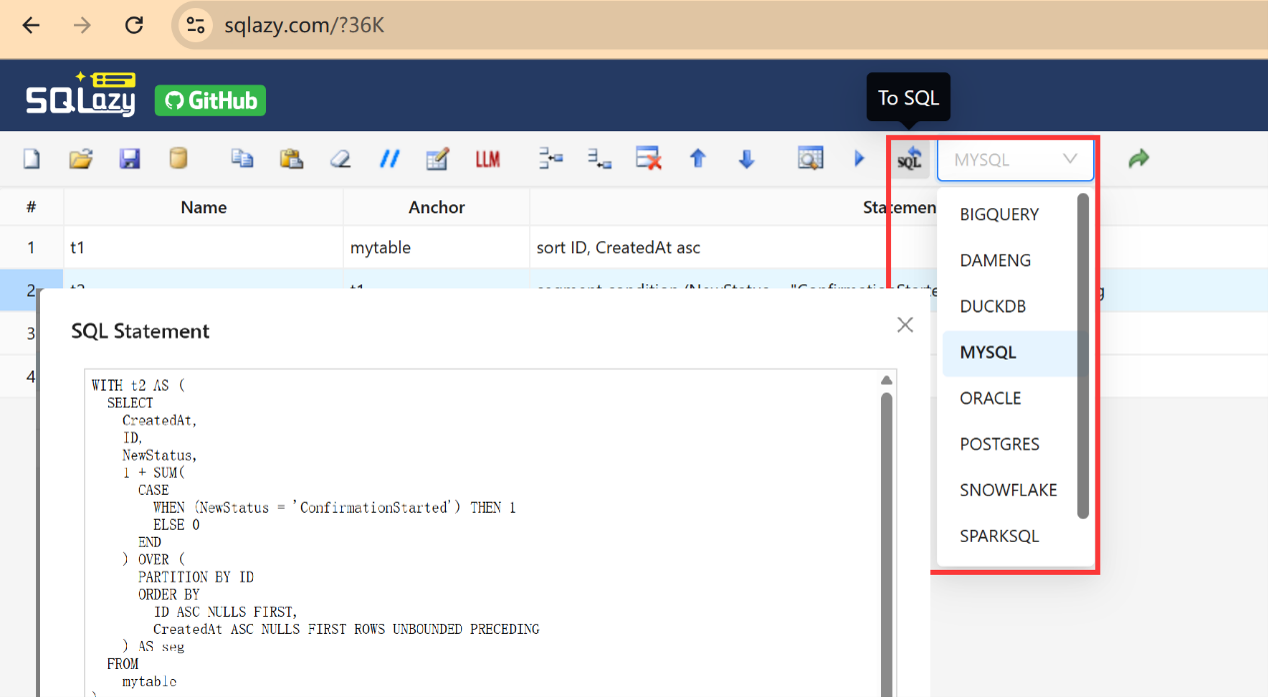
Compiler: A deterministic compiler that translates a workflow into native SQL for the target dialect according to predefined rules. A single workflow can be compiled into native SQL for MySQL, PostgreSQL, Snowflake, or BigQuery.
The contract constrains both ends. The LLM’s output is bound by DSL, so it never produces SQL directly. The compiler takes the workflow as input and does not guess. A single workflow produces exactly the same SQL, whether it is compiled today or tomorrow. The workflow itself becomes auditable logic documentation. Reviewers no longer have to guess what the AI intended; they simply review the steps.
SQLazy is the concrete implementation of this architecture: The LLM plans steps, and the compiler generates SQL deterministic.
Key design elements
Three key design elements underpin SQLazy’s determinism and auditability.
Design 1: DSL-based workflow and step-by-step debugging
The workflow follows the natural order of human reasoning. If an error occurs in step 2, you only need to modify that step. Each step can be executed independently, with its intermediate table available for preview. Boundary errors show up directly in the intermediate results, so there’s no need to work backward from the final output. Take partitioning as an example: run the step, and you immediately see the values in the partition column, so you can tell on the spot whether the data was split as expected.
Design 2: Deterministic compilation
The compiler translates by predefined rules, not by probabilistic generation. Each workflow operation – such as sorting, filtering, partitioning and aggregation – maps one-to-one to corresponding SQL constructs – ORDER BY, WHERE, SUM(CASE WHEN) OVER(PARTITION BY) for partitioning, and GROUP BY. There are no hallucinations, and the results are reproducible. A single workflow produces the same result across runs and across machines, meeting the traceability requirement of compliance-regulated scenarios.
Design 3: Change audit and version control
A workflow is a plain-text contract, so it fits naturally into Git for version control. When the logic changes, you edit only the corresponding step. And the compiler automatically rebuilds the SQL, keeping the logic and SQL in sync. Every change can be diffed, reviewed, and rolled back. The history remains clear and traceable, and regulatory audits only need to go through the Git commit history.
Example validation and scope of applicability
Let’s validate the SQLazy approach using the example above.
Source data mytable:
CreatedAt ID NewStatus
2022-05-25 23:17:44 147 Active
2022-05-28 05:59:02 147 Closed
2022-06-18 05:59:01 147 Closed
2022-06-25 05:59:01 147 Closed
2022-07-13 00:02:47 147 ConfirmationStarted
2022-08-25 05:59:01 147 Closed
2023-04-29 05:59:02 1645 Closed
2023-05-08 14:53:34 1645 ConfirmationStarted
The expected result contains only two rows (147→2022-06-25, 1645→2023-04-29). For all other rows, the Closed date is either too early or falls after ConfirmationStarted.
In SQLazy, the same logic is expressed as an ordered workflow:
Name Anchor Statement
t1 mytable sort ID, CreatedAt asc
t2
segment condition (NewStatus = "ConfirmationStarted") partition ID as seg
t3
filter (NewStatus = "Closed" and seg = 1)
t4
summarize max CreatedAt as CreatedAt; group ID
Run this example onlin: https://www.sqlazy.com/?36K
Step 1: sort ID, CreatedAt asc sorts data by ID and CreatedAt to preserve chronological order. The sort operation maps to SQL’s ORDER BY clause.
Step 2: segment condition (NewStatus = "ConfirmationStarted") partition ID as seg splits the data into segments at each occurrence of ConfirmationStarted. partition ID ensures that each ID is segmented independently. After the operation runs, a new column, seg, appears. Rows where seg=1 identify the target interval, eliminating the need to hand-write SUM(CASE WHEN ...) OVER. To verify the segmentation, simply click t2 to inspect the seg column.
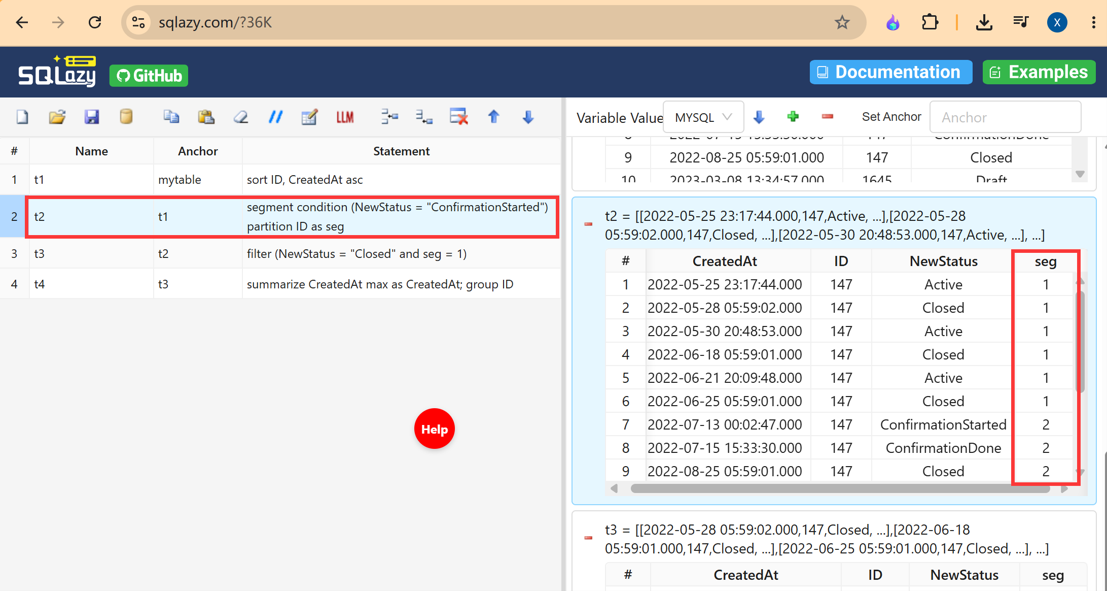
Step 3: filter (NewStatus = "Closed" and seg = 1) only retains the Closed row within the target interval. filter maps to SQL’s WHERE clause.
Step 4: summarize max CreatedAt as CreatedAt; group ID groups the data by ID and gets the latest CreatedAt timestamp for each group. The summarize operation maps to SQL’s GROUP BY and aggregate operation.
Once the workflow is finished, click “Compile” to produce SQL according to predefined rules. Compared with the original SQL, this SQL has a clearer step-by-step structure:
WITH t2 AS (
        SELECT CreatedAt, ID, NewStatus
            , 1 + SUM(CASE
                WHEN (NewStatus = 'ConfirmationStarted') THEN 1
                ELSE 0
            END) OVER (PARTITION BY ID ORDER BY ID ASC, CreatedAt ASC ROWS UNBOUNDED PRECEDING) AS seg
        FROM mytable
    )
SELECT ID, MAX(CreatedAt) AS CreatedAt
FROM (
    SELECT CreatedAt, ID, NewStatus, seg
    FROM t2
    WHERE (NewStatus = 'Closed'
        AND seg = 1)
) t_3
GROUP BY ID
ORDER BY ID
The same workflow produces exactly the same SQL every time it is compiled. Switching SQL dialects requires no changes to the workflow.
The scope of applicability should also be stated honestly. For simple CRUD operations, writing SQL directly is more appropriate; introducing a workflow for just a few lines of logic is hardly worth the overhead. Features such as macros and loops are still on the roadmap. SQLazy is built for helping developers design and validate complex analytical logic, which can then be embedded into workflows such as dbt. It is intended to complement these tools, not replace them.
Open-source vs Commercial components: SQLazy’s syntax and examples are open source, while its compiler and IDE are proprietary, with a free version available. The IDE supports local and private deployment, meeting enterprise requirements for data export and working offline.
AI writes the logic. A compiler writes the SQL.
Online trial: sqlazy.com (Free to use, no sign-up required. Playground runs locally in your browser).
Open-source examples: github.com/SPLWare/SQLazy/examples
SPL Official Website 👉 https://www.esproc.com
SPL Feedback and Help 👉 https://www.reddit.com/r/esProcSPL
SPL Learning Material 👉 https://c.esproc.com
SPL Source Code and Package 👉 https://github.com/SPLWare/esProc
Discord 👉 https://discord.gg/sxd59A8F2W
Youtube 👉 https://www.youtube.com/@esProc_SPL


chinese version: https://c.raqsoft.com.cn/article/1788514908887