

Convert Time Columns into Rows and Pivot into a New Cross Table
Problem Description
The table tb can be seen as a cross table: the combination of the ID and PartNum fields forms the row header, the three field names EnteredOn, PickedTime and DeliveredTime form the column header, and the cells hold time points. Neither the content nor the number of the row headers is fixed. Now the table has to be turned around: the original cells (the time points) become the row header of the new table, the original row header (the combination of PartNum and ID) becomes the column header of the new table, and the original three column headers are replaced by the strings ENTERED, PICKED and DELIVERED, which are filled into the cells.
Source Data
ID |
PartNum |
EnteredOn |
PickedTime |
DeliveredTime |
100 |
50A |
2024-03-28 08:59:13.727 |
2024-03-28 09:30:20.237 |
2024-03-28 09:56:42.570 |
125 |
60B |
2024-03-28 08:59:22.290 |
2024-03-28 09:31:32.543 |
2024-03-28 09:56:50.683 |
171 |
50A |
2024-03-28 14:31:28.480 |
||
211 |
70B |
2024-03-28 14:31:33.613 |
Expected Result
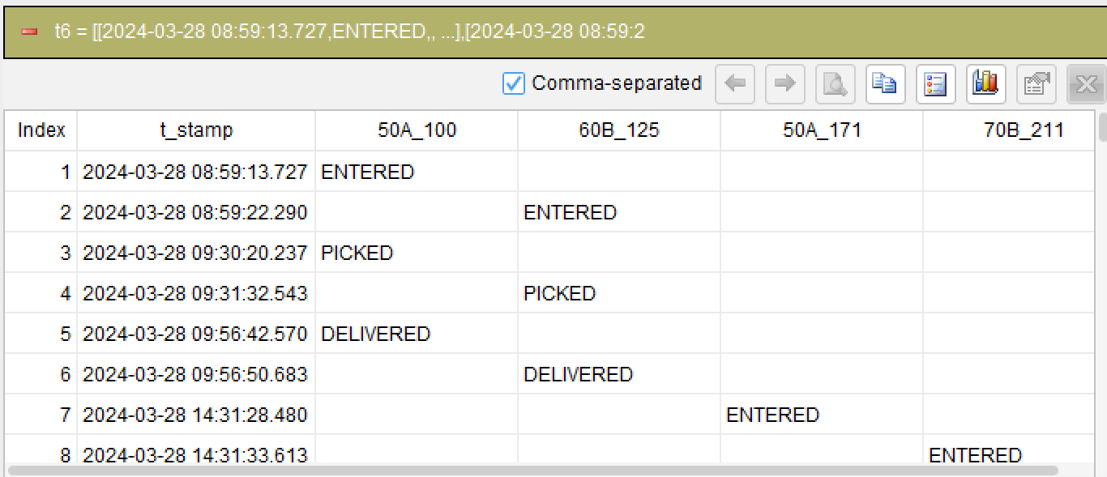
The column header is the combination of PartNum and ID, the row header is the time point, and the cells hold the action names:
t_stamp |
50A_100 |
60B_125 |
50A_171 |
70B_211 |
2024-03-28 08:59:13.727 |
ENTERED |
|||
2024-03-28 08:59:22.290 |
ENTERED |
|||
2024-03-28 09:30:20.237 |
PICKED |
|||
2024-03-28 09:31:32.543 |
PICKED |
|||
2024-03-28 09:56:42.570 |
DELIVERED |
|||
2024-03-28 09:56:50.683 |
DELIVERED |
|||
2024-03-28 14:31:28.480 |
ENTERED |
|||
2024-03-28 14:31:33.613 |
ENTERED |
The first row 2024-03-28 08:59:13.727 falls in the column 50A_100 with the value ENTERED, which means it is the entered time of the record with ID=100 and PartNum=50A. Further down the same column the rows PICKED and DELIVERED appear, which are the picked time and the delivered time of that record. In other words, the three time points that used to lie side by side in one row are now stacked vertically in one column.
The records with ID=171 and ID=211 have only an entered time, while the picked and delivered times are empty, so the columns 50A_171 and 70B_211 each contain a single ENTERED and no PICKED or DELIVERED. Empty values have to be filtered out first, otherwise the new table would contain two meaningless time point rows.
The number of columns of the new table equals the number of "row header combinations" in the source data (4 in this example), and the number of rows equals the total number of non-empty values in the three time columns (6 plus 2, that is 8, in this example). Neither direction is fixed, which is why this problem cannot be solved by hard-coding the column names.
SQLazy Step-by-Step Implementation
The essence of this problem is pivoting twice. The first pivot turns the three time columns into rows, so that every time point occupies a row of its own and carries the action it belongs to; the second pivot turns the rows back into columns, using the combination of PartNum and ID as the new column names. Both pivots use the pivot action: the first one uses its inverse mode (column-to-row) and the second one uses the default mode (row-to-column). Two small things happen in between: filtering out the empty time points, and replacing the action field names with the short names the problem asks for.
[Click to run this example online]
The steps are explained below.
Name |
Anchor |
Statement |
t1 |
tb |
pivot group ID, PartNum; name action_type; value t_stamp; inverse |
t2 |
t1 |
filter (t_stamp notnull) |
t3 |
t2 |
compute if(action_type = "EnteredOn" then "ENTERED", action_type = "PickedTime" then "PICKED", action_type = "DeliveredTime" then "DELIVERED") as status |
t4 |
t3 |
compute concat(PartNum, "_", ID) as col_name |
t5 |
t4 |
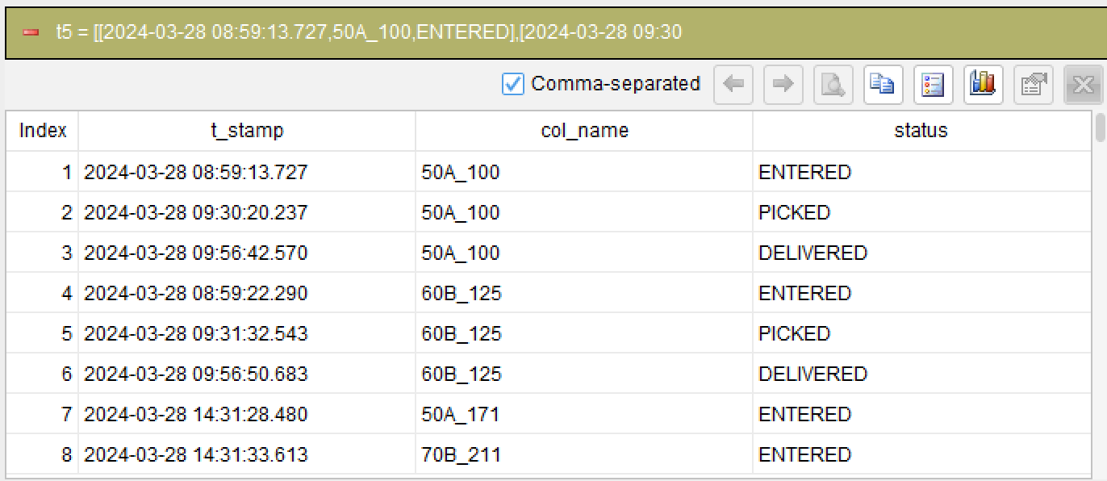
derive t_stamp, col_name, status |
t5 |
pivot group t_stamp; name col_name; value status |
Step 1: Turn the three time columns into rows
pivot group ID, PartNum; name action_type; value t_stamp; inverse
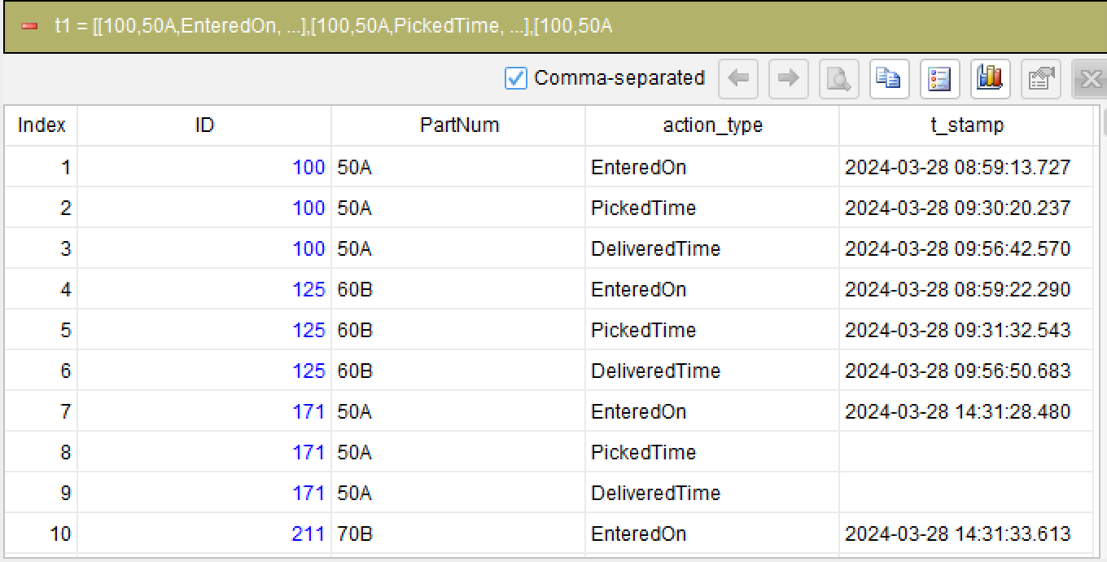
This is the first key action of the problem. The pivot action turns rows into columns by default, and adding the inverse parameter switches it to column-to-row: the two grouping columns ID and PartNum stay unchanged, the other three time columns are expanded into rows, the original column names EnteredOn, PickedTime and DeliveredTime become the values of the new column action_type, and the original column values (the time points) become the values of the new column t_stamp.
After this step one wide record becomes three long records: the record with ID=100 turns into three rows carrying the three action names EnteredOn, PickedTime and DeliveredTime together with their time points. How many row header combinations and how many column headers there are does not affect this action, so an unfixed number of row headers is not a problem.
Step 2: Filter out the empty time points
filter (t_stamp notnull)
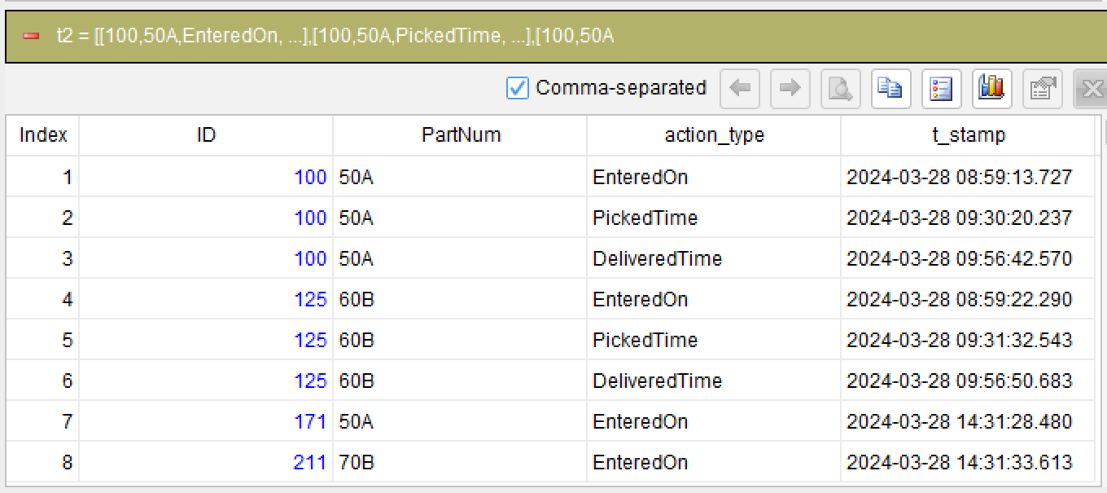
In the source data the records with ID=171 and ID=211 have only an entered time, while the picked and delivered times are empty. Column-to-row also expands the empty values into rows, and those rows are meaningless, so they are filtered out first. The test for an empty value uses the not-null function, and the whole condition is written inside the parentheses of the filter action.
Step 3: Replace the action names with the short names the problem asks for
compute if(action_type = “EnteredOn” then “ENTERED”, action_type = “PickedTime” then “PICKED”, action_type = “DeliveredTime” then “DELIVERED”) as status
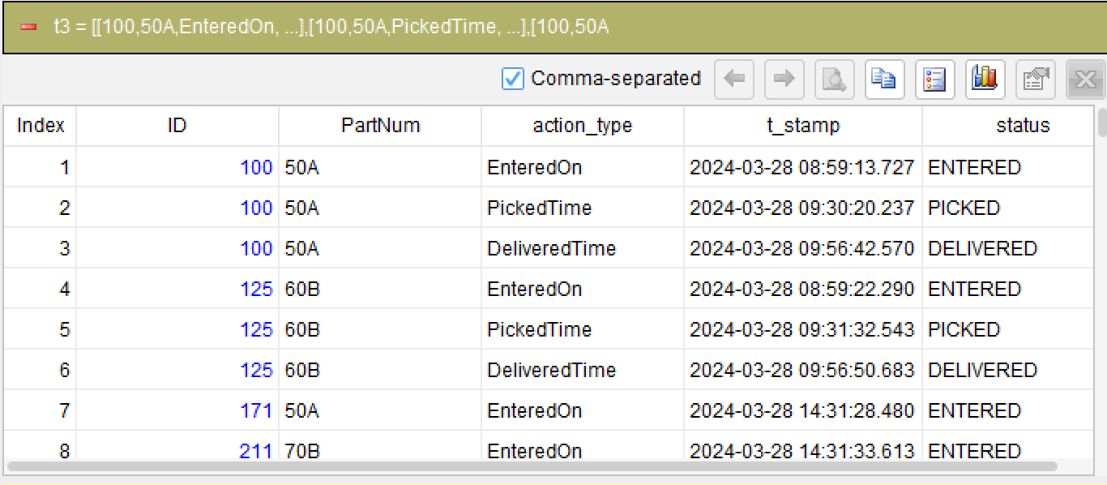
The problem requires the cells to hold ENTERED, PICKED and DELIVERED, while column-to-row produces the original column names, so a computed column with the condition function performs the mapping: when the action name equals EnteredOn it becomes ENTERED, when it equals PickedTime it becomes PICKED, and when it equals DeliveredTime it becomes DELIVERED. The result goes into the new column status. The condition function can test several conditions in turn and return the matching value, which suits this kind of mapping with several equality branches.
Step 4: Build the column names of the new table
compute concat(PartNum, “_”, ID) as col_name
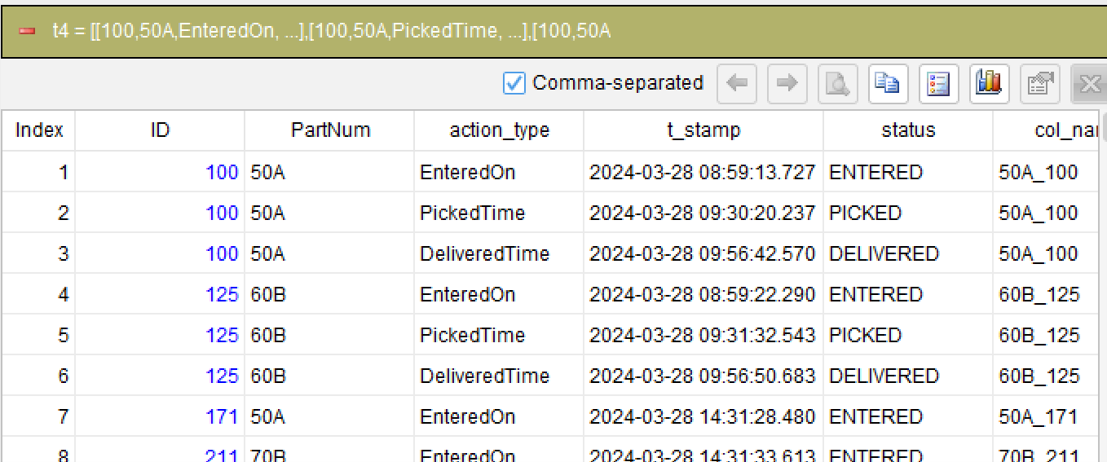
The column header of the new table is the combination of PartNum and ID joined by an underscore, such as 50A_100. The concat function joins the two fields and the underscore in between into one string, which is written into the new column col_name. The column names are not known in advance but computed from the data, which is the other reason this problem cannot hard-code them.
Step 5: Keep only the three columns that are needed
derive t_stamp, col_name, status
The previous steps leave intermediate columns such as ID, PartNum and action_type. The second pivot needs only the time point, the column name and the action name, so the derive action picks those three out.
Step 6: Turn the rows into columns
pivot group t_stamp; name col_name; value status
The second pivot does not write a calculation method and uses the default row-to-column mode: group by t_stamp, let every value of col_name become the name of a new column, and fill the values of status into the matching cells. One row and one column occur only once in the data (a time point belongs to the action of a single record), so no aggregation algorithm has to be specified and the default of taking the first record in the group is enough.
No inverse parameter is written here, which is the opposite of step 1: step 1 turns columns into rows and this step turns rows into columns, and the two pivots together turn the whole table around.
Generated SQL
After confirming the logic of the above 6 steps, the SQLazy compiler automatically generates native SQL (MySQL syntax used here):
WITH t1 AS (
    SELECT ID, PartNum, 'EnteredOn' AS action_type, EnteredOn AS t_stamp
    FROM tb
    UNION ALL
    SELECT ID, PartNum, 'PickedTime' AS action_type, PickedTime AS t_stamp
    FROM tb
    UNION ALL
    SELECT ID, PartNum, 'DeliveredTime' AS action_type, DeliveredTime AS t_stamp
    FROM tb
  ),
  t2 AS (
    SELECT ID, PartNum, EnteredOn, PickedTime, DeliveredTime
    FROM t1
    WHERE t_stamp IS NOT NULL
  ),
  t4 AS (
    SELECT ID, PartNum, action_type, t_stamp
      , CASE
        WHEN action_type = 'EnteredOn' THEN 'ENTERED'
        WHEN action_type = 'PickedTime' THEN 'PICKED'
        WHEN action_type = 'DeliveredTime' THEN 'DELIVERED'
        ELSE NULL
      END AS status
      , concat_ws('', PartNum, '_', ID) AS col_name
    FROM t2
  ),
  t5 AS (
    SELECT t_stamp, col_name, status
      , FIRST_VALUE(status) OVER (PARTITION BY t_stamp, col_name ORDER BY NULL) AS FIRST_2
    FROM t4
  )
SELECT t_stamp
  , MIN(CASE
    WHEN col_name = '50A_100' THEN FIRST_2
  END) AS `50A_100`
  , MIN(CASE
    WHEN col_name = '50A_171' THEN FIRST_2
  END) AS `50A_171`
  , MIN(CASE
    WHEN col_name = '60B_125' THEN FIRST_2
  END) AS `60B_125`
  , MIN(CASE
    WHEN col_name = '70B_211' THEN FIRST_2
  END) AS `70B_211`
FROM t5
GROUP BY t_stamp
SQLazy lets you describe logic in business language instead of writing nested SQL queries. Each of the two pivots in this problem is expressed by a single pivot statement: the first uses the inverse mode to expand the three time columns into rows and the second uses the default mode to turn the rows back into columns, so the two steps "columns to rows, then rows to columns" are obvious at a glance and there is no need to hand-write UNION ALL and hard-coded CASE branches in SQL.
The two modes of the pivot action are the key to this problem. One and the same action switches direction depending on whether the inverse parameter is present, and both directions share the same wording of grouping column, name column and value column, so the business statement "which field becomes the new column name and which field becomes the new value" can be copied straight into the parameters without first working out whether SQL needs CASE or UNION.
When the new column names come from the data itself (PartNum joined with ID), SQL can only hard-code them in the statement, and the statement has to be edited whenever the data changes. SQLazy treats building the column name as an ordinary computed column, so the names are generated from the data and neither a change in the number of row headers nor in the number of column headers requires a code change.
Step-by-step calculation lets every step be inspected on its own: after step 1 you can see the expanded long table, after step 2 you can see that the empty values are gone, and after step 4 you can see the finished column names, so when something goes wrong there is no need to run the whole statement and then guess which part is at fault.
Official Links
SQLazy Online Experience: sqlazy.com (free, no registration required)
SQLazy Repository: github.com/SPLWare/SQLazy
SPL Official Website 👉 https://www.esproc.com
SPL Feedback and Help 👉 https://www.reddit.com/r/esProcSPL
SPL Learning Material 👉 https://c.esproc.com
SPL Source Code and Package 👉 https://github.com/SPLWare/esProc
Discord 👉 https://discord.gg/sxd59A8F2W
Youtube 👉 https://www.youtube.com/@esProc_SPL


chinese version: https://c.raqsoft.com.cn/article/1792648545386