

SQLazy: Convert Swipe Records into Single-Row Sessions by Pairing Order
Problem Description
Table userBuilding stores swipe logs for personnel entering and exiting buildings, with one record per timestamp and fields username, building, action (IN/OUT), and timestamp. Normally, records for the same person in the same building appear in pairs, IN followed by OUT. In practice, the data is messy: unpaired records and consecutive actions in the same direction occur. The task is to turn each pair of records for each person and each building into one row by pivoting rows to columns; unpaired records become separate rows, with NULL for the missing side, i.e., convert the vertical log into horizontal sessions in pairing order.
Source Data
username |
building |
action |
timestamp |
user-1 |
building-1 |
IN |
2024-04-10 01:00:00.000 |
user-1 |
building-1 |
OUT |
2024-04-10 02:00:00.000 |
user-1 |
building-1 |
IN |
2024-04-10 02:30:00.000 |
user-1 |
building-1 |
OUT |
2024-04-10 04:00:00.000 |
user-1 |
building-1 |
IN |
2024-04-11 10:00:00.000 |
user-1 |
building-1 |
OUT |
2024-04-11 11:00:00.000 |
user-2 |
building-1 |
IN |
2024-04-12 10:00:00.000 |
user-2 |
building-1 |
OUT |
2024-04-12 11:00:00.000 |
user-2 |
building-2 |
IN |
2024-04-10 08:00:00.000 |
user-2 |
building-2 |
OUT |
2024-04-10 09:00:00.000 |
user-2 |
building-3 |
OUT |
2024-04-11 02:30:00.000 |
user-2 |
building-4 |
IN |
2024-04-11 04:00:00.000 |
user-3 |
building-1 |
OUT |
2024-04-10 01:00:00.000 |
user-3 |
building-1 |
IN |
2024-04-10 10:00:00.000 |
user-3 |
building-1 |
IN |
2024-04-10 11:00:00.000 |
user-3 |
building-1 |
IN |
2024-04-10 12:00:00.000 |
user-3 |
building-1 |
OUT |
2024-04-10 13:00:00.000 |
user-3 |
building-1 |
OUT |
2024-04-10 14:00:00.000 |
user-3 |
building-1 |
OUT |
2024-04-10 15:00:00.000 |
Expected Result
username |
building |
IN |
OUT |
user-1 |
building-1 |
2024-04-10 01:00:00.000 |
2024-04-10 02:00:00.000 |
user-1 |
building-1 |
2024-04-10 02:30:00.000 |
2024-04-10 04:00:00.000 |
user-1 |
building-1 |
2024-04-11 10:00:00.000 |
2024-04-11 11:00:00.000 |
user-2 |
building-1 |
2024-04-12 10:00:00.000 |
2024-04-12 11:00:00.000 |
user-2 |
building-2 |
2024-04-10 08:00:00.000 |
2024-04-10 09:00:00.000 |
user-2 |
building-3 |
2024-04-11 02:30:00.000 |
|
user-2 |
building-4 |
2024-04-11 04:00:00.000 |
|
user-3 |
building-1 |
2024-04-10 01:00:00.000 |
|
user-3 |
building-1 |
2024-04-10 10:00:00.000 |
|
user-3 |
building-1 |
2024-04-10 11:00:00.000 |
|
user-3 |
building-1 |
2024-04-10 12:00:00.000 |
2024-04-10 13:00:00.000 |
user-3 |
building-1 |
2024-04-10 14:00:00.000 |
|
user-3 |
building-1 |
2024-04-10 15:00:00.000 |
Take user-3/building-1 as an example. The raw sequence is OUT, IN, IN, IN, OUT, OUT, OUT, which is split into 6 segments by the pairing rules: the first OUT stands alone, the next two INs each stand alone, the fourth IN pairs with the first OUT into one row, and the last two OUTs each stand alone. Consecutive actions in the same direction are never forced into a pair, ensuring correct session boundaries. In the 13-row result, this user accounts for 6 rows, which illustrates the logic.
SQLazy Step-by-Step Implementation
Core idea: First sort by username, building, and timestamp to arrange the log of the same person in the same building in time order; then use a conditional segment to detect session boundaries - start a new group when the previous record is OUT or the current record is IN, so each group contains at most one IN and at most one OUT; finally group by username, building, and seg, and use conditional max aggregation to collapse the IN time and OUT time within each group into one row, with NULL for unpaired sides.
[Click to run this example online]
Name |
Anchor |
Statement |
t1 |
userBuilding |
sort username, building, timestamp asc |
t2 |
t1 |
segment condition ((action[-1] = "OUT")or (action[-1] = "IN" and action = "IN")) partition username, building as seg |
t3 |
t2 |
summarize condition (action = "IN") max timestamp as 'IN', condition (action = "OUT") max timestamp as 'OUT'; group username, building, seg |
t4 |
t3 |
derive delete seg |
The steps are explained below.
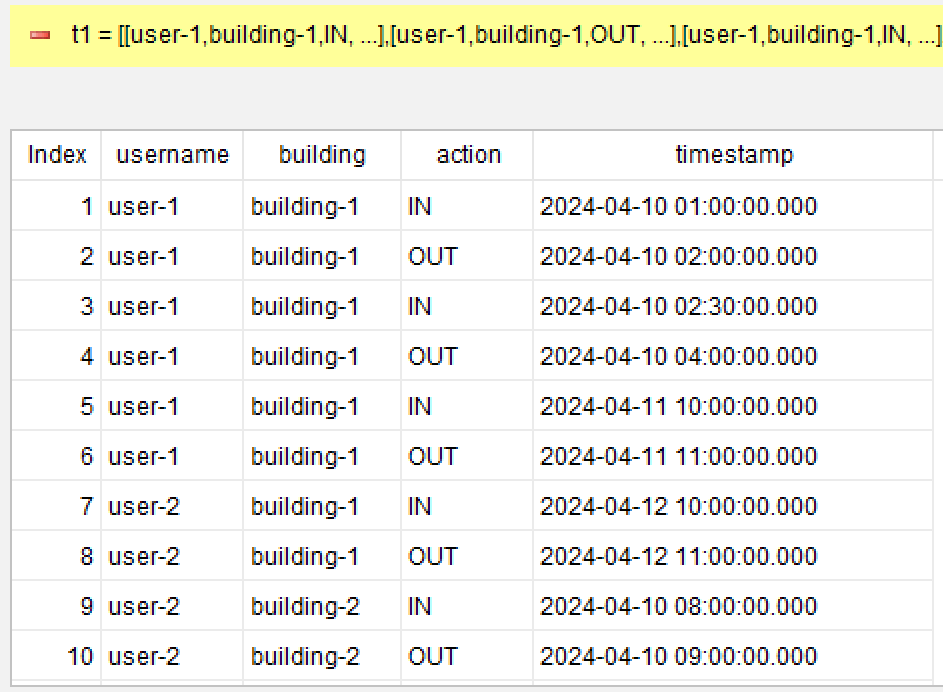
Step 1: Sort by person, building, and time
sort username, building, timestamp asc
Sort records of the same person in the same building by timestamp in ascending order to ensure subsequent pairing decisions follow time order. Using username and building as leading sort keys keeps the order within each partition consistent with the partition keys. Sorting is a prerequisite for the subsequent segment and summarize steps.
Step 2: Segment by pairing semantics to generate seg (core)
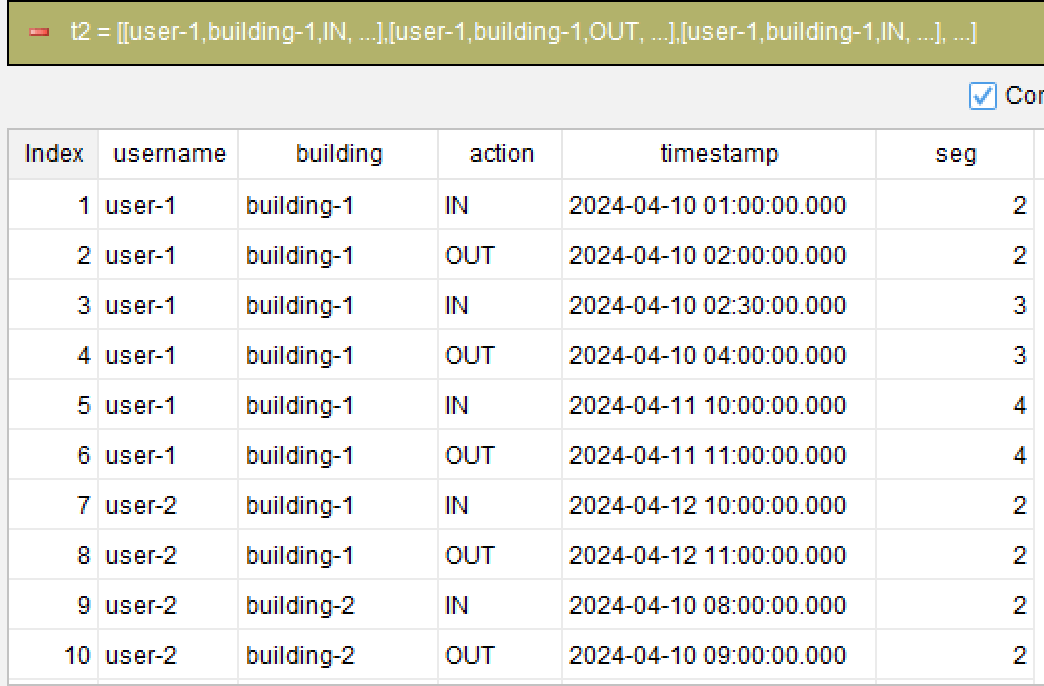
segment condition ((action[-1] = "OUT")or (action[-1] = "IN" and action = "IN")) partition username, building as seg
The most critical step is to express session boundaries with a conditional segment: start a new group when the previous record is OUT, or when the previous record is IN and the current is also IN. A previous OUT means the previous session is closed and a new one should start; consecutive INs mean multiple swipes for entry, and each additional IN starts a new group to avoid squeezing multiple INs into one session. partition username, building keeps different persons and buildings independent, each numbered with its own seg. The condition action[-1] is SQLazy's relative position syntax, equivalent to LAG(action,1), without manually writing window functions.
Step 3: Group by person, building, and segment number, then conditionally aggregate rows to columns
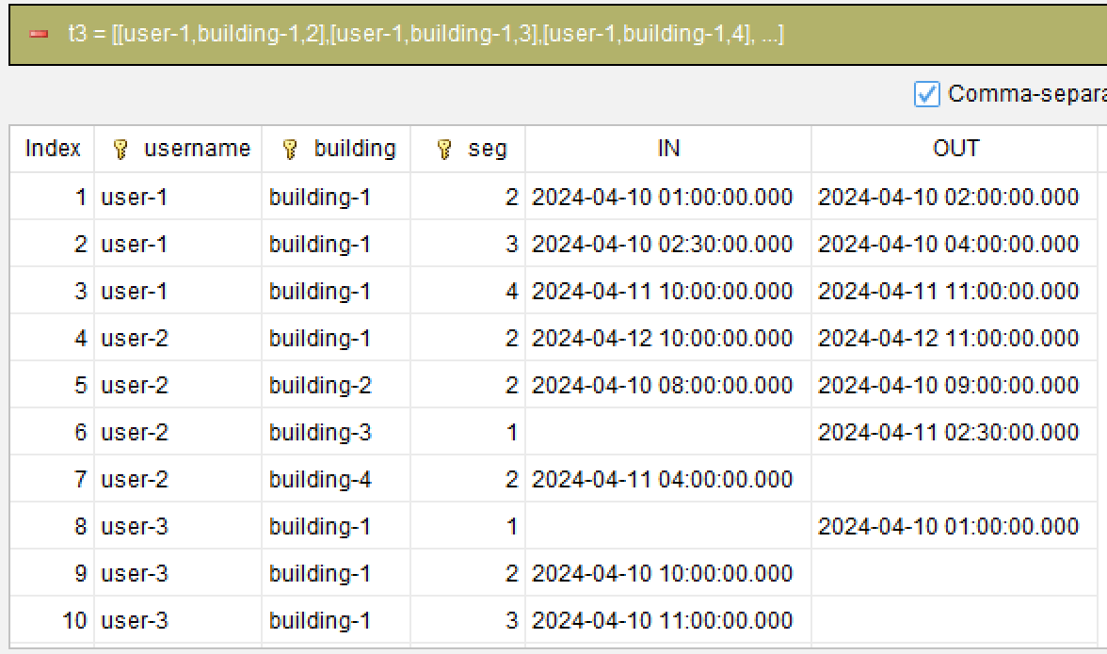
summarize condition (action = "IN") max timestamp as 'IN', condition (action = "OUT") max timestamp as 'OUT'; group username, building, seg
Group by username, building, and seg; each group contains at most one entry and one exit. Use conditional aggregation: when action = "IN", take max(timestamp) as the IN column, and when action = "OUT", take max(timestamp) as the OUT column. max and first are equivalent here because there is at most one record of each type per group; using conditional max naturally yields NULL on the other side for unpaired groups. Note that in the latest syntax the aggregation function (max) comes before the aggregated expression (timestamp), and grouping keys are specified via "group username, building, seg".
Step 4: Clean up the helper column
derive delete seg
Remove the auxiliary column seg produced by segment, keeping only the four columns username, building, IN, and OUT for the final result. The table is cleaner.
Generated SQL
After confirming the four steps above, the SQLazy compiler automatically generates native SQL (Oracle syntax here):
SELECT MAX(CASE
        WHEN (action = 'OUT') THEN timestamp
        ELSE NULL
    END) AS "OUT"
    , MAX(CASE
        WHEN (action = 'IN') THEN timestamp
        ELSE NULL
    END) AS "IN"
    , building, username
FROM (
    SELECT username, building, action, timestamp
        , 1 + SUM(CASE
            WHEN (col__2 = 'OUT'
                OR action = 'IN')
            THEN 1
            ELSE 0
        END) OVER (PARTITION BY username, building ORDER BY username ASC, building ASC, timestamp ASC ROWS UNBOUNDED PRECEDING) AS seg
    FROM (
        SELECT t1.*, LAG(action) OVER (PARTITION BY username, building ORDER BY username ASC, building ASC, timestamp ASC) AS col__2
        FROM t1
    ) sub__3
) t_4
GROUP BY username, building, seg
ORDER BY username, building, seg;
SQLazy lets you describe logic in business language instead of writing nested queries in SQL syntax. In this example, a single conditional segment expresses the business rule clearly: segment condition ((action[-1] = "OUT")or (action[-1] = "IN" and action = "IN"))partition username, building, i.e., "start a new session when the previous segment is closed or a consecutive swipe-in occurs". Writing this in SQL manually requires LAG to fetch the previous row, SUM OVER to accumulate segment numbers, two layers of subqueries to wrap window columns, and finally conditional aggregation MAX(CASE...) to pivot rows to columns, plus handling partition and ordering consistency. SQLazy compresses all of this into four steps - sort, segment, conditional summarize, and cleanup - each verifiable independently; relative positions and partitions are compiled into window functions, and conditional summarize handles NULL automatically.
Official Links
SQLazy Online Experience: sqlazy.com (free, no registration required)
SQLazy Repository: github.com/SPLWare/SQLazy
SPL Official Website 👉 https://www.esproc.com
SPL Feedback and Help 👉 https://www.reddit.com/r/esProcSPL
SPL Learning Material 👉 https://c.esproc.com
SPL Source Code and Package 👉 https://github.com/SPLWare/esProc
Discord 👉 https://discord.gg/sxd59A8F2W
Youtube 👉 https://www.youtube.com/@esProc_SPL


Chinese version:https://c.raqsoft.com.cn/article/1787370820290