

SQLazy: Search for Adjacent Records at a Specified Offset Within Groups
Problem Description
In a table, ProductionLine_Number is the grouping field, and within each group records are sorted by date_Time. The task is to search, within each group, all records whose Cardboard_Number equals a specified string, then take the records within a specified offset before and after each matched record, merge and remove duplicates before outputting.
Source Data
id |
Cardboard_Number |
date_Time |
ProductionLine_Number |
2 |
WDL-005943998-1 |
2024-02-29 17:13:50 |
1 |
4 |
spL1ml82N4o |
2024-02-29 17:13:54 |
1 |
5 |
WDL-005943998-1 |
2024-03-01 09:44:42 |
1 |
6 |
WDL-005943998-1 |
2024-03-01 10:34:57 |
1 |
7 |
950024027237 |
2024-03-01 10:44:57 |
1 |
8 |
950024027237 |
2024-03-01 10:52:57 |
1 |
9 |
WDL-005943998-1 |
2024-03-01 13:58:43 |
2 |
10 |
WDL-005943998-1 |
2024-03-01 13:58:46 |
2 |
11 |
spL1ml82N4o |
2024-03-01 14:09:43 |
2 |
12 |
WDL-005943998-1 |
2024-03-12 15:48:36 |
2 |
Expected Result
id |
Cardboard_Number |
date_Time |
ProductionLine_Number |
2 |
WDL-005943998-1 |
2024-02-29 17:13:50 |
1 |
4 |
spL1ml82N4o |
2024-02-29 17:13:54 |
1 |
5 |
WDL-005943998-1 |
2024-03-01 09:44:42 |
1 |
6 |
WDL-005943998-1 |
2024-03-01 10:34:57 |
1 |
9 |
WDL-005943998-1 |
2024-03-01 13:58:43 |
2 |
10 |
WDL-005943998-1 |
2024-03-01 13:58:46 |
2 |
11 |
spL1ml82N4o |
2024-03-01 14:09:43 |
2 |
12 |
WDL-005943998-1 |
2024-03-12 15:48:36 |
2 |
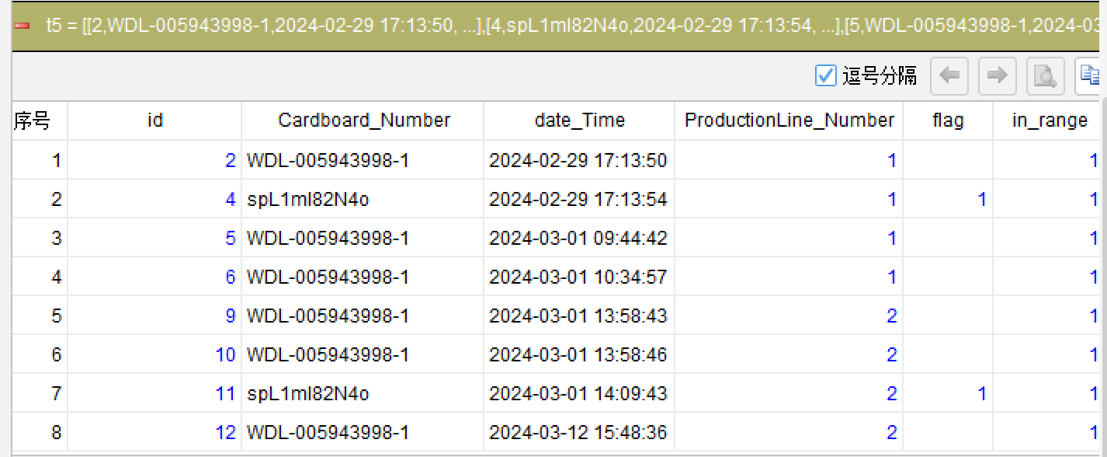
In the ProductionLine_Number=1 group, sorted by time, the ids are 2,4,5,6,7,8, where the row matching spL1ml82N4o is id=4. Taking 2 rows before and after id=4 gives ids 2,4,5,6.
In the ProductionLine_Number=2 group, sorted by time, the ids are 9,10,11,12, where the row matching spL1ml82N4o is id=11. Taking 2 rows before and after id=11 gives ids 9,10,11,12.
Merging and deduplicating both groups gives 2,4,5,6,9,10,11,12. Note that ids 7 and 8 are more than 2 rows away from the matched row id=4, so they are excluded.
SQLazy Step-by-Step Implementation
Core idea: After sorting by grouping field and time within groups, use compute to flag the rows matching the target value within each group, then use the relative-position range syntax flag[-2:2] to take a window of 2 rows before and after the current row, and check whether the window contains a matched row. If so, the current row falls within the result range. Finally filter and deduplicate.
Name |
Anchor |
Statement |
t1 |
table1 |
sort ProductionLine_Number, date_Time asc |
t2 |
t1 |
compute (if (Cardboard_Number = "spL1ml82N4o" then 1)) , as flag; partition ProductionLine_Number |
t3 |
t2 |
compute flag[-2:2] , max , as in_range; partition ProductionLine_Number |
t4 |
t3 |
filter in_range = 1 |
t5 |
t4 |
distinct id |
[Click to run this example online]
The steps are explained below.
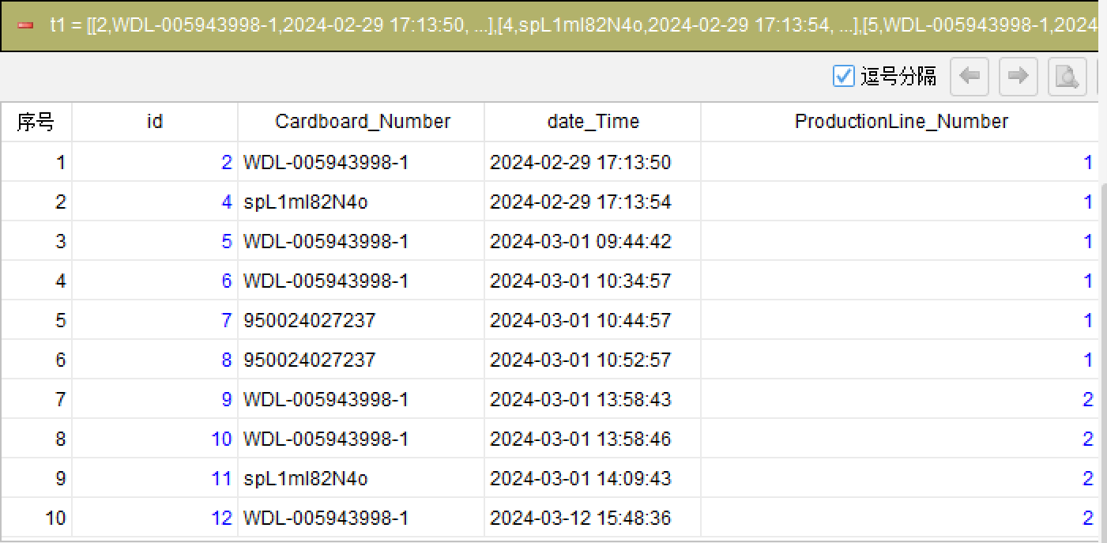
Step 1: Sort by grouping field and time within groups
sort ProductionLine_Number, date_Time asc
Sort the data by ProductionLine_Number to group records, and by date_Time ascending within each group, ensuring subsequent relative-position calculations follow the correct time order.
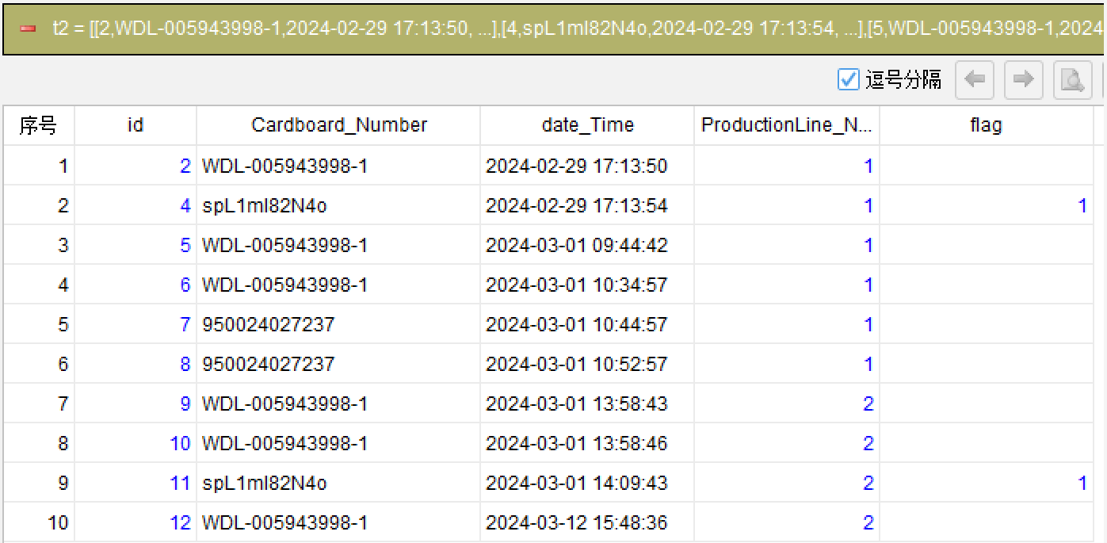
Step 2: Flag the rows matching the target value
compute (if (Cardboard_Number = “spL1ml82N4o” then 1)) , as flag; partition ProductionLine_Number
Within each ProductionLine_Number group, mark rows where Cardboard_Number equals the target string spL1ml82N4o as 1, leaving others empty. partition confines the flagging to each group independently.
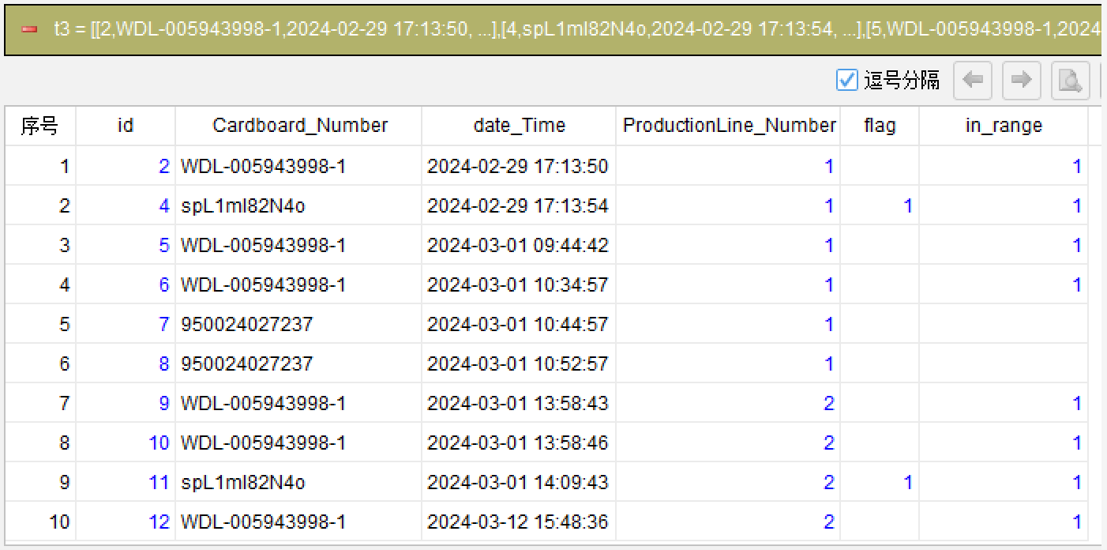
Step 3: Use range syntax to check whether the window contains a match (core)
compute flag[-2:2] , max , as in_range; partition ProductionLine_Number
This is the core step, using SQLazy’s relative-position range syntax. flag[-2:2] takes the flag values in the window from 2 rows before to 2 rows after the current row, then aggregates with max: as long as the window contains a matched row (flag=1), the current row’s in_range is 1. Thus every record within the offset range of each matched row is covered.
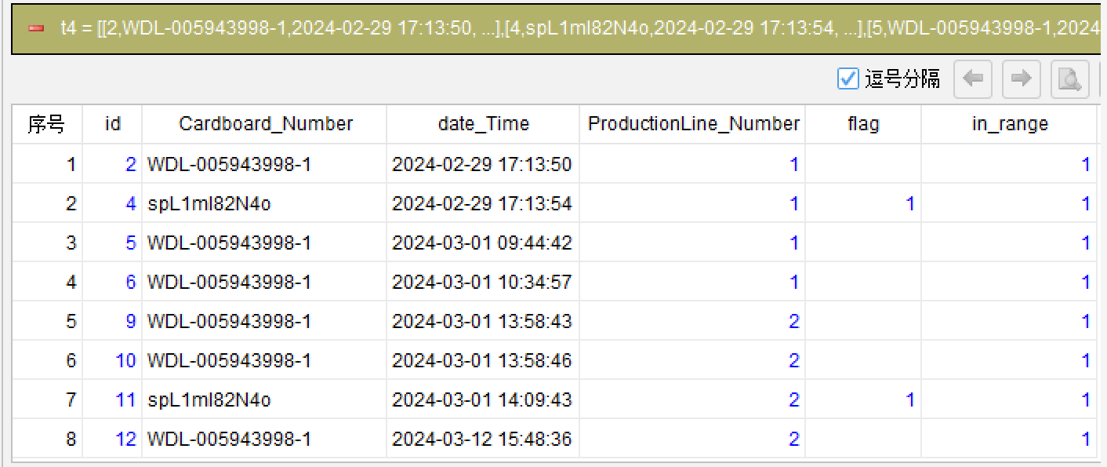
Step 4: Filter records within the range
filter in_range = 1
Keep only rows where in_range is 1, i.e., records falling within the offset range before or after a matched row.
Step 5: Remove duplicate records
distinct id
When the offset ranges of multiple matched rows overlap, the same row may be selected more than once. Use distinct id to deduplicate and output the final result.
Generated SQL
After confirming the above steps, the SQLazy compiler automatically generates native SQL (MySQL syntax):
WITH t2 AS (
    SELECT id, Cardboard_Number, date_Time, ProductionLine_Number
        , CASE
            WHEN Cardboard_Number = 'spL1ml82N4o' THEN 1
            ELSE NULL
        END AS flag
    FROM table1
),
t3 AS (
    SELECT id, Cardboard_Number, date_Time, ProductionLine_Number, flag
        , MAX(flag) OVER (PARTITION BY ProductionLine_Number ORDER BY CASE
            WHEN ProductionLine_Number IS NULL THEN 1
            ELSE 0
        END, ProductionLine_Number ASC, CASE
            WHEN date_Time IS NULL THEN 1
            ELSE 0
        END, date_Time ASC ROWS BETWEEN 2 PRECEDING AND 2 FOLLOWING) AS in_range
    FROM t2
),
t4 AS (
    SELECT id, Cardboard_Number, date_Time, ProductionLine_Number, flag
        , in_range
    FROM t3
    WHERE in_range = 1
)
SELECT id, Cardboard_Number, date_Time, ProductionLine_Number, flag
    , in_range
FROM t4
GROUP BY id
SQLazy lets you describe logic in business language instead of writing nested SQL queries. In this example of searching adjacent records at a specified offset within groups, the highlight is the relative-position range syntax: flag[-2:2] expresses a 2-row window before and after with a simple index range, corresponding to the verbose ROWS BETWEEN 2 PRECEDING AND 2 FOLLOWING in SQL. Combined with compute's max aggregation, one line determines whether the window contains a match. partition keeps all calculations independent within each group, and step-by-step computation lets every intermediate result be verified.
Official Links
SQLazy Online Experience: sqlazy.com (free, no registration required)
SQLazy Repository: github.com/SPLWare/SQLazy
SPL Official Website 👉 https://www.esproc.com
SPL Feedback and Help 👉 https://www.reddit.com/r/esProcSPL
SPL Learning Material 👉 https://c.esproc.com
SPL Source Code and Package 👉 https://github.com/SPLWare/esProc
Discord 👉 https://discord.gg/sxd59A8F2W
Youtube 👉 https://www.youtube.com/@esProc_SPL


Chinese Version: https://c.raqsoft.com.cn/article/1786092062618