

SQLazy: Find Strings with 5 or More Consecutive Alphabetical Letters
Problem Description
Table table_name has a single string field VALUE (max length 50). Find strings that contain at least 5 consecutive letters in ascending alphabetical order. That is: for each string, extract all letters, check them in original order, find the longest consecutive ascending subsequence (each letter >= previous one), and keep rows where the length >= 5. Non-letter characters must be excluded.
Source Data
VALUE |
Test |
Test1 |
Tesssst |
TTTTest |
ABCDTest |
Testuvwxyz |
Expected Result
VALUE |
ABCDTest |
Testuvwxyz |
Two qualifying strings as examples:
ABCDTest: the letters are A, B, C, D, T, e, s, t. The first four A-B-C-D are consecutively ascending. Then T (ASCII 84) is still greater than D, so the ascending segment extends to A-B-C-D-T (5 letters). But the next letter e (ASCII 101) is greater than T (84), so the ascent continues. The entire letter sequence A-B-C-D-T-e-s-t is ascending, with a max run length of 8. In fact >= 5 is sufficient to qualify.
Testuvwxyz: the letters are T, e, s, t, u, v, w, x, y, z. Among them, u-v-w-x-y-z has 6 consecutive ascending letters, length >= 5, qualifying.
SQLazy Step-by-step Implementation
Core idea: first expand by string length into one row per character, filter out non-letter characters, then use segment's not_up condition to detect where the ascending order breaks (start a new group when the current character is less than the previous one), then aggregate by group size, and finally filter strings whose max run >= 5. This pattern of character expansion, segmentation, and aggregation filtering is a typical SQLazy paradigm for string sequence problems.
Name |
Anchor |
Statement |
T1 |
table_name |
expand 50 as Position |
T2 |
compute mid(VALUE, Position, 1) as Ch |
|
T3 |
filter (Ch isalpha) |
|
T4 |
segment Ch; not_up; partition VALUE; as GrpNo |
|
T5 |
summarize Ch count as GrpSize; group VALUE, GrpNo |
|
T6 |
summarize GrpSize max as MaxRun; group VALUE |
|
T7 |
filter (MaxRun >= 5) |
|
T8 |
derive VALUE |
The steps are explained below.
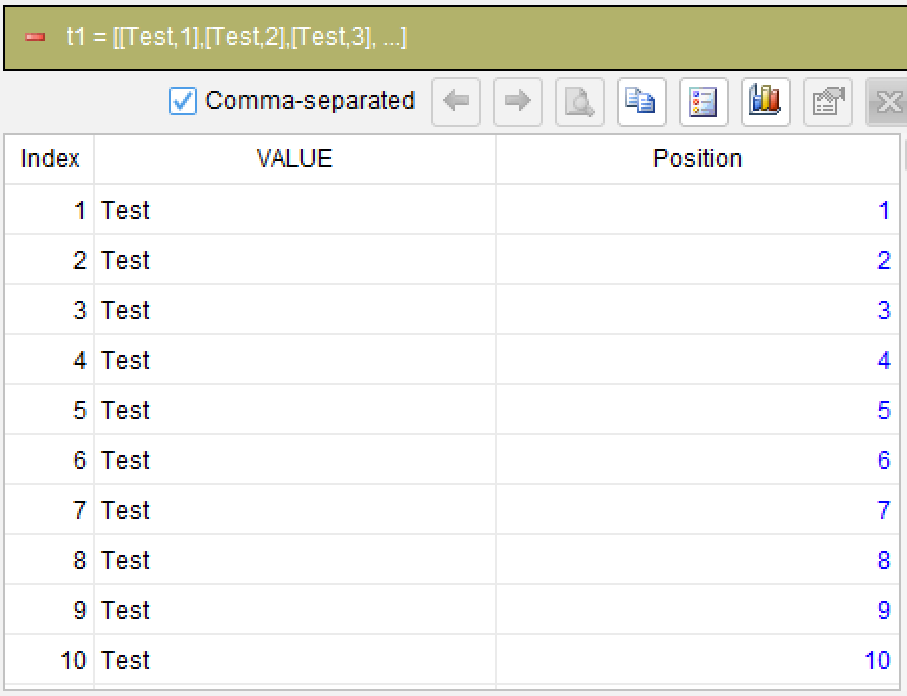
Step 1: Expand rows by max string length
expand 50 as Position
Expand each string into 50 rows, with Position ranging 1~50. This is a preprocessing step for strings, enabling subsequent per-character computation. Since the maximum string length is 50, expand 50 covers all character positions.
Step 2: Extract character at each position
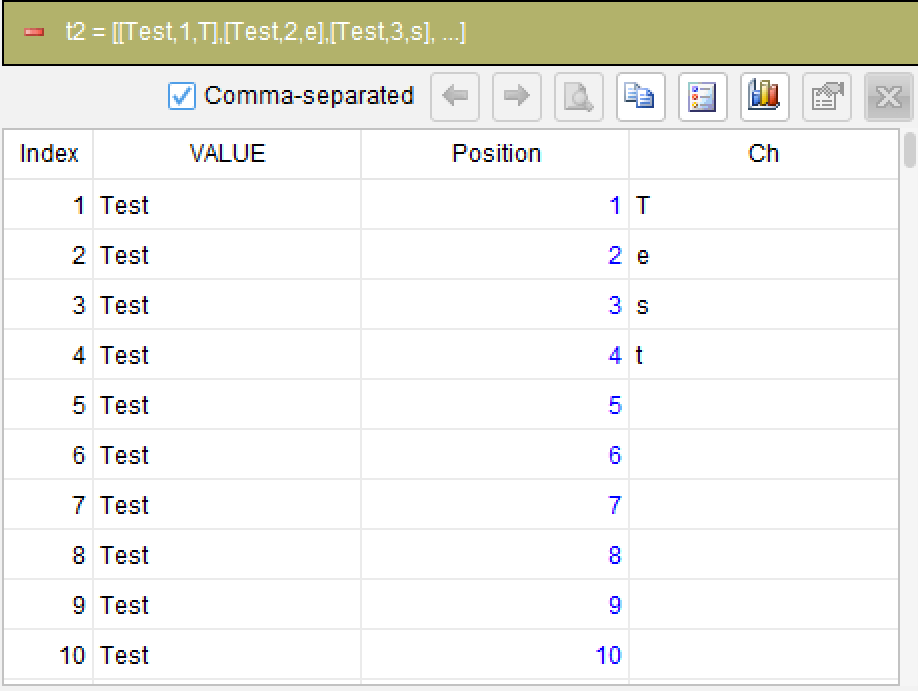
compute mid(VALUE, Position, 1) as Ch
Use the mid function to extract 1 character at Position from VALUE, named Ch. For positions beyond the actual string length, mid returns empty.
Step 3: Filter out non-letter characters
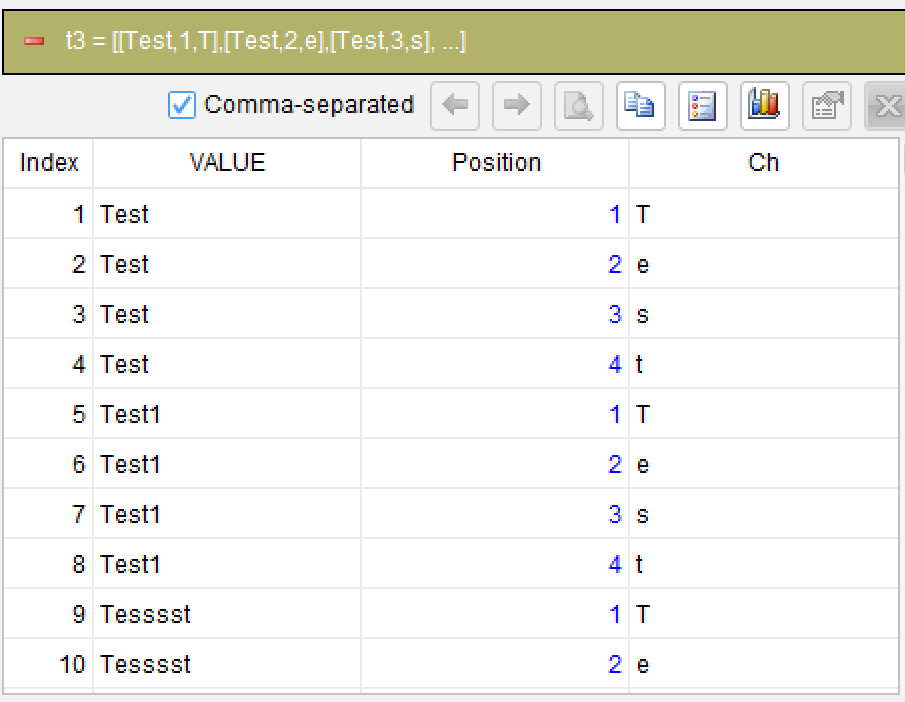
filter (Ch isalpha)
Use the isalpha function to keep only letters (A-Z, a-z), removing empty characters, digits, and symbols.
Step 4: Detect ascending breaks (core)
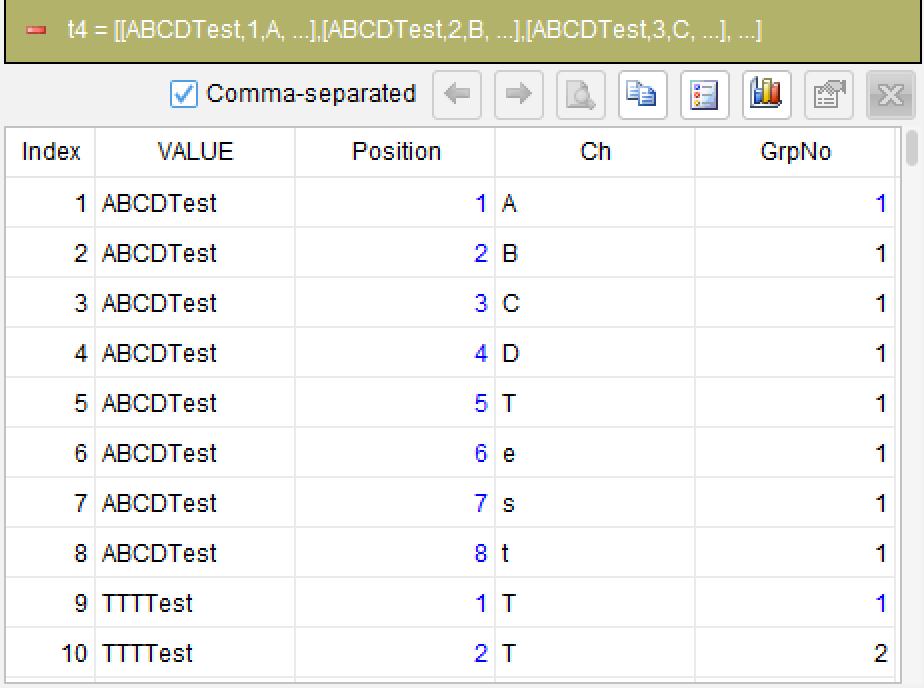
segment Ch; not_up; partition VALUE; as GrpNo
This is the most critical step. The segment statement partitions by VALUE and checks the Ch sequence within each partition: not_up specifies the non-ascending condition - when the current character (ASCII value) is less than or equal to the previous one, a segment break is triggered. Each time the ascending order breaks, a new group starts, generating group number GrpNo. Consecutively ascending letters are assigned to the same group.
Step 5: Count characters per group
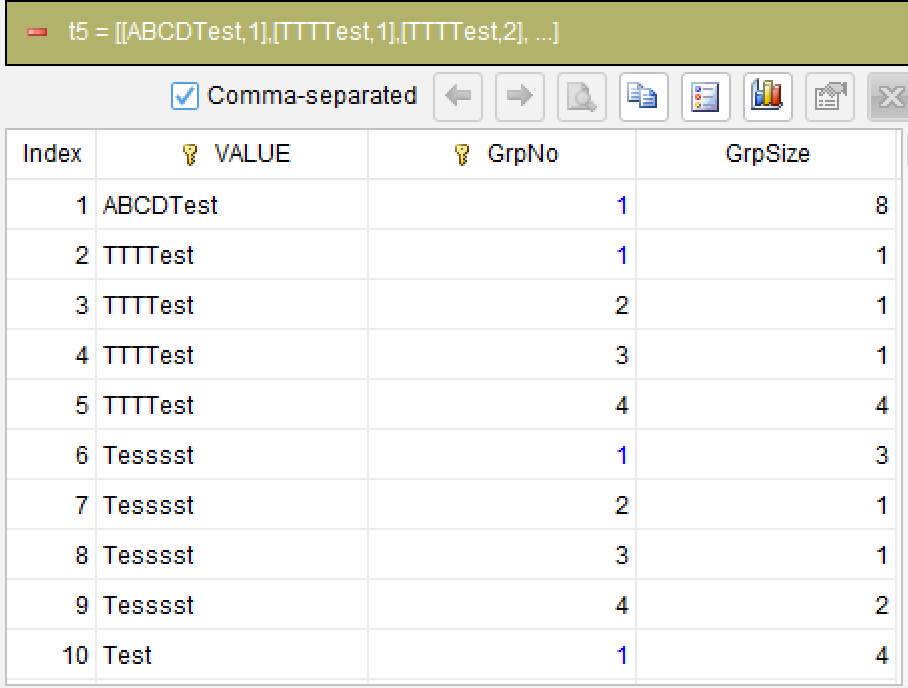
summarize Ch count as GrpSize; group VALUE, GrpNo
Group by VALUE and GrpNo, count the number of letters in each group as GrpSize.
Step 6: Get max group length per string
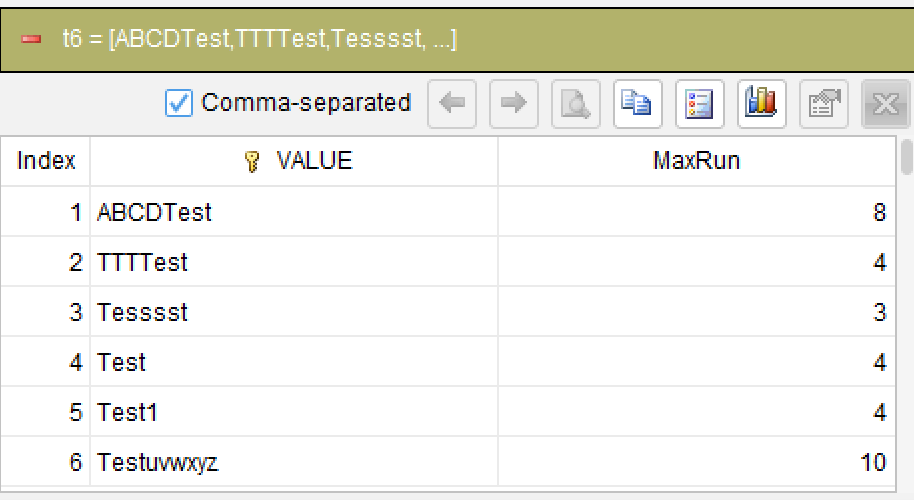
summarize GrpSize max as MaxRun; group VALUE
Group by VALUE, take the maximum GrpSize to get the longest consecutive ascending segment length MaxRun for each string.
Step 7: Filter strings with length >= 5
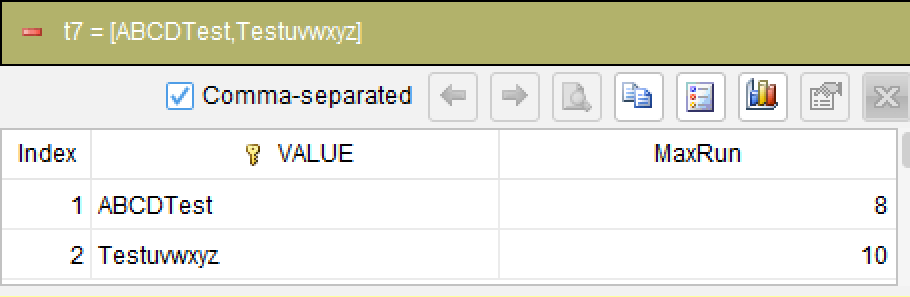
filter (MaxRun >= 5)
Keep rows where MaxRun >= 5.
Step 8: Keep final result columns
Generated SQL
After confirming the above steps, the SQLazy compiler automatically generates native SQL (Oracle syntax):
WITH TEMP_TABLE__2 AS (
    SELECT 1 AS col_1 FROM DUAL
    UNION ALL SELECT col_1 + 1 FROM TEMP_TABLE__2 WHERE col_1 < 50
), t1 AS (
    SELECT table_name.VALUE, col_1
    FROM table_name CROSS JOIN TEMP_TABLE__2
), t2 AS (
    SELECT VALUE, Position, SUBSTR(VALUE, Position, 1) AS Ch FROM t1
), t3 AS (
    SELECT VALUE, Position, Ch FROM t2 WHERE REGEXP_LIKE(Ch, '^[A-Za-z]+$')
), t5 AS (
    SELECT VALUE, GrpNo, COUNT(Ch) AS GrpSize
    FROM (
        SELECT VALUE, Position, Ch,
            SUM(CASE WHEN Ch <= col__5 THEN 1 ELSE 0 END)
                OVER (PARTITION BY VALUE ORDER BY VALUE
                ROWS UNBOUNDED PRECEDING) + 1 AS GrpNo
        FROM (SELECT t3.*, LAG(Ch,1)
            OVER (PARTITION BY VALUE ORDER BY VALUE) AS col__5 FROM t3) sub
    ) t4 GROUP BY VALUE, GrpNo
), t6 AS (
    SELECT VALUE, MAX(GrpSize) AS MaxRun
    FROM t5 GROUP BY VALUE
)
SELECT VALUE FROM t6 WHERE MaxRun >= 5
SQLazy lets you describe logic in business language instead of writing nested queries in SQL syntax. In this example of finding consecutive alphabetical letters, SQLazy uses 8 steps to clearly describe the entire flow from character expansion to segment aggregation. The segment not_up condition directly expresses the semantics of starting a new group when alphabetical order breaks, simplifying what would otherwise require recursive CTE + LAG + SUM window functions into a single readable declaration. The expand row expansion combined with per-character computation makes string processing as intuitive as table row operations; the step-by-step computation model ensures every step from character extraction to grouping and filtering is traceable and debuggable.
Official Links
SQLazy Online Experience: sqlazy.com (free, no registration required)
SQLazy Repository: github.com/SPLWare/SQLazy
SPL Official Website 👉 https://www.esproc.com
SPL Feedback and Help 👉 https://www.reddit.com/r/esProcSPL
SPL Learning Material 👉 https://c.esproc.com
SPL Source Code and Package 👉 https://github.com/SPLWare/esProc
Discord 👉 https://discord.gg/sxd59A8F2W
Youtube 👉 https://www.youtube.com/@esProc_SPL


Chinese Version: https://c.raqsoft.com.cn/article/1785464625134