

I Break Down a 100-Line SQL Script That No One Dares to Touch into 7 Steps
I bet every data team’s repository has one or two pieces of “ancient SQL” that nobody wants to touch – over a hundred lines long, with N layers of nested CTEs and window functions stacked on top of window functions. Whoever wrote them left the company long ago, and the comments are practically nonexistent. No one dares change it, and no one can fully make sense of it either. Whenever the business requirements change even slightly, the next person who takes over has to spend two hours just figuring out what each layer of subquery does, then another one hour making the change and debugging it, all the while never knowing whether touching a single line might bring the whole chain of logic crashing down.
At four p.m. on Friday, your product manager @mentioned you in the work chat: “We need to confirm the online feature that calculates the daily cumulative count of distinct products. Can we get it live today?”
You open the SQL – more precisely, the piece of legacy SQL a former coworker left behind six months ago.
The business scenario: Daily cumulative distinct count
The requirement itself sounds simple. The table below records the products purchased by each account each day:
Date |
ACCOUNT |
NAME |
2024-01-01 |
A |
XOXO |
2024-01-02 |
A |
XOXO |
2024-01-02 |
A |
OXXO |
2024-01-04 |
A |
XOOX |
2024-01-05 |
A |
OOXO |
2024-01-06 |
A |
XOXO |
2024-01-01 |
B |
B11 |
2024-01-02 |
B |
B21 |
2024-01-02 |
B |
B21 |
2024-01-02 |
B |
B22 |
2024-01-02 |
B |
B11 |
2024-01-03 |
B |
B31 |
2024-01-01 |
C |
C1 |
2024-01-02 |
C |
C1 |
2024-01-03 |
C |
C1 |
The expected result is this: for each account, the number of distinct products purchased before each day (excluding that day).
Date |
ACCOUNT |
COUNT_DISTINCT_NAME |
2024-01-01 |
A |
Null |
2024-01-02 |
A |
1 |
2024-01-04 |
A |
2 |
2024-01-05 |
A |
3 |
2024-01-06 |
A |
4 |
2024-01-01 is the first day. Since there are no purchase records before this date, so the cumulative distinct count is NULL. On 2024-01-02, account A had purchased one product, XOXO, on 2024-01-01, so the cumulative distinct count is 1. By 2024-01-04, the purchases from the previous two days included two distinct products, XOXO and OXXO, so the cumulative distinct count is 2; and so on.
Group the data by account, sort it by date, process each day in sequence, take the period from the first day up to the previous day, and calculate the distinct count over that period. The logic sounds straightforward, right?
SQL in the production environment
You open that SQL script, and this is what you see (the comments have already been stripped out, but all the logic remains):
WITH
cte_base AS (
    SELECT account, dt, name,
        1 AS dummy_const, 'N/A' AS dummy_text
    FROM orders WHERE 1 = 1
),
cte_with_row_num AS (
    SELECT account, dt, name,
        ROW_NUMBER() OVER (PARTITION BY account ORDER BY dt) AS row_num
    FROM cte_base
),
cte_with_lag AS (
    SELECT account, dt, name, row_num,
        LAG(name) OVER (PARTITION BY account ORDER BY dt) AS lag_name,
        LAG(dt) OVER (PARTITION BY account ORDER BY dt) AS lag_dt
    FROM cte_with_row_num
),
cte_self_join_distinct AS (
    SELECT a.account, a.dt, a.name,
        COUNT(DISTINCT b.name) AS self_join_distinct_count
    FROM cte_with_row_num a
    LEFT JOIN cte_with_row_num b
        ON a.account = b.account AND b.row_num < a.row_num
    GROUP BY a.account, a.dt, a.name, a.row_num
),
cte_with_window AS (
    SELECT account, dt, name, row_num,
        COUNT(DISTINCT name) OVER (
            PARTITION BY account
            ORDER BY dt
            ROWS BETWEEN UNBOUNDED PRECEDING AND 1 PRECEDING
        ) AS window_distinct_count
    FROM cte_with_row_num
),
cte_combined AS (
    SELECT w.account, w.dt, w.name, w.window_distinct_count,
        s.self_join_distinct_count,
        CASE WHEN w.window_distinct_count = s.self_join_distinct_count
             THEN 'MATCH' ELSE 'MISMATCH' END AS match_flag
    FROM cte_with_window w
    LEFT JOIN cte_self_join_distinct s
        ON w.account = s.account AND w.dt = s.dt AND w.name = s.name
),
cte_with_flag AS (
    SELECT account, dt, name,
        window_distinct_count,
        EXTRACT(YEAR FROM dt) AS dt_year,
        EXTRACT(MONTH FROM dt) AS dt_month,
        EXTRACT(DAY FROM dt) AS dt_day,
        ROW_NUMBER() OVER (PARTITION BY account, dt ORDER BY name) AS rn_per_day
    FROM cte_combined
),
cte_daily_agg AS (
    SELECT account, dt,
        MAX(window_distinct_count) AS daily_distinct_count,
        COUNT(DISTINCT name) AS daily_unique_names,
        COUNT(*) AS daily_total_rows
    FROM cte_with_flag
    GROUP BY account, dt
),
cte_with_previous AS (
    SELECT account, dt, daily_distinct_count,
        LAG(daily_distinct_count) OVER (PARTITION BY account ORDER BY dt) AS prev_day_count,
        LAG(dt) OVER (PARTITION BY account ORDER BY dt) AS prev_dt,
        (SELECT COUNT(DISTINCT dt) FROM cte_daily_agg b WHERE b.account = a.account) AS total_days
    FROM cte_daily_agg a
),
cte_final AS (
    SELECT account, dt,
        CASE WHEN daily_distinct_count = 0 THEN NULL ELSE daily_distinct_count END AS count_distinct_name,
        prev_day_count AS dummy_prev
    FROM cte_with_previous
    WHERE 1 = 1
    UNION ALL
    SELECT NULL, NULL, NULL, NULL WHERE 1 = 0
)
SELECT DISTINCT account, dt, count_distinct_name
FROM cte_final
WHERE account IS NOT NULL
ORDER BY account, dt;
You spend a full thirty minutes staring at the screen.
What is this CTE supposed to do? Why does cte_self_join_distinct use a self-join to calculate the distinct count? If window functions are already involved, why does it still combine two results and compare them using MATCH/MISMATCH? Why are the fields generated by EXTRACT(YEAR FROM dt) still there when the outermost query never uses them? And why are there an empty UNION ALL and a SELECT DISTINCT at the end?
In theory, window functions alone should not require such complex code. But this is what the SQL in production environment often ends up looking like. Maybe the requirements kept piling up over time: one person added a change, the next person took over and, afraid to remove the old logic, simply kept adding more code on top of it. Or maybe a temporary patch was added during an urgent fix and was never cleaned up afterward. The code accumulates layer by layer like tree rings, eventually bloating to nearly 100 lines.
The code runs. But no one dares touch a single line.
The problem with 100 lines of SQL is not the length – it’s that nobody dares to touch it
The problem with this piece of SQL is not that it is long. Long code itself is tolerable. The real problem is that changing it is riskier than rewriting it from scratch. Why?
First, you don’t know which parts of the code are still active.
In that cte_self_join_distinct CTE, cte_with_window had already calculated the same distinct count using window functions. So why is a self-join-based distinct still there? Is there some edge case that window functions cannot handle? Or did the person who wrote it simply forget to remove it? The fields generated by EXTRACT(YEAR FROM dt), EXTRACT(MONTH FROM dt), EXTRACT(DAY FROM dt), and ROW_NUMBER()OVER (PARTITION BY account), along with dt ORDER BY name) AS rn_per_day are never used in the outermost query. Why were they left there? You have no way of knowing.
Second, you don’t know what your changes might break.
The outermost cte_final contains an empty UNION ALL set, itself wrapped in a SELECT DISTINCT. You want to delete these obviously useless pieces. But what if they exist to preserve field types expected by some downstream dependency? What if one day a scheduled job happens to depend on the number of fields in this UNION ALL? You still have no way of knowing – and you dare not to find out.
Third, you can’t fix it step by step.
SQL is declarative. You cannot set a breakpoint halfway through the query to see what cte_self_join_distinct actually produces, nor can you pause after cte_with_window finishes executing to inspect its result. You can only run the entire SQL statement in one shot while praying that the result is correct. If an edge case is mishandled in cte_with_window, the problem will not surface until the outermost SELECT DISTINCT, and by then you have no idea which layer caused it.
Fourth, AI also cannot solve the problem.
Even if you ask AI to rewrite this piece of SQL, you first need to fully explain to it what the SQL actually does – and you just spent two hours trying to figure that out yourself, without success. You make the change, run the code, and get a wrong result. You don’t even know whether this comes from AI’s misinterpretation or your own inaccurate description. In the end, you have no choice but to return to square one: since the code runs, better to leave it alone.
A different approach: Breaking 100 lines down into 7 steps
SQLazy’s approach is to preserve the grouped subset within each subgroup, so that every step of operation retains its intermediate result for use in the subsequent steps.
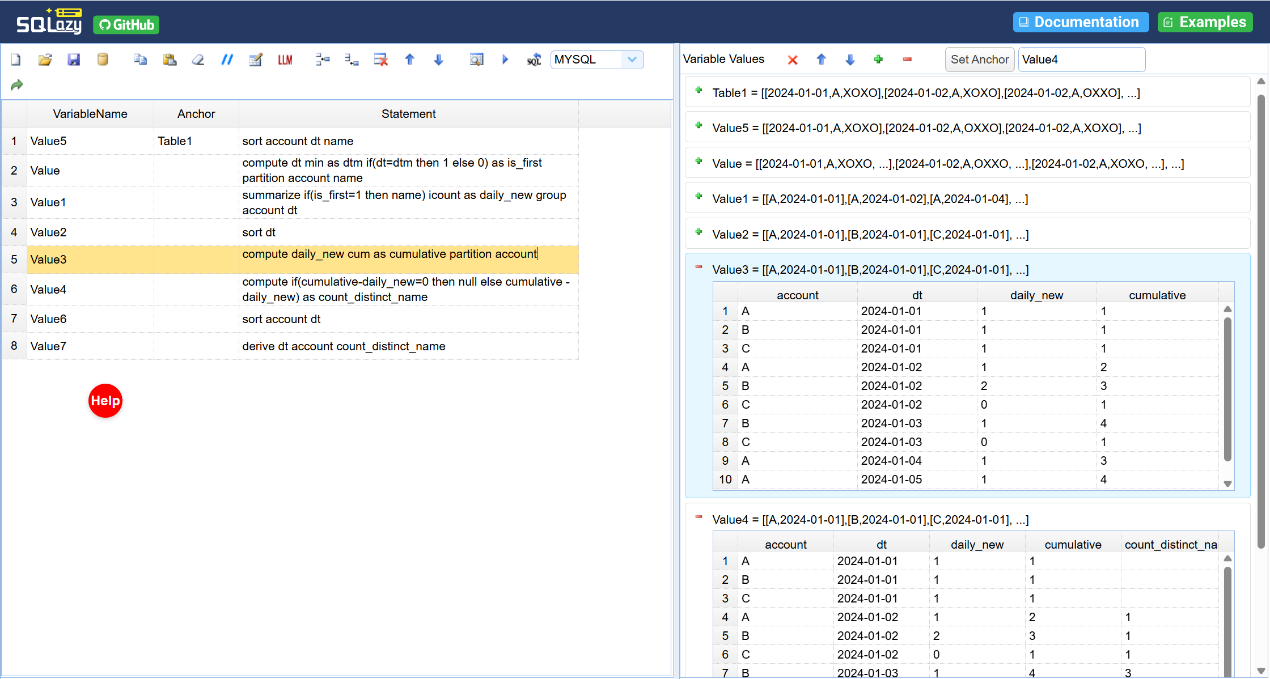
Group the data by account and then by date, process each group sequentially by retrieving all records from the beginning up to the previous date, and perform a distinct count. The following code is written using SQLazy’s workflow:
VariableName |
Anchor |
Statement |
Value5 |
Table1 |
sort account dt name |
Value |
compute dt min as dtm if(dt=dtm then 1 else 0) as is_first partition account name |
|
Value1 |
summarize if(is_first=1 then name) icount as daily_new group account dt |
|
Value2 |
sort dt |
|
Value3 |
compute daily_new cum as cumulative partition account |
|
Value4 |
compute if(cumulative-daily_new=0 then null else cumulative - daily_new) as count_distinct_name |
|
Value6 |
sort account dt |
|
Value7 |
derive dt account count_distinct_name |
This is not just about writing fewer lines of code; it is about adopting a different way of thinking.
Step 1: Sort data by account, date, and product name – the goal is to bring order to the data.
Step 2: For each product under each account, mark the date when it first appears. is_first=1 indicates that this is the first date on which the account purchased the product.
Step 3: Aggregate by account and date to calculate how many products appear for the first time each day – that is, the number of newly added distinct products on that date.
Step 4: Sort data by date – the goal is to prepare for the cumulative count.
Step 5: For each account, calculate the cumulative value of daily_new – that is, the cumulative number of distinct products purchased up to and including the current date.
Step 6: Calculate the final result – cumulative - daily_new returns the cumulative number of distinct products purchased before the current date. If the result is 0, set it to NULL.
Step 7: Format the output by retaining only the needed fields.
You can inspect the intermediate results at each step. Once step 3 is executed, you can instantly see how many new products are added each day. After step 5 is completed, you can instantly verify whether the cumulative count is correct. No need to wait until the outermost query finishes to discover that something went wrong.
The compiler’s guarantee: 100% accurate, auto-generated SQL
After the workflow is written, the compiler generates SQL in the target database’s dialect.
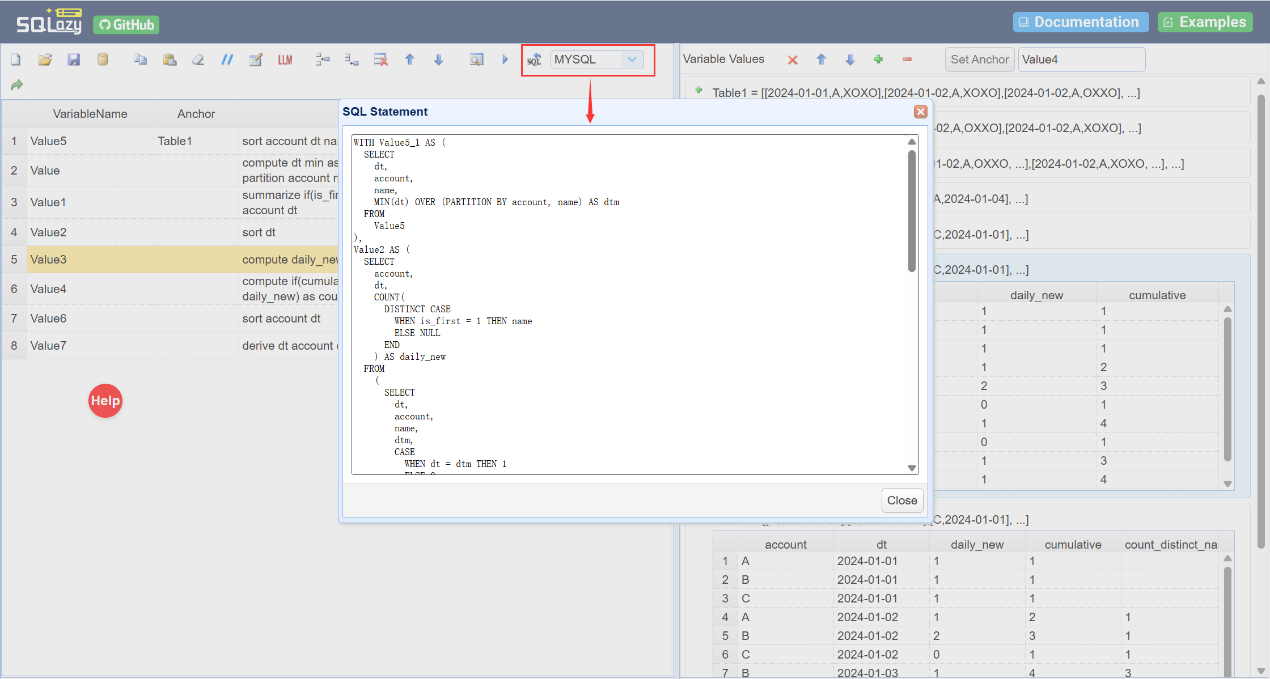
Six months later, the requirement changed: besides calculating the cumulative distinct count, you now need to divide daily new products into “old” and “new” – find how many had never appeared before and how many had appeared previously.
With the original 100-line SQL, you have no idea where to start. You don’t know which layer of CTE handles the split between “first appearances” from “repeated appearances”. The is_first flags may be buried in a CASE WHEN clause somewhere in the query, or this dimension may not exist at all. Either you rewrite the query from scratch, or you cram an additional aggregation into a CTE and pray it won’t break the downstream cumulative calculation.
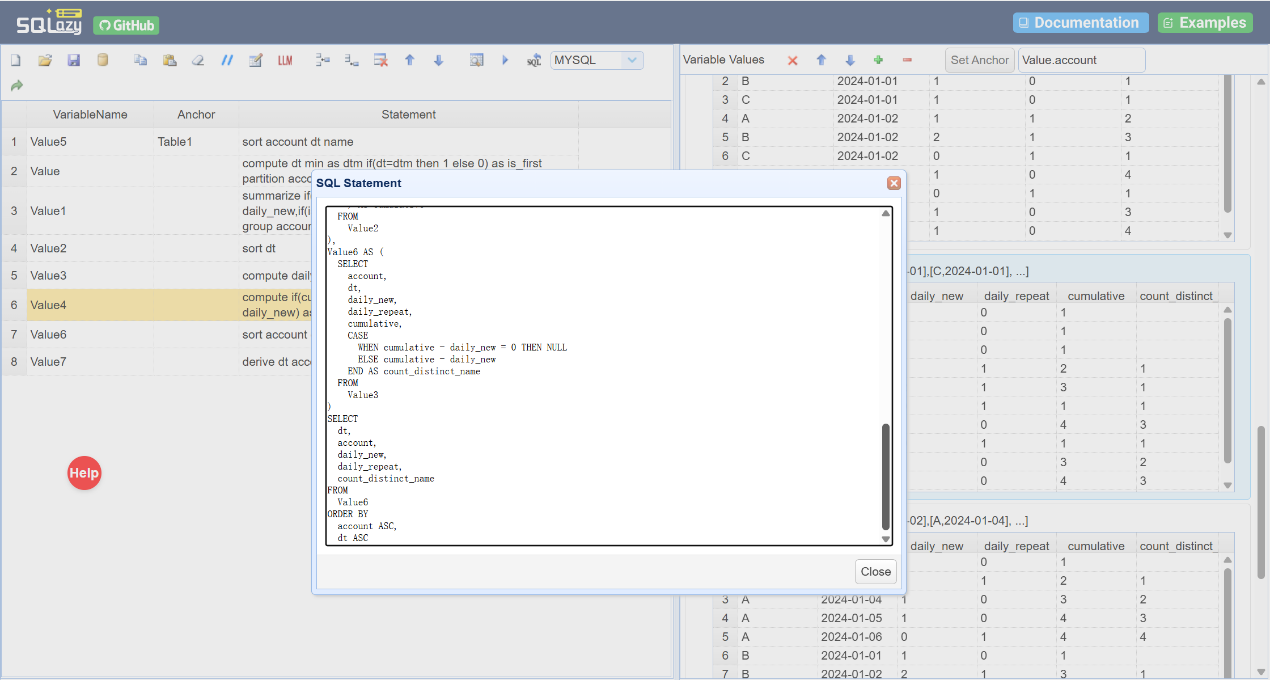
In the SQLazy workflow, modify two steps (only one is core):
The original step 3: summarize if(is_first=1 then name) icount as daily_new group account dt – calculate the daily number of first-time products.
The original step 7: derive dt account count_distinct_name – format the output.
Now, to distinguish “new” from “od” products, just add a count dimension in step 3:
Step 3: summarize if(is_first=1 then name) icount as daily_new,if(is_first=0 then name) icount as daily_repeat; group account dt
Then, output the needed fields in step 7: derive dt account, daily_new, daily_repeat, and count_distinct_name.
The core change is just one line – add a daily_repeat field in the summarize step. The compiler regenerates the SQL, and the new field automatically appears in the output. No other workflow steps need to be changed, because both daily_new and daily_repeat are grouped by the same dimensions, so the downstream cumulative logic remains naturally compatible.
Only one line needs to be changed. You don’t need to understand what every CTE layer in the 100-line SQL does, or worry that changing one part might affect another.
The compiler regenerates the SQL – 100% accurate and free from hallucinations.
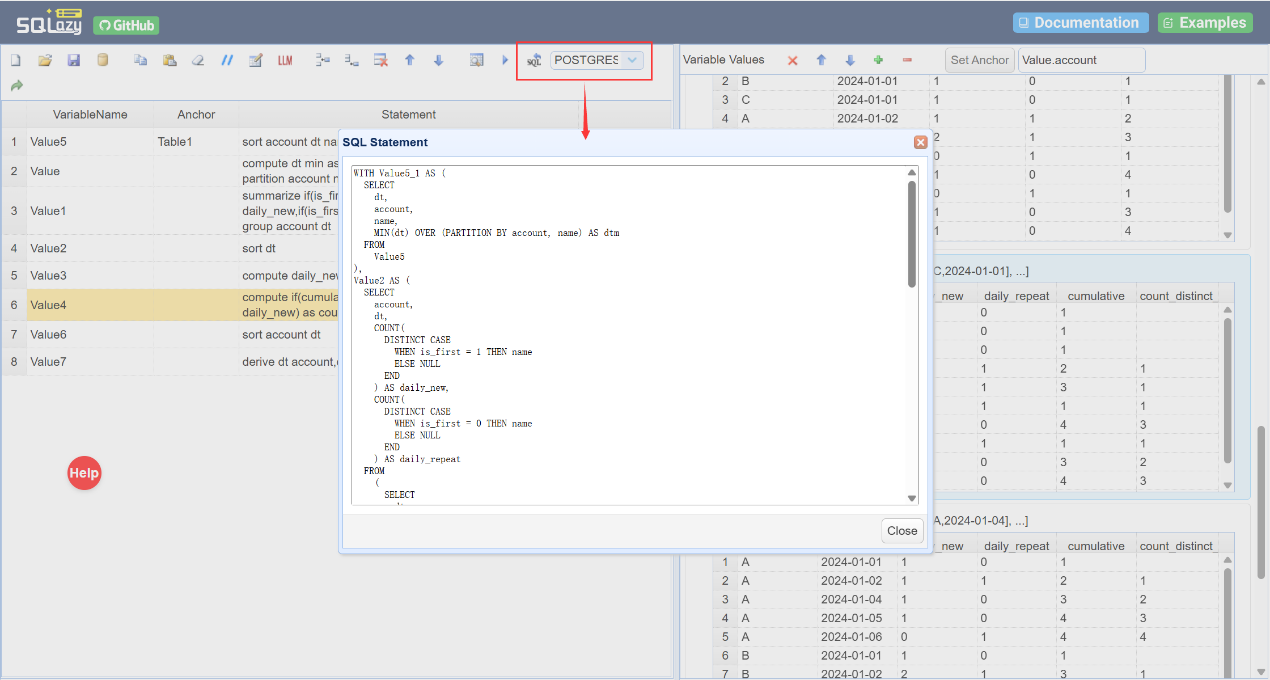
If the target database changes from MySQL to PostgreSQL, simply switch the database option. There is no need to modify the workflow; SQL automatically adapts to the target dialect.
LLM-assisted polish
In SQLazy’s workflow, the role of AI is redefined. In the traditional approach, AI is responsible for directly generating the final SQL from natural language – a highly challenging task with a high risk of hallucinations. In SQLazy, AI has only one responsibility: translating the user’s conversational step descriptions into standardized workflow syntax. The former is decision-making; the latter is translation. Even if the AI’s translation is off, you can spot it at a glance at the workflow level, and the cost of correction is almost zero.
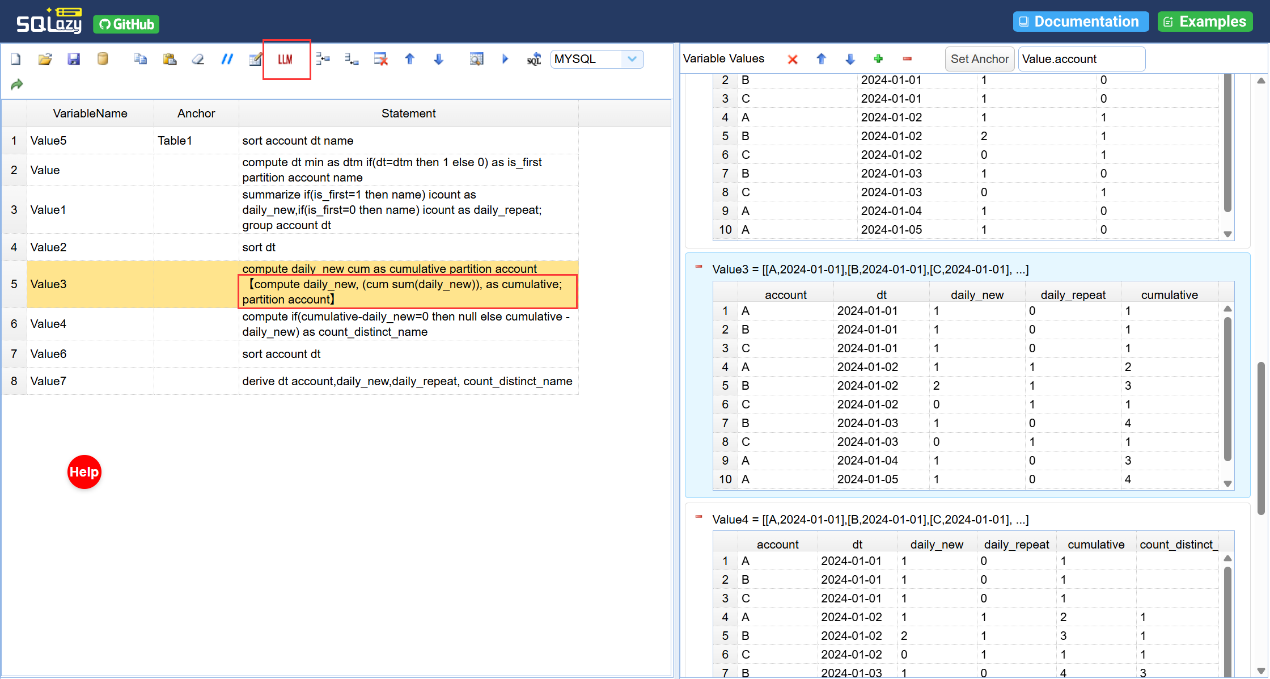
Translate natural language into SQLazy syntax using an LLM
That 100-line SQL was left behind by a former coworker. But honestly, even if you’d written it yourself, you might still struggle to understand it when you look back three months later. This isn’t a matter of coding standards. It’s a limitation of SQL itself as a language: better suited to machine execution than to human reading.
SQLazy does something simple: the logic you write for humans is the same code that gets compiled into SQL. Code as documentation – they are the same thing.
Combined with AI, this reveals the core logic behind SQLazy:
AI writes the logic. A compiler writes the SQL.
SPL Official Website 👉 https://www.esproc.com
SPL Feedback and Help 👉 https://www.reddit.com/r/esProcSPL
SPL Learning Material 👉 https://c.esproc.com
SPL Source Code and Package 👉 https://github.com/SPLWare/esProc
Discord 👉 https://discord.gg/sxd59A8F2W
Youtube 👉 https://www.youtube.com/@esProc_SPL


Chinese version