

SQLazy: Calculate Original Inventory by Working Backwards from a Given Date
Problem Description
An inventory plan table records planned inbound quantities QTY and post-inbound inventory CUSTQTY for specific dates. Given a target date (2024-02-26), the task is to work backwards from that date, subtracting each day's inbound quantity to calculate the original pre-inbound inventory UPDATED_CUSTQTY, until it reaches zero. Records after the target date are excluded.
Source Data
ITEM |
LOC |
NEEDDATE |
QTY |
CUSTQTY |
ABC |
XYZ |
2024-02-29 00:00:00 |
0.6 |
3 |
ABC |
XYZ |
2024-02-28 00:00:00 |
0.6 |
3 |
ABC |
XYZ |
2024-02-27 00:00:00 |
0.6 |
3 |
ABC |
XYZ |
2024-02-26 00:00:00 |
0.6 |
3 |
ABC |
XYZ |
2024-02-23 00:00:00 |
0.6 |
3 |
ABC |
XYZ |
2024-02-22 00:00:00 |
0.6 |
3 |
ABC |
XYZ |
2024-02-21 00:00:00 |
0.6 |
3 |
ABC |
XYZ |
2024-02-20 00:00:00 |
0.6 |
3 |
ABC |
XYZ |
2024-02-19 00:00:00 |
0.6 |
3 |
ABC |
XYZ |
2024-02-16 00:00:00 |
0.6 |
3 |
ABC |
XYZ |
2024-02-15 00:00:00 |
0.6 |
3 |
ABC |
XYZ |
2024-02-14 00:00:00 |
0.6 |
3 |
ABC |
XYZ |
2024-02-13 00:00:00 |
4.8 |
3 |
Expected Result
ITEM |
LOC |
NEEDDATE |
QTY |
CUSTQTY |
UPDATED_CUSTQTY |
ABC |
XYZ |
2024-02-29 00:00:00 |
0.6 |
3 |
|
ABC |
XYZ |
2024-02-28 00:00:00 |
0.6 |
3 |
|
ABC |
XYZ |
2024-02-27 00:00:00 |
0.6 |
3 |
|
ABC |
XYZ |
2024-02-26 00:00:00 |
0.6 |
3 |
2.4 |
ABC |
XYZ |
2024-02-23 00:00:00 |
0.6 |
3 |
1.8 |
ABC |
XYZ |
2024-02-22 00:00:00 |
0.6 |
3 |
1.2 |
ABC |
XYZ |
2024-02-21 00:00:00 |
0.6 |
3 |
0.6 |
ABC |
XYZ |
2024-02-20 00:00:00 |
0.6 |
3 |
0.0 |
ABC |
XYZ |
2024-02-19 00:00:00 |
0.6 |
3 |
|
ABC |
XYZ |
2024-02-16 00:00:00 |
0.6 |
3 |
|
ABC |
XYZ |
2024-02-15 00:00:00 |
0.6 |
3 |
|
ABC |
XYZ |
2024-02-14 00:00:00 |
0.6 |
3 |
|
ABC |
XYZ |
2024-02-13 00:00:00 |
4.8 |
3 |
Using item ABC at location XYZ as an example:
On target date 2024-02-26, pre-inbound inventory = CUSTQTY - QTY = 3 - 0.6 = 2.4. Working backwards: each prior day subtracts that day's inbound quantity of 0.6 (2.4 - 0.6 = 1.8, then 1.2, 0.6), until inventory reaches zero (0.0) on 2024-02-20.
SQLazy Step-by-Step Implementation
Core idea: Sort by date descending. Starting from the target date, use compute's conditional accumulation to work backwards: the target date gets a base value (CUSTQTY - QTY), each prior day subtracts QTY, later dates are ignored. The accumulated result is the original inventory for each day, stopping at zero.
Name |
Anchor |
Statement |
warehouse |
sort ITEM, LOC, NEEDDATE desc |
|
t1 |
warehouse |
compute if(NEEDDATE > datetime("2024-02-26 00:00:00") then 0, NEEDDATE = datetime("2024-02-26 00:00:00") then CUSTQTY - QTY; else -QTY) cum as cum_val |
t2 |
t1 |
derive append if(round(cum_val, 2) >= 0 and NEEDDATE <= datetime("2024-02-26 00:00:00") then round(cum_val, 1) else null) as UPDATED_CUSTQTY; delete cum_val |
[Click to run this example online]
The steps are explained below.
Step 1: Sort by item, location in descending date order
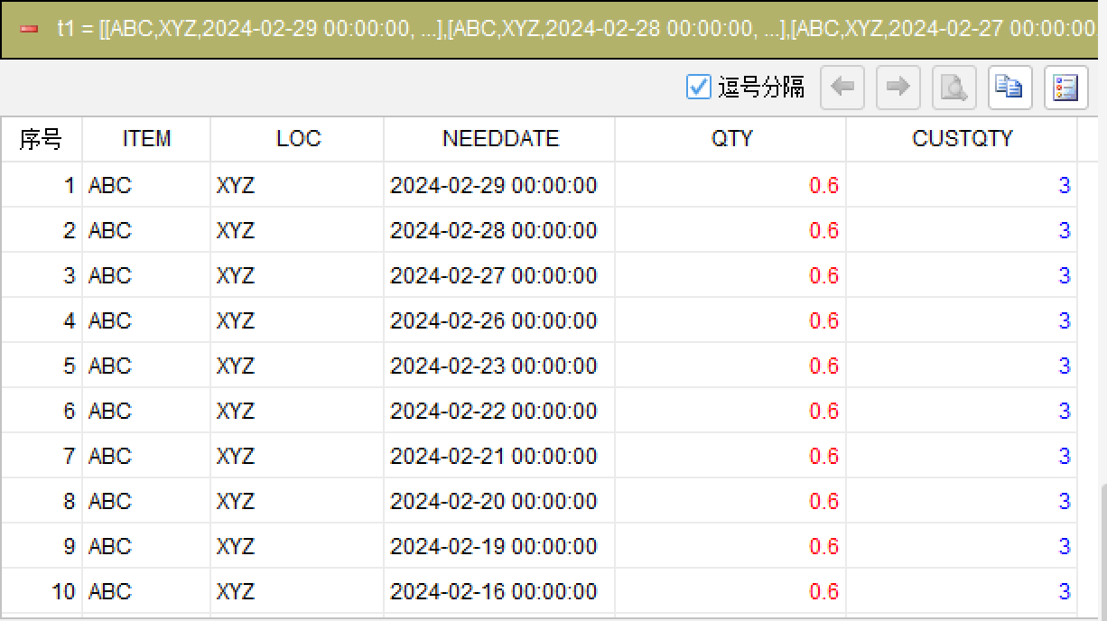
sort ITEM, LOC, NEEDDATE desc
Sort the data by ITEM, LOC, and within each group sort NEEDDATE in descending order, ensuring the same item is processed from newest to oldest, enabling backward accumulation from the target date.
Step 2: Calculate cumulative inventory with conditional expressions (core)
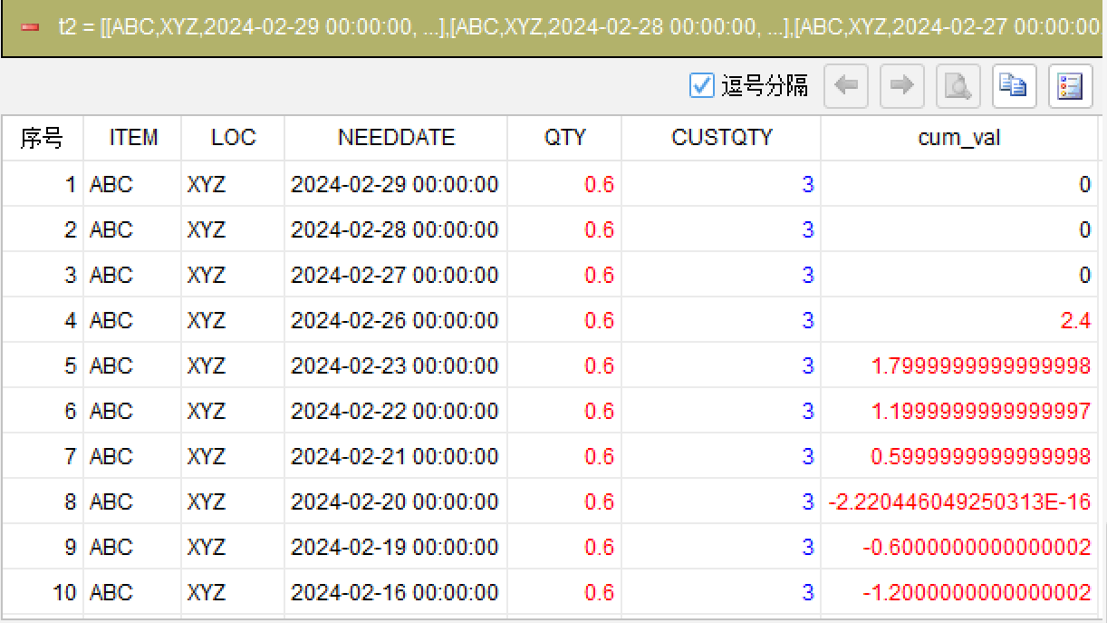
compute if(NEEDDATE > datetime("2024-02-26 00:00:00") then 0, NEEDDATE = datetime("2024-02-26 00:00:00") then CUSTQTY - QTY; else -QTY) cum as cum_val
This is the core step. compute's if expression has three branches: 1. Records after the target date: cumulative value set to 0 (excluded); 2. Records on the target date: cumulative value = CUSTQTY - QTY (that day's original inventory); 3. Records before the target date: subtract each day's inbound quantity (-QTY). compute accumulates row by row from top to bottom — cum_val is the working inventory. Without a partition clause, it accumulates across the entire dataset, which is exactly what we need.
Step 3: Generate the target column
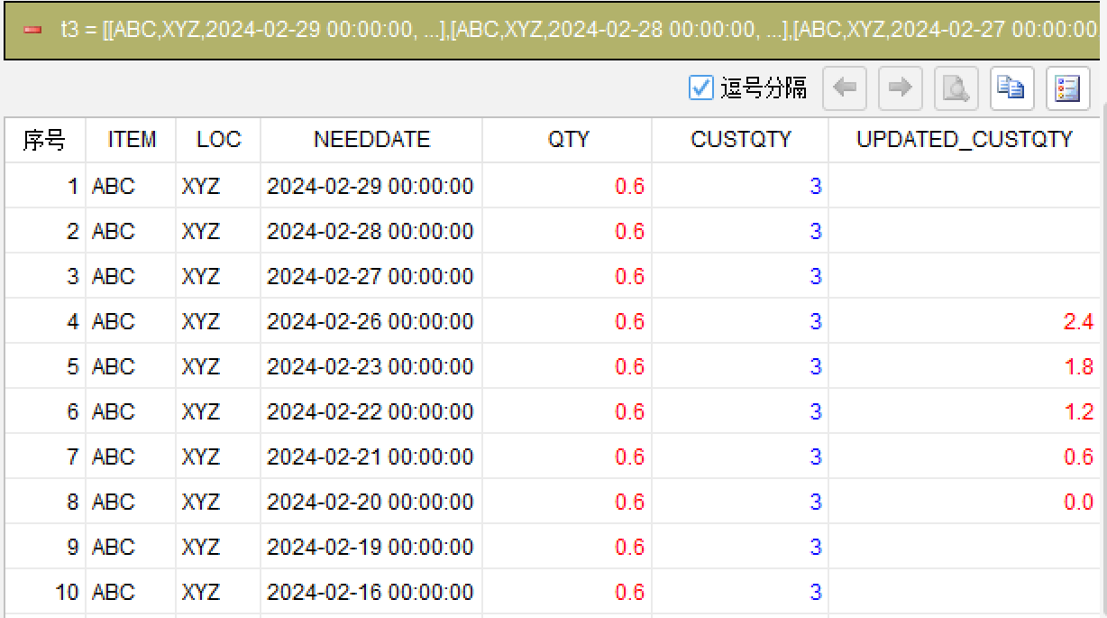
derive append if(round(cum_val, 2) >= 0 and NEEDDATE <= datetime("2024-02-26 00:00:00") then round(cum_val, 1) else null) as UPDATED_CUSTQTY; delete cum_val
Use derive append to add UPDATED_CUSTQTY: output original inventory (non-negative) for the target date and prior dates, and null otherwise. round(cum_val, 2) >= 0 checks whether inventory is zero or positive (negative values excluded). Finally, use delete to remove the auxiliary column cum_val.
Generated SQL
After confirming the above steps, the SQLazy compiler automatically generates native SQL (Oracle syntax):
WITH t2 AS (
    SELECT ITEM, LOC, NEEDDATE, QTY, CUSTQTY
        , SUM(CASE
            WHEN NEEDDATE > TO_TIMESTAMP("2024-02-26 00:00:00", "YYYY-MM-DD HH24:MI:SS") THEN 0
            WHEN NEEDDATE = TO_TIMESTAMP("2024-02-26 00:00:00", "YYYY-MM-DD HH24:MI:SS") THEN CUSTQTY - QTY
            ELSE -QTY
        END) OVER (ORDER BY ITEM ASC NULLS FIRST, LOC ASC NULLS FIRST, NEEDDATE DESC ROWS UNBOUNDED PRECEDING) AS cum_val
    FROM warehouse
)
SELECT ITEM, LOC, NEEDDATE, QTY, CUSTQTY
    , CASE
        WHEN round(cum_val, 2) >= 0
            AND NEEDDATE <= TO_TIMESTAMP("2024-02-26 00:00:00", "YYYY-MM-DD HH24:MI:SS")
        THEN round(cum_val, 2)
        ELSE NULL
    END AS UPDATED_CUSTQTY
FROM t2
ORDER BY ITEM ASC NULLS FIRST, LOC ASC NULLS FIRST, NEEDDATE DESC
SQLazy lets you describe logic in business language instead of writing nested SQL queries. In this example, the core is compute's three-branch conditional accumulation, directly expressing the business rule as an if expression and letting compute handle row-by-row accumulation automatically. Writing the same logic in SQL requires SUM() OVER with CASE WHEN and ROWS UNBOUNDED PRECEDING — one mistake and the result is wrong. SQLazy's step-by-step computation lets each step independently verify intermediate results, reducing errors in complex logic.
Official Links
SQLazy Online Experience: sqlazy.com (free, no registration required)
SQLazy Repository: github.com/SPLWare/SQLazy
SPL Official Website 👉 https://www.esproc.com
SPL Feedback and Help 👉 https://www.reddit.com/r/esProcSPL
SPL Learning Material 👉 https://c.esproc.com
SPL Source Code and Package 👉 https://github.com/SPLWare/esProc
Discord 👉 https://discord.gg/sxd59A8F2W
Youtube 👉 https://www.youtube.com/@esProc_SPL


Chinese Version:https://c.raqsoft.com.cn/article/1784687529128