

SQLazy: Fill Field Values by Sequence Across Sub-Groups
Problem Description
A table contains Group1 and Group2 as grouping fields, LineID as the sequence number within each group, and TargetField as the target field to fill. After sorting by Group1, Group2, and LineID, within the same Group1, each Group2 has the same number of records; only the last Group2 has TargetField values, while the others are empty. The goal is to copy the values from the last sub-group within each big group to fill the same-row positions of other sub-groups.
Source Data
Group1 |
Group2 |
LineID |
TargetField |
1 |
1 |
5 |
|
1 |
1 |
6 |
|
1 |
2 |
3 |
|
1 |
2 |
4 |
|
1 |
3 |
1 |
1 |
1 |
3 |
2 |
2 |
2 |
4 |
11 |
|
2 |
4 |
12 |
|
2 |
4 |
13 |
|
2 |
5 |
16 |
5 |
2 |
5 |
17 |
3 |
2 |
5 |
18 |
4 |
Expected Result
Group1 |
Group2 |
LineID |
TargetField |
1 |
1 |
5 |
1 |
1 |
1 |
6 |
2 |
1 |
2 |
3 |
1 |
1 |
2 |
4 |
2 |
1 |
3 |
1 |
1 |
1 |
3 |
2 |
2 |
2 |
4 |
11 |
5 |
2 |
4 |
12 |
3 |
2 |
4 |
13 |
4 |
2 |
5 |
16 |
5 |
2 |
5 |
17 |
3 |
2 |
5 |
18 |
4 |
Group1=2 has 2 sub-groups (Group2=4,5), each with 3 records. The last sub-group Group2=5 has TargetField [5,3,4]; these values are copied to the other sub-group Group2=4.
SQLazy Step-by-Step Implementation
Core idea: First use rank to generate row numbers rn within each (Group1, Group2), then leverage the fact that only the last sub-group has values. Use compute to summarize TargetField by (Group1, rn). Each (Group1, rn) group has only one non-null row, so sum returns that value, naturally copying the last sub-group's values to the same-row positions of other sub-groups.
Name |
Anchor |
Statement |
t1 |
lines |
sort Group1, Group2, LineID |
t2 |
rank as rn; partition Group1, Group2 |
|
t3 |
compute TargetField sum as tempTarget; partition Group1, rn |
|
derive Group1, Group2, LineID, tempTarget as TargetField |
[Click to run this example online]
The steps are explained below.
Step 1: Sort by grouping fields and sequence
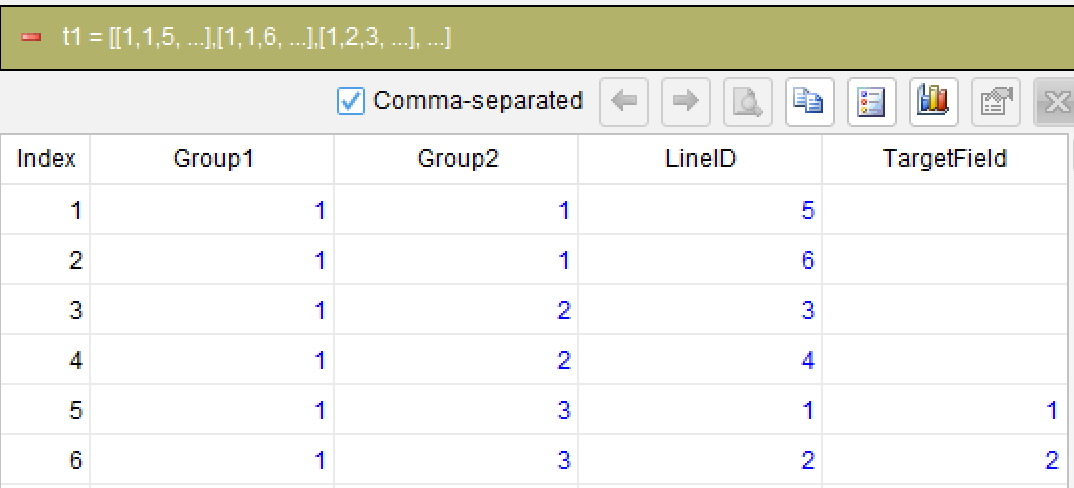
sort Group1, Group2, LineID
Sort the data by Group1, Group2, LineID in ascending order to ensure records within each big group are processed in sub-group and row number order.
Step 2: Generate row numbers within each sub-group
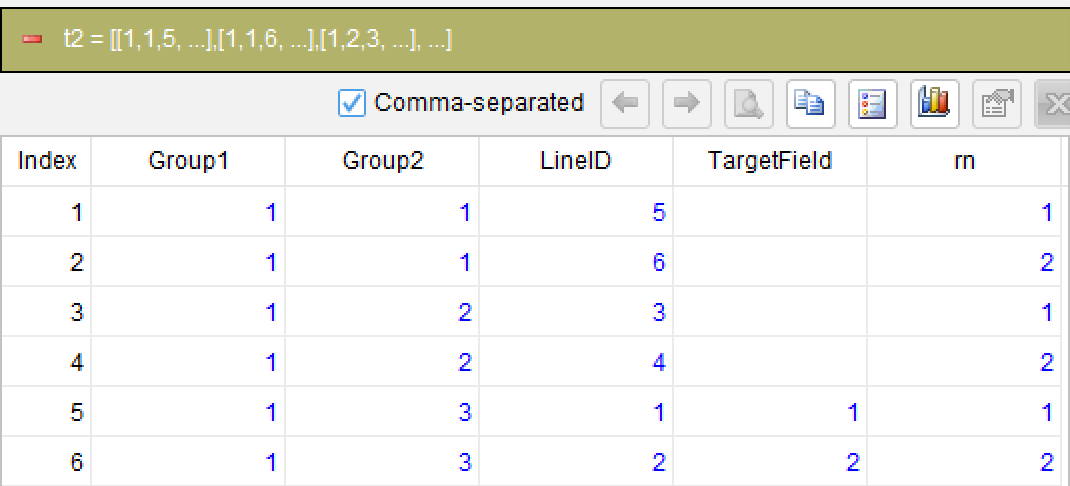
rank as rn; partition Group1, Group2
Use rank within each (Group1, Group2) partition to generate row numbers rn. Since each sub-group has the same number of records, within the same big group, rn=1 rows come from each sub-group's first record, rn=2 from the second, and so on.
Step 3: Aggregate by row number to fill values (core)
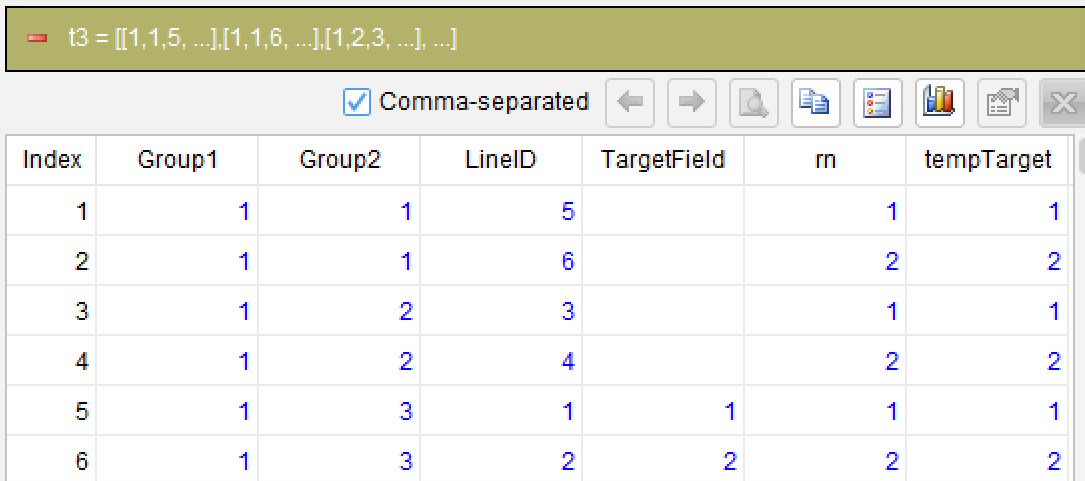
compute TargetField sum as tempTarget; partition Group1, rn
This is the core step. Group by (Group1, rn) and use sum to aggregate TargetField. Since only the last sub-group has non-null TargetField values (others are NULL), sum ignores NULL. Each (Group1, rn) group has only one valid value, so sum returns that value, naturally copying the last sub-group's values to the same-row positions of other sub-groups.
Step 4: Select the final result columns
derive Group1, Group2, LineID, tempTarget as TargetField
Generated SQL
After confirming the above steps, the SQLazy compiler automatically generates native SQL (PostgreSQL syntax):
WITH t1 AS (
  SELECT Group1, Group2, LineID, TargetField
  FROM lines
),
sub__6 AS (
  SELECT
    sub__5.*,
    RANK() OVER (PARTITION BY Group1, Group2 ORDER BY Group1, Group2, LineID) AS rn
  FROM t1 sub__5
),
t3 AS (
  SELECT
    Group1, Group2, LineID, TargetField, rn,
    SUM(TargetField) OVER (PARTITION BY Group1, rn) AS tempTarget
  FROM sub__6
)
SELECT Group1, Group2, LineID, tempTarget AS TargetField
FROM t3
SQLazy lets you describe logic in business language instead of writing nested SQL queries.
The solution process is divided into 4 steps, each of which can independently verify intermediate results, reducing the probability of errors in complex logic. SQLazy's rank function generates row numbers directly within partitions, more concise than SQL's RANK() OVER. The compute function combined with sum naturally aggregates unique non-null values from the same row position across sub-groups, replacing explicit cross-row references.
Official Links
SQLazy Online Experience:sqlazy.com(free, no registration required)
SQLazy Repository:github.com/SPLWare/SQLazy
SPL Official Website 👉 https://www.esproc.com
SPL Feedback and Help 👉 https://www.reddit.com/r/esProcSPL
SPL Learning Material 👉 https://c.esproc.com
SPL Source Code and Package 👉 https://github.com/SPLWare/esProc
Discord 👉 https://discord.gg/sxd59A8F2W
Youtube 👉 https://www.youtube.com/@esProc_SPL


Chinese Version:https://c.raqsoft.com.cn/article/1784286598944