

SQLazy: Identify Whether Differences Within Groups Come from Brand or Type Problem Description
The ID field of table tbl represents car categories, with each category further divided into Brand and Type. The task is to group by ID and determine the source of differences within each group: if a group has multiple brands, Difference is "Brand"; if a group has multiple types, Difference is "Type". The same ID may produce multiple records.
Source Data
ID |
Brand |
Type |
1 |
Honda |
Coupe |
1 |
Jeep |
SUV |
2 |
Ford |
Sedan |
2 |
Ford |
Crossover |
Expected Result
ID |
Difference |
1 |
Brand |
1 |
Type |
2 |
Type |
ID=1 has both Honda and Jeep as brands, as well as Coupe and SUV as types, so Difference produces both Brand and Type.
ID=2 only has Ford as a brand, but has Sedan and Crossover as types, so only Type is produced.
SQLazy Step-by-Step Implementation
Core idea: First use summarize to group by ID and count distinct brands (cntBrand) and types (cntType), then use expand to cross-join the results with the dimensions ("Brand" and "Type"), and finally use filter to keep only the rows that satisfy the conditions.
Name |
Anchor |
Statement |
t1 |
tbl |
summarize Brand icount as cntBrand, Type icount as cntType; group ID |
t2 |
expand ["Brand","Type"] as Difference |
|
t3 |
filter (if ((Difference = "Brand") then cntBrand>1; (Difference = "Type") then cntType>1)) |
|
derive ID, Difference |
[Click to run this example online]
The steps are explained below.
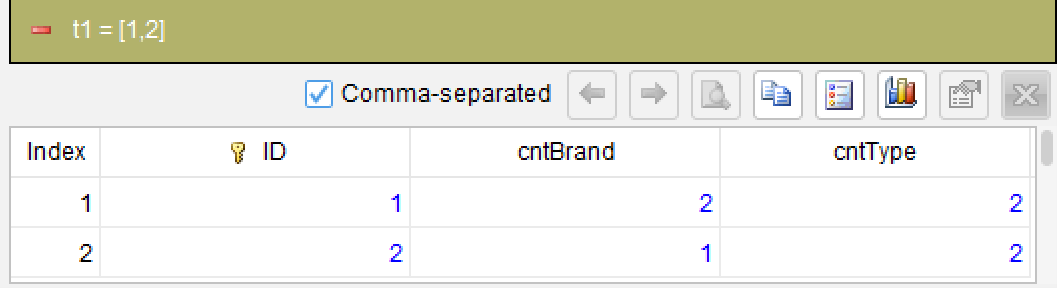
Step 1: Group by ID and count distinct brands and types
summarize Brand icount as cntBrand, Type icount as cntType; group ID
Use summarize to group by ID. The icount function counts distinct Brand and Type values within each group, recorded as cntBrand and cntType respectively. This step compresses each row of detail data into one row per ID, containing distinct counts.
Step 2: Expand the dimension list into rows
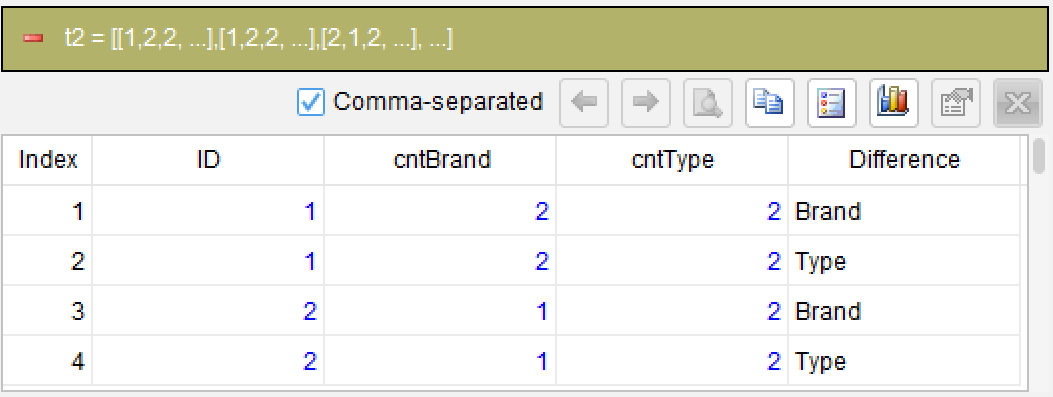
expand ["Brand","Type"] as Difference
The expand function unfolds the constant list ["Brand","Type"] into rows, cross-joining with each upstream row to generate the new column Difference. Each ID gets two rows: Difference="Brand" and Difference="Type", while retaining cntBrand and cntType fields.
Step 3: Filter dimensions that meet the conditions
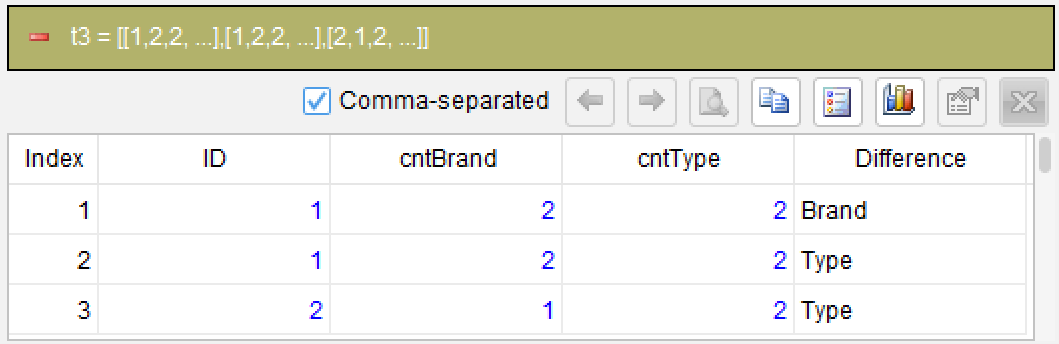
filter (if ((Difference = "Brand") then cntBrand>1; (Difference = "Type") then cntType>1))
Use filter with conditional branching syntax: for rows where Difference="Brand", check cntBrand>1; for rows where Difference="Type", check cntType>1. Only rows with counts greater than 1 are kept. A single filter statement expresses different conditions for different branches, much more intuitive than SQL's nested CASE WHEN.
Step 4: Select the required columns from the result
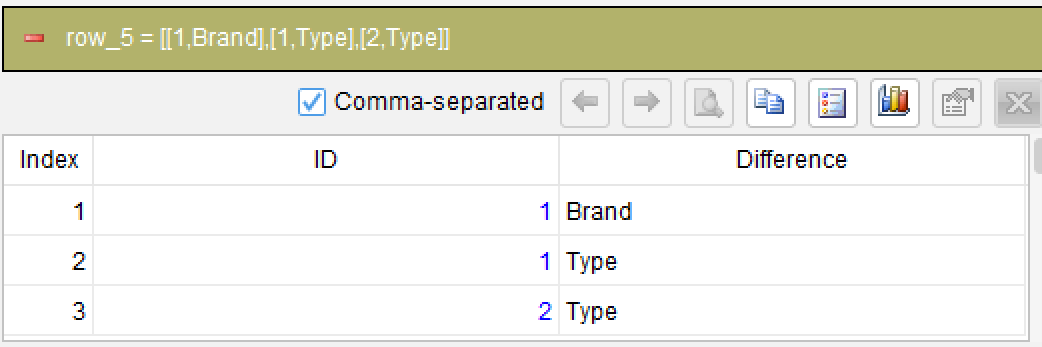
derive ID, Difference
Generated SQL
After confirming the above steps, the SQLazy compiler automatically generates native SQL (PostgreSQL syntax):
WITH Value1 AS (
  SELECT
    ID,
    COUNT(DISTINCT Brand) AS cntBrand,
    COUNT(DISTINCT Type) AS cntType
  FROM (
    SELECT ID, Brand, Type FROM tbl
  ) tbl
  GROUP BY ID
),
Value2 AS (
  SELECT
    Value1.ID, Value1.cntBrand, Value1.cntType, Difference
  FROM Value1
  CROSS JOIN (
    SELECT 'Brand' AS Difference
    UNION ALL
    SELECT 'Type'
  ) T_1
)
SELECT ID, Difference FROM Value2
WHERE CASE
  WHEN (Difference = 'Brand') THEN cntBrand > 1
  WHEN (Difference = 'Type') THEN cntType > 1
  ELSE NULL
END
SQLazy lets you describe logic in business language instead of writing nested SQL queries. The solution process is divided into 4 steps, each can independently verify intermediate results, reducing the probability of errors in complex logic. The icount function of summarize can directly count distinct values, replacing SQL's COUNT(DISTINCT ...). The expand function expands a constant list into rows, completing in one line what requires CROSS JOIN with UNION ALL in SQL. The filter function's conditional branching syntax (if ... then ...; ... then ...) makes multi-condition filtering logic clear at a glance, clearer than SQL's nested CASE WHEN.
Official Links
SQLazy Online Experience: sqlazy.com (free, no registration required)
SQLazy Repository: github.com/SPLWare/SQLazy
SPL Official Website 👉 https://www.esproc.com
SPL Feedback and Help 👉 https://www.reddit.com/r/esProcSPL
SPL Learning Material 👉 https://c.esproc.com
SPL Source Code and Package 👉 https://github.com/SPLWare/esProc
Discord 👉 https://discord.gg/sxd59A8F2W
Youtube 👉 https://www.youtube.com/@esProc_SPL


Chinese version: https://c.raqsoft.com.cn/article/1784196284211