

SQLazy:Merge Multiple Tables into Single Rows by Common ID
Problem Description
Merge multiple structurally similar tables with different column names into a wide table using full outer joins by common ID. Four tables have similar structures, each with two fields. The fields have the same meaning but different names (id, id2, id3, id4 all represent ID). The goal is to merge the four tables into single rows by ID, with each ID appearing in exactly one row. When an ID is absent in a table, the corresponding columns take NULL.
Source Data
T1 table:
id |
colA |
555 |
A_OK |
T2 table:
id2 |
colB |
555 |
B_OK |
10 |
Bx |
T3 table:
id3 |
colC |
222 |
C |
T4 table:
id4 |
colD |
10 |
Dx |
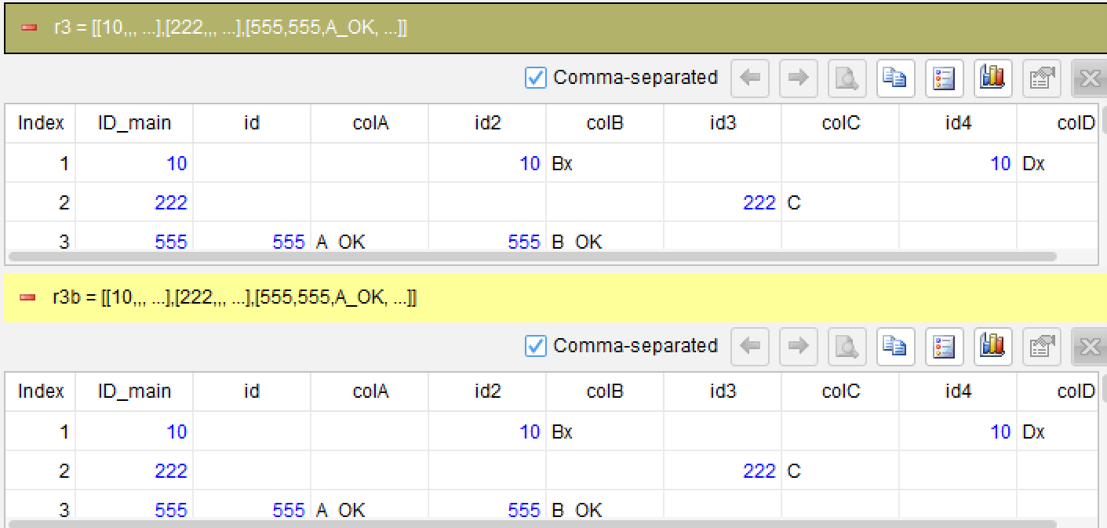
Expected Result
ID_main |
id |
colA |
id2 |
colB |
id3 |
colC |
id4 |
colD |
10 |
10 |
Bx |
10 |
Dx |
||||
222 |
222 |
C |
||||||
555 |
555 |
A_OK |
555 |
B_OK |
For example, ID=555 appears in both T1 and T2 but not in T3 or T4, so id, colA, id2, colB have values, while id3/colC/id4/colD are NULL.
ID=222 only appears in T3, so only id3 and colC have values; all other columns are NULL.
ID=10 appears in T2 and T4 but not in T1 or T3, so id2, colB, id4, colD have values; all other columns are NULL.
SQLazy Step-by-Step Implementation
Core Idea: First use derive to unify the ID column names of each table to ID_main, making subsequent merging easier. Then start from the first table and perform full outer joins one by one: use join to full outer join the current result with the next table on ID_main, then use derive and nvl to merge the new ID into the ID_main column, appending tables one by one to get the final result.
Name |
Anchor |
Statement |
t1 |
T1 |
derive id as ID_main, id, colA |
t2 |
T2 |
derive id2 as ID_main, id2, colB |
t3 |
T3 |
derive id3 as ID_main, id3, colC |
t4 |
T4 |
derive id4 as ID_main, id4, colD |
r1 |
t1 |
join ID_main; with t2; ID_main; take id2, colB; full |
r1b |
derive nvl(ID_main, id2) as ID_main, id, colA, id2, colB |
|
r2 |
join ID_main; with t3; ID_main; take id3, colC; full |
|
r2b |
derive nvl(ID_main, id3) as ID_main, id, colA, id2, colB, id3, colC |
|
r3 |
join ID_main; with t4; ID_main; take id4, colD; full |
|
derive nvl(ID_main, id4) as ID_main, id, colA, id2, colB, id3, colC, id4, colD |
[Click to run this example online]
The steps are explained below.
Steps 1-4: Unify ID Column Names Across Tables
derive id as ID_main, id, colA
Use derive on T1-T4 to rename their respective ID column names (id/id2/id3/id4) uniformly to ID_main.
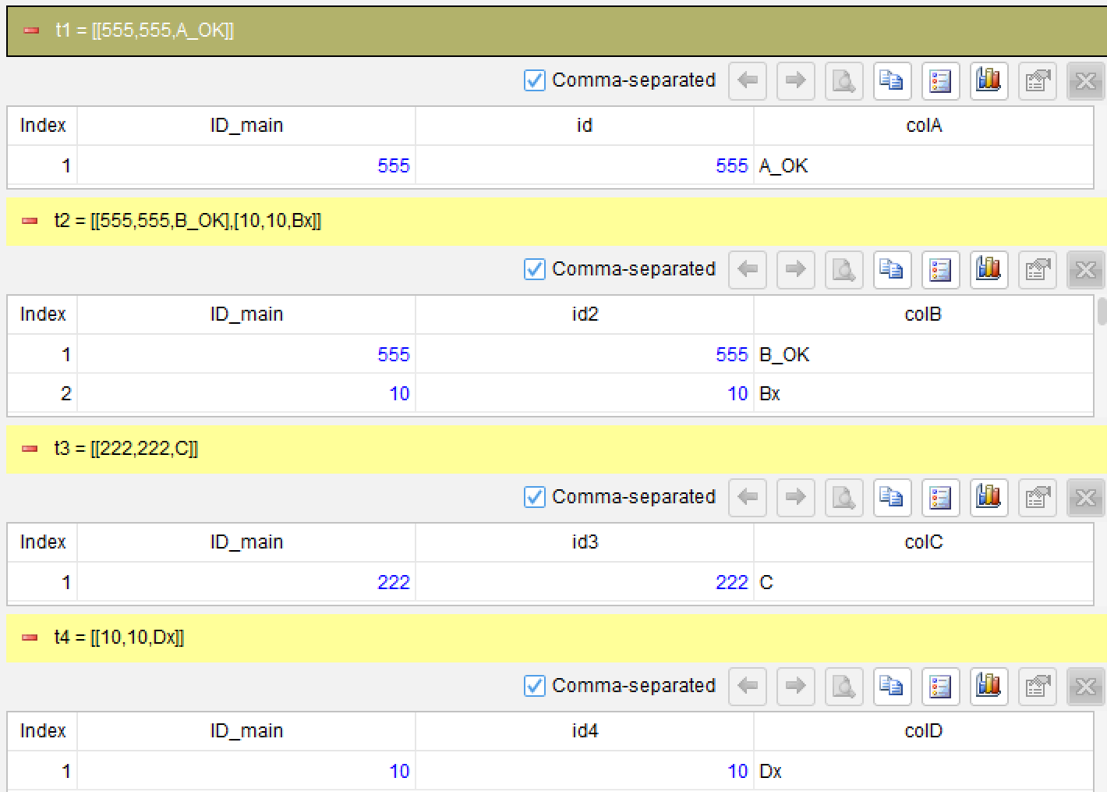
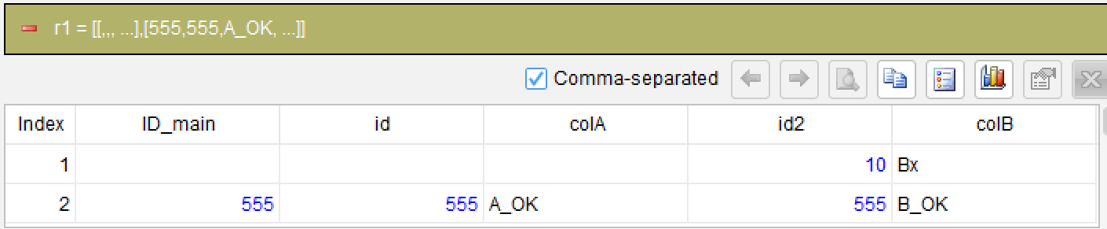
Step 5: Full Outer Join T1 and T2
join ID_main; with t2; ID_main; take id2, colB; full
Use the join function to full outer join t1 and t2 on ID_main.
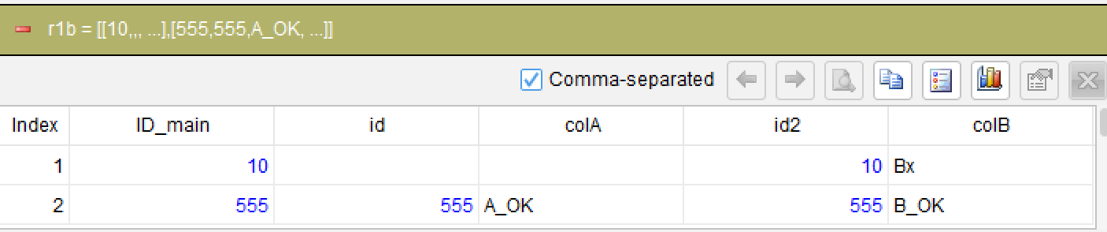
Step 6: Merge NULLs in ID Column
derive nvl(ID_main, id2) as ID_main, id, colA, id2, colB
If a record comes from t2 but is not present in t1, its ID_main is NULL. This step assigns t2.id2 to ID_main in such records, ensuring the ID_main column always has a value. Different SQL implementations use different syntax for this step - for example, Oracle uses nvl and SQL Server uses COALESCE - while NSPL uniformly uses the nvl function, which is automatically translated into the corresponding dialect during compilation based on the database type.
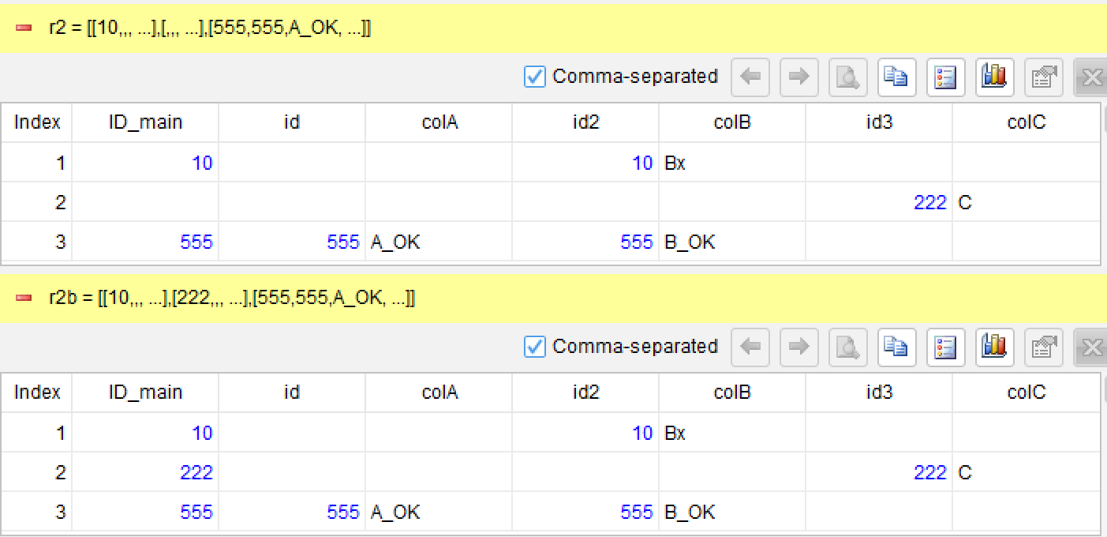
Steps 7-8: Append T3
join ID_main; with t3; ID_main; take id3, colC; full
derive nvl(ID_main, id3) as ID_main, id, colA, id2, colB, id3, colC
Repeat the join + derive pattern to full outer join T3 into the current result. After appending each table, use ifn to merge the new ID into the unified ID_main column.
Steps 9-10: Append T4 to Get Final Result
join ID_main; with t4; ID_main; take id4, colD; full
derive nvl(ID_main, id4) as ID_main, id, colA, id2, colB, id3, colC, id4, colD
Generated SQL
After confirming the above steps, the SQLazy compiler automatically generates native SQL (SQL Server syntax):
WITH t1 AS (
		SELECT id AS ID_main, id, colA
		FROM T1
	),
	t2 AS (
		SELECT id2 AS ID_main, id2, colB
		FROM T2
	),
	r1 AS (
		SELECT t1.ID_main, t1.id, t1.colA, t2.id2, t2.colB
		FROM t1
			FULL JOIN t2 ON ID_main = t2.ID_main
	),
	r1b AS (
		SELECT COALESCE(NULLIF(CAST(ID_main AS VARCHAR(10)), ''), NULLIF(CAST(id2 AS VARCHAR(10)), '')) AS ID_main
			, id, colA, id2, colB
		FROM r1
	),
	t3 AS (
		SELECT id3 AS ID_main, id3, colC
		FROM T3
	),
	r2 AS (
		SELECT r1b.ID_main, r1b.id, r1b.colA, r1b.id2, r1b.colB
			, t3.id3, t3.colC
		FROM r1b
			FULL JOIN t3 ON ID_main = t3.ID_main
	),
	r2b AS (
		SELECT COALESCE(NULLIF(CAST(ID_main AS VARCHAR(10)), ''), NULLIF(CAST(id3 AS VARCHAR(10)), '')) AS ID_main
			, id, colA, id2, colB, id3
			, colC
		FROM r2
	),
	t4 AS (
		SELECT id4 AS ID_main, id4, colD
		FROM T4
	),
	r3 AS (
		SELECT r2b.ID_main, r2b.id, r2b.colA, r2b.id2, r2b.colB
			, r2b.id3, r2b.colC, t4.id4, t4.colD
		FROM r2b
			FULL JOIN t4 ON ID_main = t4.ID_main
	)
SELECT COALESCE(NULLIF(CAST(ID_main AS VARCHAR(10)), ''), NULLIF(CAST(id4 AS VARCHAR(10)), '')) AS ID_main
	, id, colA, id2, colB, id3
	, colC, id4, colD
FROM r3
SQLazy lets you describe logic in business language instead of writing nested SQL queries. SQLazy's step-by-step computation breaks multi-table merging into independent steps such as unifying column names, performing full outer joins one table at a time, and merging IDs - each step can be independently verified for intermediate results. The join function, combined with derive and nvl, flexibly handles post-merge operations such as renaming columns and merging NULL values. This strategy of appending tables one by one is much clearer and more maintainable than writing deeply nested FULL JOIN + COALESCE queries in SQL.
Official Links
SQLazy Online Experience: sqlazy.com (free, no registration required)
SQLazy Repository: github.com/SPLWare/SQLazy
SPL Official Website 👉 https://www.esproc.com
SPL Feedback and Help 👉 https://www.reddit.com/r/esProcSPL
SPL Learning Material 👉 https://c.esproc.com
SPL Source Code and Package 👉 https://github.com/SPLWare/esProc
Discord 👉 https://discord.gg/sxd59A8F2W
Youtube 👉 https://www.youtube.com/@esProc_SPL


Chinese version: https://c.raqsoft.com.cn/article/1784109363970