

SQLazy:Forward Fill NULL Values
Problem Description
A table records employee information with three fields: id (sort key), name, and dept (department). The dept column contains NULL values that need to be forward filled—each NULL should be replaced with the most recent non-NULL value in the same column.
Source Data
id |
name |
dept |
1 |
Sophia |
Marketing |
2 |
Rachel |
NULL |
3 |
John |
Sales |
4 |
Megan |
NULL |
5 |
Megan |
NULL |
6 |
Zack |
IT |
7 |
Jane |
NULL |
Expected Result
id |
name |
dept |
1 |
Sophia |
Marketing |
2 |
Rachel |
Marketing |
3 |
John |
Sales |
4 |
Megan |
Sales |
5 |
Megan |
Sales |
6 |
Zack |
IT |
7 |
Jane |
IT |
For example, id=4–5 (dept=NULL): take the dept value Sales from id=3.
SQLazy Step-by-Step Implementation
Core idea: First create a logical grouping marker (grp) that increments each time dept is NOT NULL, grouping consecutive NULL rows with their preceding non-NULL row into the same partition. Then use grp as the partition key, taking the max dept value within each partition to forward fill the NULLs. This two-step strategy—create grouping marker first, then aggregate by partition—is SQLazy’s classic pattern for forward-fill problems.
Name |
Anchor |
Statement |
t1 |
forwardFill |
sort id asc |
t2 |
compute if ((dept notnull) then 1 else 0) cum as grp |
|
t3 |
compute dept max as filled_dept; partition grp |
|
derive id, name, filled_dept as dept |
[Click to run this example online]
The steps are explained below.
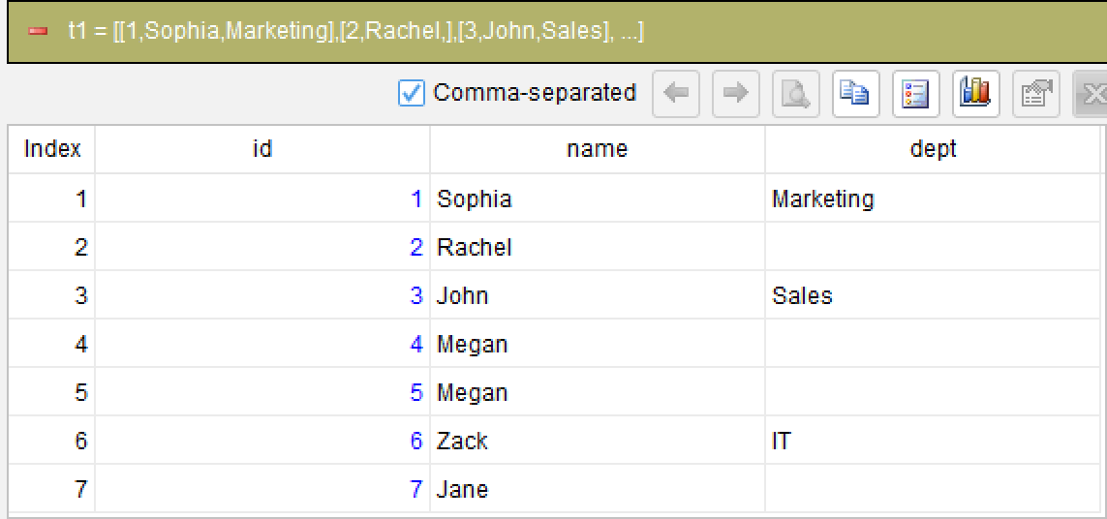
Step 1: Sort by id in ascending order
sort id asc
Sort by id in ascending order to ensure records are processed in sequence; this is the prerequisite for subsequent grouping and filling.
Step 2: Create a logical grouping marker
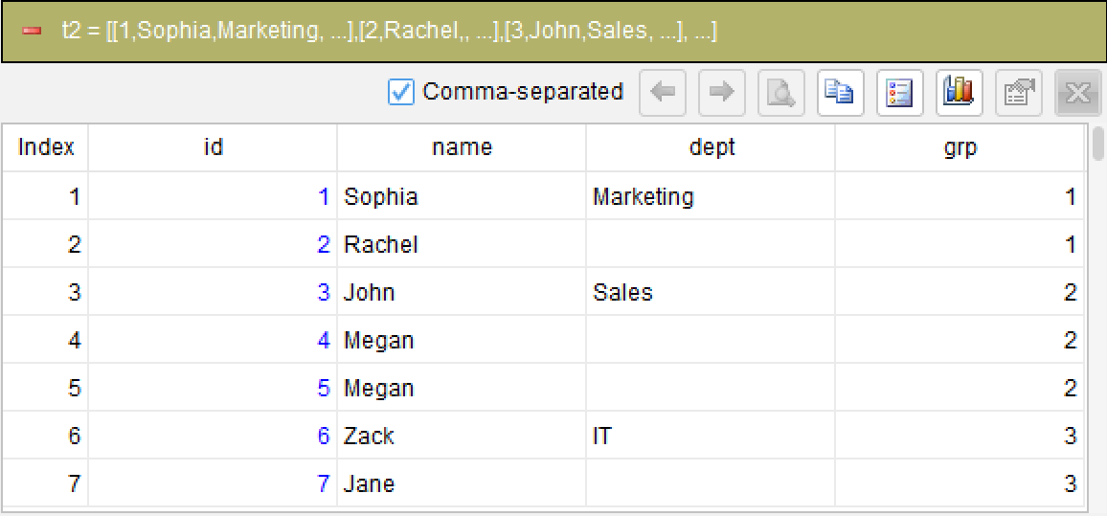
compute if ((dept notnull) then 1 else 0) cum as grp
This is the most critical step. Use the computed column with the cum (running total) argument to cumulatively sum the condition if ((dept notnull) then 1 else 0). When dept is NOT NULL, it contributes 1 (starting a new group); when NULL, it contributes 0 (continuing the current group). The cumulative result grp increments by 1 each time dept is non-NULL, dividing the data into partitions.
Step 3: Forward fill by partition
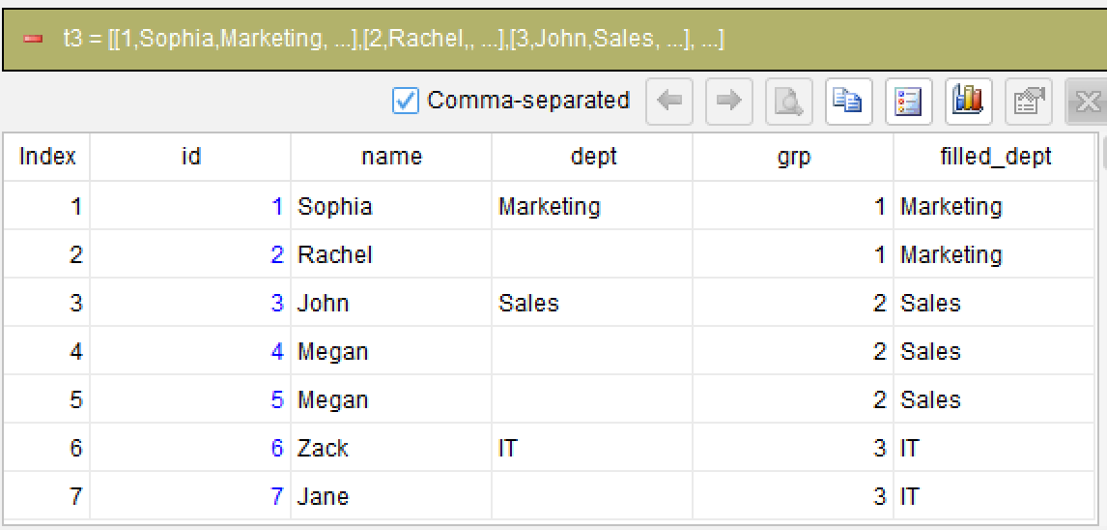
compute dept max as filled_dept; partition grp
Within the grp partition, use the max aggregation to get the dept value. Each partition has only the first row’s dept as non-NULL, the rest are NULL. The MAX function automatically picks the non-NULL value, achieving forward fill.
The partition grp ensures that fills in different partitions do not interfere with each other. This replaces NULL values with the preceding non-NULL value in id order.
Step 4: Use derive to select the output fields
Generated SQL
After confirming the logic of the above 4 steps, the SQLazy compiler automatically generates native SQL (MySQL syntax used here):
WITH t2 AS (
		SELECT id, name, dept
			, SUM(CASE
				WHEN dept IS NOT NULL THEN 1
				ELSE 0
			END) OVER (ORDER BY CASE
				WHEN id IS NULL THEN 1
				ELSE 0
			END, id ASC ROWS UNBOUNDED PRECEDING) AS grp
		FROM forwardFill
	)
	t3 AS (
		SELECT id, name, dept, grp
			, MAX(dept) OVER (PARTITION BY grp) AS filled_dept
		FROM t2
	)
SELECT id, name, filled_dept AS dept
FROM t3
ORDER BY CASE
	WHEN id IS NULL THEN 1
	ELSE 0
END, id ASC
;
SQLazy lets you describe logic in business language instead of writing nested SQL queries. Step-by-step calculation breaks forward fill into independent steps, each verifiable independently. The cum (conditional running total) automatically generates group numbers—this is cleaner than SQL’s window function approach for forward-fill problems.
Official Links
SQLazy Online Experience: sqlazy.com (free, no registration required)
SQLazy Repository: github.com/SPLWare/SQLazy
SPL Official Website 👉 https://www.esproc.com
SPL Feedback and Help 👉 https://www.reddit.com/r/esProcSPL
SPL Learning Material 👉 https://c.esproc.com
SPL Source Code and Package 👉 https://github.com/SPLWare/esProc
Discord 👉 https://discord.gg/sxd59A8F2W
Youtube 👉 https://www.youtube.com/@esProc_SPL


Chinese version https://c.raqsoft.com.cn/article/1784022426270