

SQLazy:Conditional Running Total with Reset
Problem Description
Conditional running total with reset: restart accumulation when logic is 't'. An event table table_t1 records event sequences with three fields: id (sort key), logic (condition flag, values 't' or 'f'), and val (numeric value for accumulation). A computed column output needs to be added: when logic equals 't', output is set to 1; otherwise output equals the previous row's output plus the current row's val. This is a conditional running total that resets and restarts accumulation when logic is 't'.
Source Data
id |
logic |
val |
1 |
t |
1 |
2 |
f |
2 |
3 |
f |
3 |
4 |
f |
4 |
5 |
t |
0 |
6 |
f |
1 |
7 |
f |
2 |
Expected Result
id |
logic |
val |
output |
1 |
t |
1 |
1 |
2 |
f |
2 |
3 |
3 |
f |
3 |
6 |
4 |
f |
4 |
10 |
5 |
t |
0 |
1 |
6 |
f |
1 |
2 |
7 |
f |
2 |
4 |
id=1 (logic=t): Start of a new segment, output = 1
id=2 to id=4 (logic=f): Accumulating row by row within the same segment, output = previous output + current val, yielding 3, 6, 10
id=5 (logic=t): Reset condition met, start a new segment, output = 1
SQLazy Step-by-Step Implementation
Core idea: First create a grouping marker, then accumulate by partition. Generate a logical grouping marker (logic_run) via a computed column; this marker increments each time logic is 't', dividing the data into independent segments. Then use logic_run as the partition key, applying the cum function for conditional accumulation within each partition. This two-step strategy—create grouping marker first, then accumulate by partition—is SQLazy's classic pattern for conditional reset accumulation problems.
Name |
Anchor |
Statement |
t2 |
t1 |
sort id asc |
t3 |
compute if (logic = 't' then 1 else 0) cum as logic_run |
|
result |
compute if (logic = 't' then 1 else val) cum as op partition logic_run |
[Click to run this example online]
The steps are explained below.
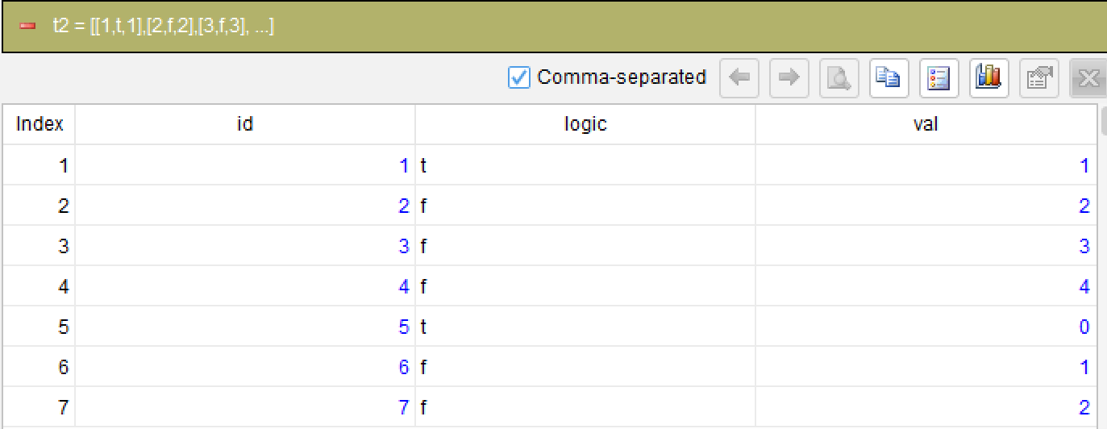
Step 1: Sort by id in ascending order
sort id asc
Sort the data by id in ascending order to ensure records are processed in chronological order; this is the prerequisite for subsequent segmentation and accumulation.
Step 2: Create a logical grouping marker
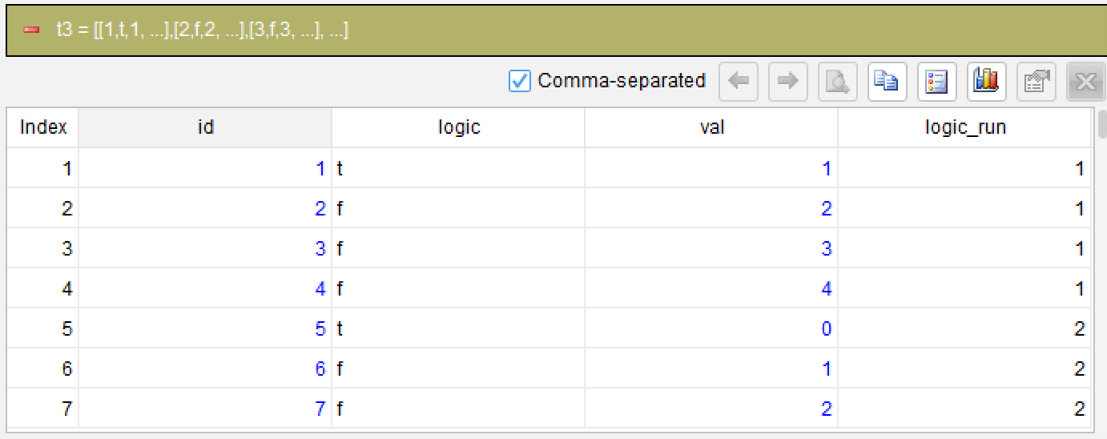
compute if (logic = 't' then 1 else 0) cum as logic_run
This is the most critical step. Use the computed column with the cum (running total) argument to cumulatively sum the conditional expression if (logic=‘t’ then 1 else 0). When logic is ‘t’, it contributes 1 (indicating the start of a new segment); when logic is ‘f’, it contributes 0 (continuing the current segment). The cumulative result logic_run increments by 1 each time logic is ‘t’, dividing the data into segments: the first 4 records (id=1-4) have logic_run=1, the last 3 records (id=5-7) have logic_run=2.
Step 3: Calculate running total by partition
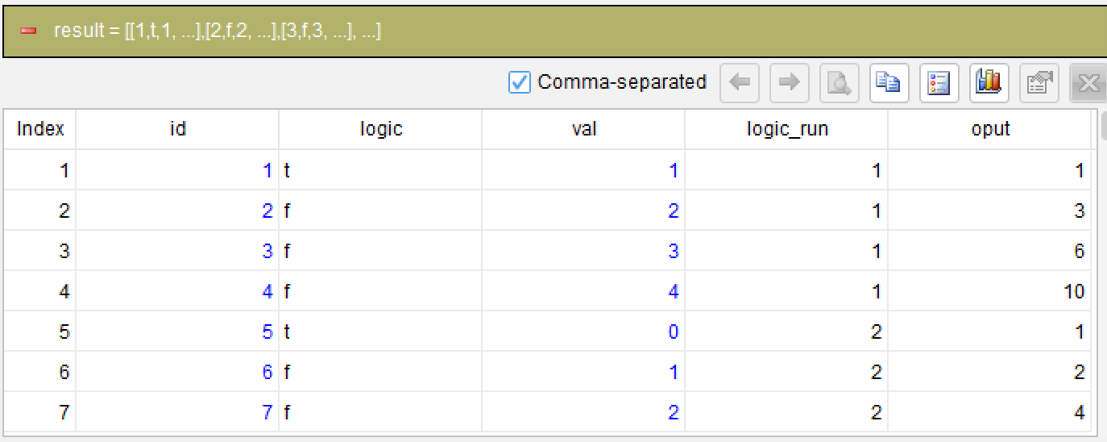
compute if (logic = 't' then 1 else val) cum as op partition logic_run
Within the logic_run partition, use the cum (running total) function to cumulatively sum the conditional expression if (logic=‘t’ then 1 else val). Each partition is calculated independently: when logic is ‘t’, the cumulative value resets to 1; when logic is ‘f’, the cumulative value is the previous row’s accumulation plus the current row’s val. The partition logic_run ensures that accumulations in different partitions do not interfere with each other. This achieves the conditional running total with reset.
Unnecessary fields can be removed later using the derive function.
Generated SQL
After confirming the logic of the above 3 steps, the SQLazy compiler automatically generates native SQL (MySQL syntax used here):
WITH t3 AS (
		SELECT id, logic, val, SUM(CASE
				WHEN logic = 't' THEN 1
				ELSE 0
			END) OVER (ORDER BY CASE
				WHEN id IS NULL THEN 1
				ELSE 0
			END, id ASC ROWS UNBOUNDED PRECEDING) AS logic_run
		FROM t2
	)
SELECT id, logic, val, logic_run
	, SUM(CASE
		WHEN logic = 't' THEN 1
		ELSE val
	END) OVER (PARTITION BY logic_run ORDER BY CASE
		WHEN id IS NULL THEN 1
		ELSE 0
	END, id ASC ROWS UNBOUNDED PRECEDING) AS oput
FROM t3
ORDER BY CASE
	WHEN id IS NULL THEN 1
	ELSE 0
END, id ASC
SQLazy lets you describe logic in business language instead of writing nested SQL queries. This example demonstrates two major features of SQLazy: first, step-by-step calculation that breaks conditional reset accumulation into three independent steps—sort, create grouping marker, accumulate by partition—each verifiable independently; second, the partition + cum syntax for partitioned running totals, which is more concise and intuitive than SQL’s window function syntax, directly expressing the business semantics of “reset on ‘t’, otherwise accumulate”.
Official Links
SQLazy Online Experience: sqlazy.com (free, no registration required)
SQLazy Repository: github.com/SPLWare/SQLazy
SPL Official Website 👉 https://www.esproc.com
SPL Feedback and Help 👉 https://www.reddit.com/r/esProcSPL
SPL Learning Material 👉 https://c.esproc.com
SPL Source Code and Package 👉 https://github.com/SPLWare/esProc
Discord 👉 https://discord.gg/sxd59A8F2W
Youtube 👉 https://www.youtube.com/@esProc_SPL


Chinese version:https://c.raqsoft.com.cn/article/1783563051055