

SQLazy: Querying the Start Timestamp of the Next Group from the Event Table
Problem description
A table stores status values of an object at different timestamps, with one record per timestamp. Segment rows based on changes in the status value and output the effective start timestamp and the effective end timestamp for each status segment – that is, merge consecutive records with the same status into a single time interval.
Source data:
id |
value |
timestamp |
1 |
A |
2024-01-01 10:00:00 |
1 |
A |
2024-01-02 08:00:00 |
1 |
A |
2024-01-03 12:00:00 |
1 |
B |
2024-01-04 09:00:00 |
1 |
B |
2024-01-05 14:00:00 |
1 |
A |
2024-01-06 11:00:00 |
1 |
A |
2024-01-07 16:00:00 |
2 |
X |
2024-02-01 08:00:00 |
2 |
X |
2024-02-02 09:00:00 |
2 |
Y |
2024-02-03 10:00:00 |
Expected output (intervals where each value remains constant):
id |
value |
effective_from |
effective_to |
1 |
A |
2024-01-01 10:00:00 |
2024-01-04 09:00:00 |
1 |
B |
2024-01-04 09:00:00 |
2024-01-06 11:00:00 |
1 |
A |
2024-01-06 11:00:00 |
9999-12-31 00:00:00 |
2 |
X |
2024-02-01 08:00:00 |
2024-02-03 10:00:00 |
2 |
Y |
2024-02-03 10:00:00 |
9999-12-31 00:00:00 |
Take object 1 as an example:
The first three records contain the same value A, so they can be merged into a single interval: 2024-01-01 – 2024-01-04 (the timestamp when the next record begins).
Value B remains for record 4 and record 5 and they can be merged into a single interval: 2024-01-04 – 2024-01-06 (the timestamp when the next record begins).
Record 6 and record 7 have value A again, the same as before. However, since value B intervenes between them, a new group starts: 2024-01-06 – infinity (the end date of the last interval is 9999-12-31).
Step-by-step implementation with SQLazy
Key approach: sort rows by timestamp, and check whether the value in the current row has changed relative to the previous row. If it has changed, start a new group; otherwise, put it in the current group. Finally, take the minimum timestamp in each group as the start timestamp and the minimum timestamp in the next group as its end timestamp.
Value |
Anchor |
Statement |
t1 |
events |
sort timestamp |
t2 |
segment value; change; as gid |
|
t3 |
summarize timestamp first as effective_from, id first as id; group gid, value |
|
t4 |
compute nvl(effective_from[1], datetime("9999-12-31 00:00:00")) as effective_to |
|
derive delete gid |
Let me walk through each step below:
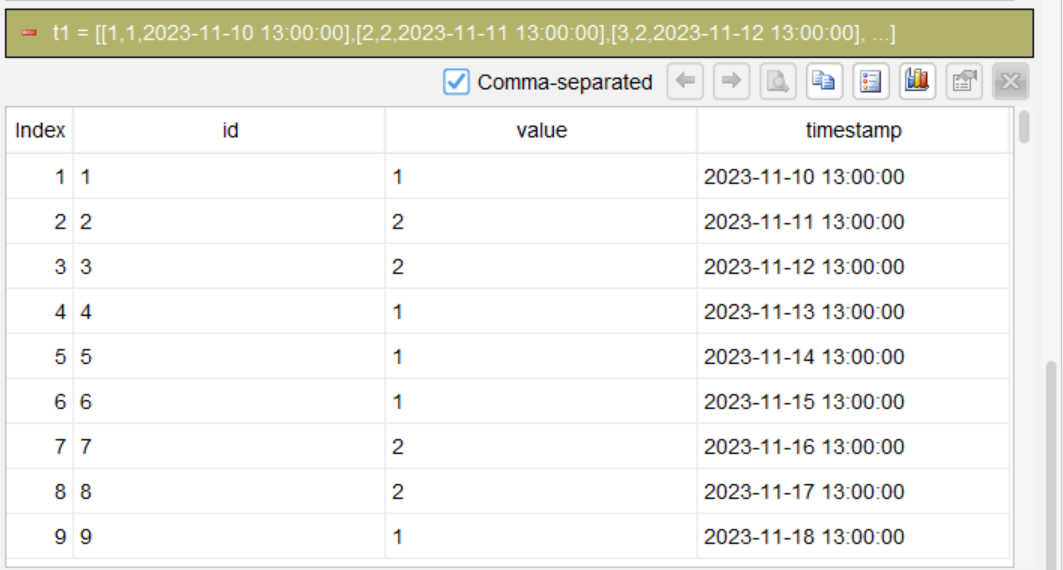
Step 1: Sort rows in chronological order in ascending order
sort timestamp
Sort rows by timestamp in ascending order, ensuring intervals in each group are processed in chronological order.
Step 2: Start a new partition when value changes
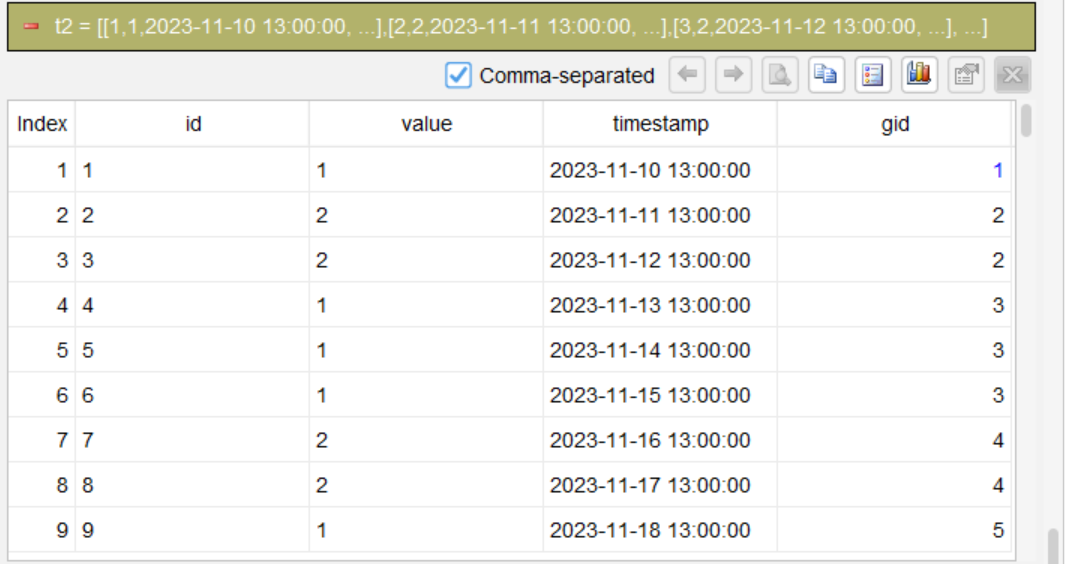
segment value; change; as gid
This is the core step. The “segment” statement segment rows by the “value” field: each time the value changes, a new group is started and assigned a group number (gid). Within each group, the value remains unchanged.
Step 3: Aggregate by group number and value, and take the start timestamp
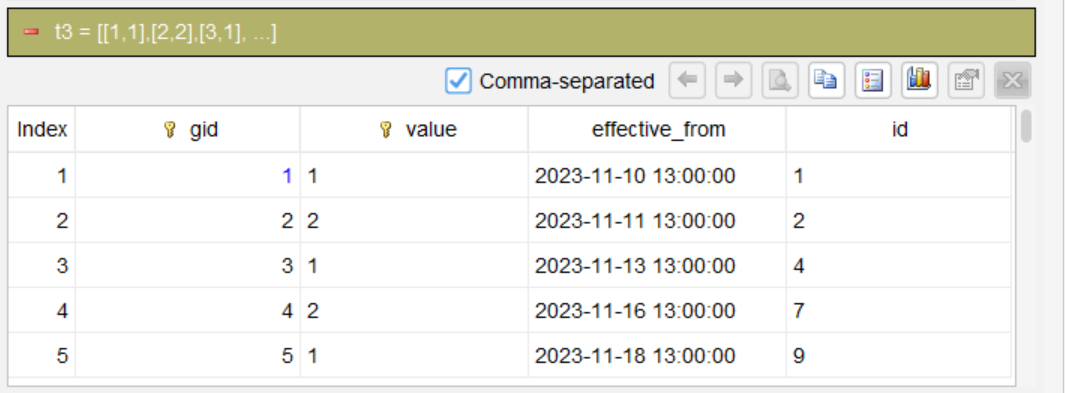
summarize timestamp first as effective_from, id first as id; group gid, value
Group rows by gid and value:
Take the timestamp of the first record in each group and use it as the effective start timestamp for that status.
id: Take the first value in each group.
Step 4: Calculate the effective end timestamp
*compute nvl(effective_from[1], datetime("9999-12-31 00:00:00")) as effective_to*
effective_from[1] takes the effective_from value of the next row after the current group as the end timestamp for the current group. If the current group is the last group (i.e., effective_from[1] is empty), use nvl to set it to a maximum date (9999-12-31), which represents “to present”.
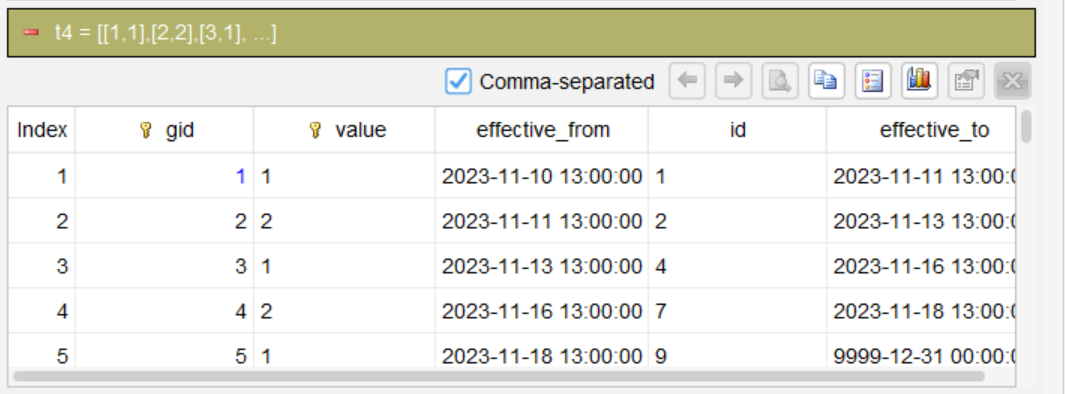
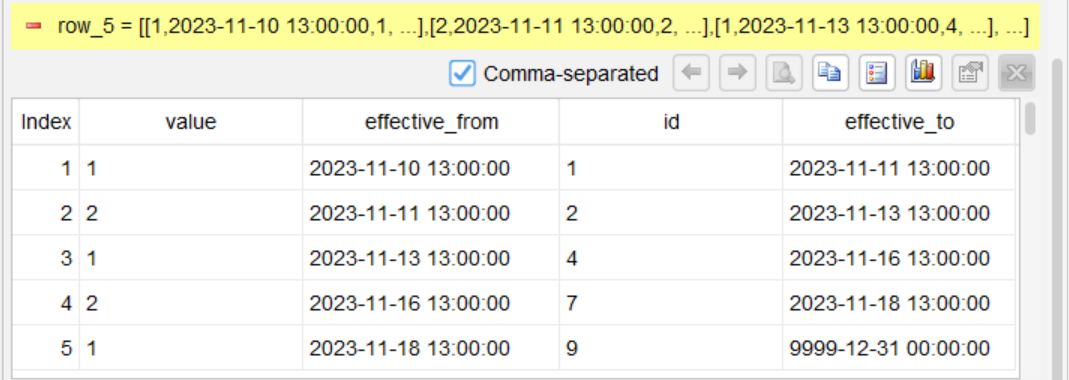
Finally, remove the helper column gid and output the final result.
Compile the steps into SQL
Once the above steps are complete and verified, SQLazy’s compiler can automatically generate the equivalent native SQL (The Oracle syntax for this example):
WITH Value AS (
    SELECT
        id,
        value,
        timestamp
    FROM
        events
),
Value2 AS (
    SELECT
        gid,
        id AS id,
        value AS value,
        timestamp AS effective_from
    FROM
        (
            SELECT
                id,
                value,
                timestamp,
                SUM(
                    CASE
                        WHEN value <> col__5 THEN 1
                        ELSE 0
                    END
                ) OVER (
                    ORDER BY
                        CASE
                            WHEN timestamp IS NULL THEN 1
                            ELSE 0
                        END,
                        timestamp ASC
                ) + 1 AS gid
            FROM
                (
                    SELECT
                        Value.*,
                        LAG(value) OVER (
                            ORDER BY
                                CASE
                                    WHEN timestamp IS NULL THEN 1
                                    ELSE 0
                                END,
                                timestamp ASC
                        ) AS col__5
                    FROM
                        Value
                ) sub__6
        ) Value1
    GROUP BY
        gid
)
SELECT
    gid,
    id,
    value,
    effective_from,
    LEAD(
        effective_from,
        1,
        TO_DATE('9999-12-31 00:00:00', 'YYYY-MM-DD HH24:MI:SS')
    ) OVER (
        ORDER BY
            gid
    ) AS effective_to
FROM
    Value2
ORDER BY
gid;
You only need to verify the logic of each of the above four steps – no need to manually debug the SQL – and the compiler generates the production-ready code.
SQLazy lets you describe logic using business language, rather than writing nested queries in SQL syntax. This example of “dividing time intervals based on value change” has one core statement: segment value; change, which directly corresponds to the business requirement of “starting a new group whenever the value changes”. To write SQL manually, you need to understand the window boundaries of LAG/LEAD, manually handle NULLs, and adjust for syntax differences across different databases. SQLazy, however, compresses this complex logic into 4 intuitive steps – sort, segment, aggregate, and take the the next row’s timestamp as the end timestamp. The intermediate result of each step can be verified independently, and the compiler generates the final runnable SQL. You just need to verify the business meaning of each step, and leave the rest to the compiler.
Try SQLazy online: sqlazy.com (Free to use, signup not required)
SQLazy project repository: github.com/SPLWare/SQLazy
SPL Official Website 👉 https://www.esproc.com
SPL Feedback and Help 👉 https://www.reddit.com/r/esProcSPL
SPL Learning Material 👉 https://c.esproc.com
SPL Source Code and Package 👉 https://github.com/SPLWare/esProc
Discord 👉 https://discord.gg/sxd59A8F2W
Youtube 👉 https://www.youtube.com/@esProc_SPL


Chinese version