

Stop trusting AI-generated SQL blindly: Build queries step-by-step with SQLazy
AI can write runnable SQL statements, but it is often unreliable. SQLazyturns SQL development into a step-by-step, verifiable, and auditable workflow, with a compiler to ensure that the final output is correct.
Problem: The AI-generated SQL is a black box
We’ve all been in such a situation: throw a complex analytical query in ChatGPT or Claude and get a monster – dozens of lines of SQL code crammed into one lump. And you think: “This might run… but can I trust it?”
In reality, the AI-generated SQL often fails in these ways:
Incorrect join logic— Use the incorrect target table, or miss a necessary join condition.
Aggregation mistake — GROUP BY does not align with the analysis goal, or miss non-aggregated columns.
Missed filter condition— Miss a subtle business constraint (such as “only count active users”).
Semantic deviation— What you mean by “revenue” may not be the same as what the model considers the “total amount”.
Ignored boundary condition—Usually the NULL values, empty sets, and extreme values are elegantly ignored.
Today, AI can generate runnable SQL. But you never know whether you can trust it. Once the query involves deeply nested window functions and subqueries, it becomes difficult to review, debug, maintain, and migrate.
Worse still, when the results look off, how do you even begin to fix it?
You can only manually run it CTE by CTE, inserting SELECT * FROM … statements everywhere just to trace the logic;
Or tweak the prompt and ask AI to regenerate – only to end up with code that is even harder to read.
In the end, it takes longer than just writing it yourself.
This is the true cost of “black-box SQL generation”.
How SQLazy works?
SQLazy does not generate a huge blob of SQL in one go. Instead, it turns the SQL development into a step-by-step, traceable workflow:
Use semi-natural language syntax to describe what each step does.
Verify the logic at each step – Intermediate results are inspectable.
Let the compiler generate the final SQL.
The final SQL is generated by the compiler, not the LLM. This means:
Zero SQL errors from AI hallucination, with 100% correct results.
The logic is fully auditable.
The output is production-ready.
Example: Count the longest consecutive rising days for a stock
This is a typical analytical query, and difficult to write in pure SQL – some companies use it as the interview question, with fewer than 20% of the candidates getting it right.
Let’s see how SQLazy tackles this step by step.
First, describe the logic step by step
Rather than wrestling with the nested subqueries, SQLazy lets you express the logic as simple, sequential actions:
Name |
Anchor |
Statement |
stock |
file "stock.csv" csv header |
|
s1 |
filter CODE = 110838 |
|
s2 |
sort DT asc |
|
s3 |
segment CL down as NoRisingDays |
|
s4 |
summarize DT count as ContinuousDays group NoRisingDays |
|
summarize ContinuousDays max as max_ContinuousDays |
That’s it. One step, one simple action. Here’s the line-by-line explanation:
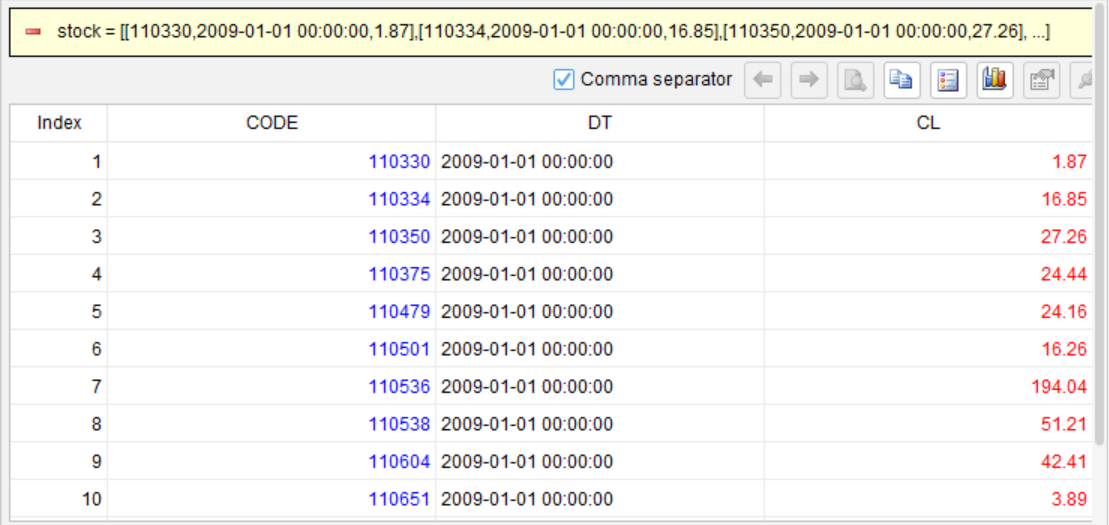
Load data from a file, a database, or an in-memory table built into SQLazy. In the IDE or WEB, you can instantly view the result at each step.
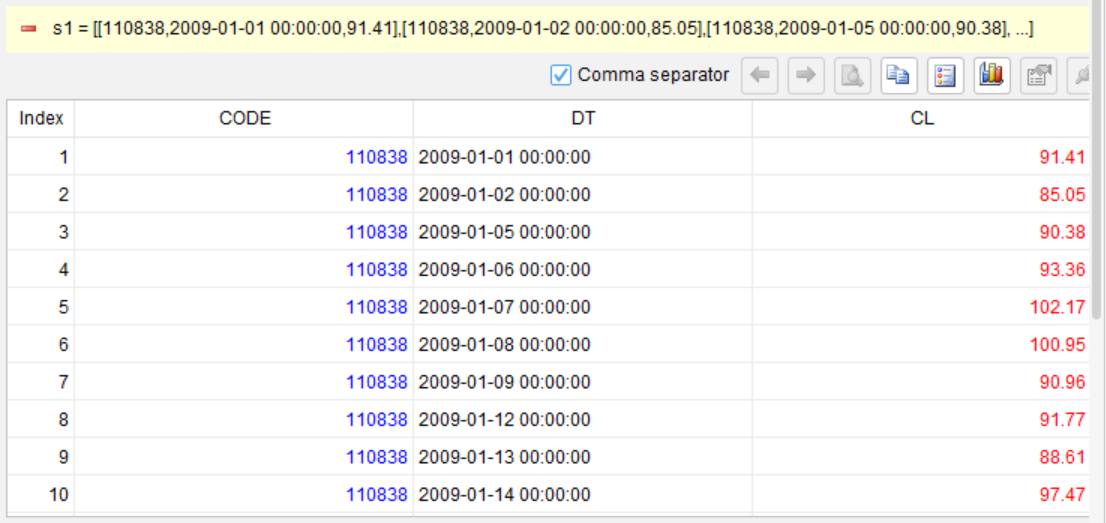
Filter records for stock 110838:
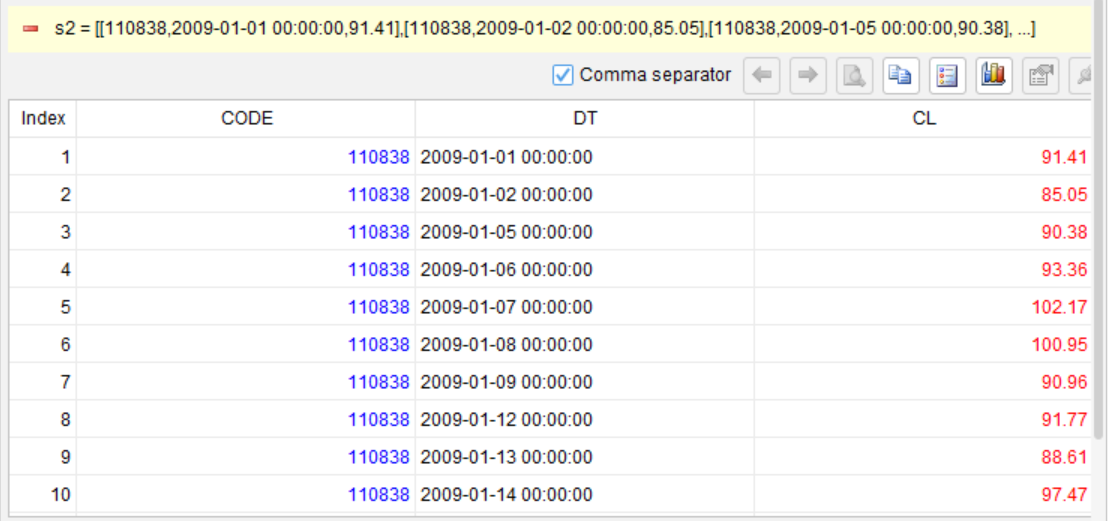
Sort records in ascending order by date:
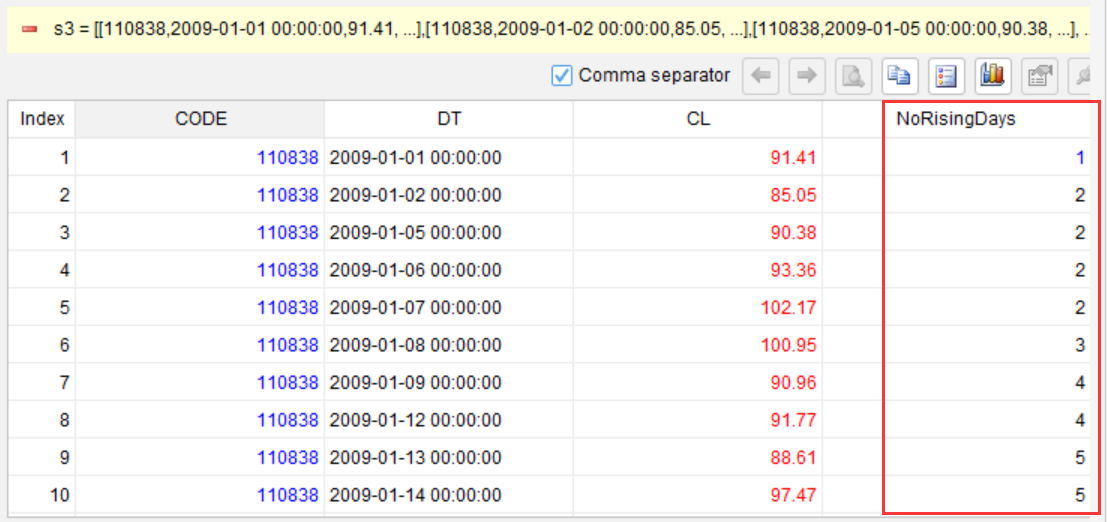
Mark breaks in the rising trend to separate consecutively rising streaks:
Count the days in each consecutively rising streak:
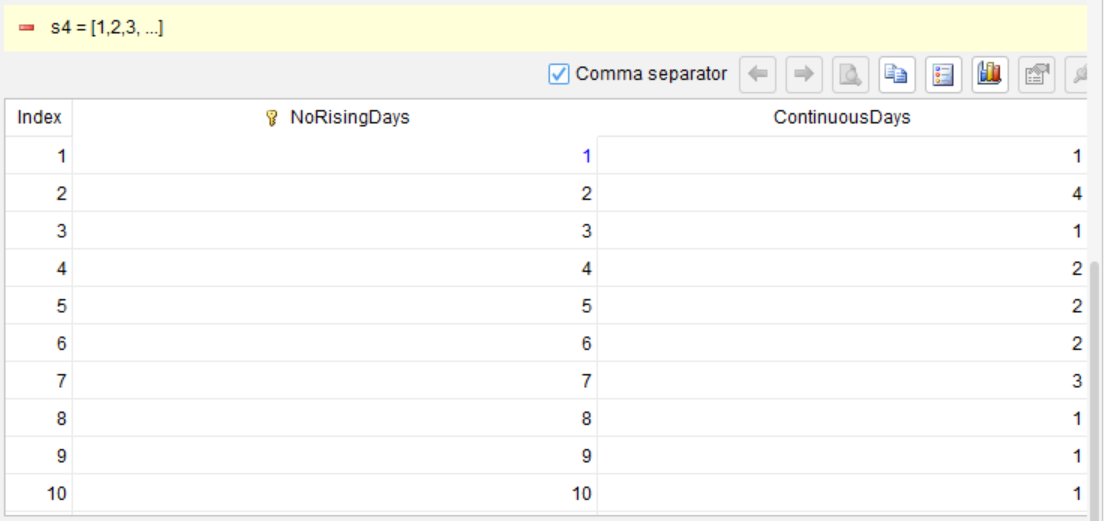
Get the longest streak:

The logic is crystal clear. Anyone can understand what the query does without being a SQL expert.
What’s more, you can execute each step and inspect the intermediate result. For example, after the records are segmented in step 3, a new column called NoRisingDays is generated, showing the group number for each consecutive streak. If something looks wrong, you can fix them immediately – no need to wait the entire query finish and guess where things went wrong.
Then generate SQL with the compiler
SQLazy automatically compiles the above steps into the native SQL dialect for your target database. It currently supports MySQL, PostgreSQL, and Oracle, with Snowflake and BigQuery support on the roadmap.
WITH s2 AS (
  SELECT CODE, DT, CL
  FROM (SELECT CODE, DT, CL FROM stock) t_3
  WHERE CODE = 110838
)
SELECT MAX(ContinuousDays) AS max_ContinuousDays
FROM (
  SELECT NoRisingDays, COUNT(DT) AS ContinuousDays
  FROM (
    SELECT CODE, DT, CL,
      SUM(CASE WHEN CL < col__4 THEN 1 ELSE 0 END)
        OVER (ORDER BY CASE WHEN DT IS NULL THEN 1 ELSE 0 END, DT ASC) + 1 AS NoRisingDays
    FROM (
      SELECT s2.*, LAG(CL) OVER (ORDER BY CASE WHEN DT IS NULL THEN 1 ELSE 0 END, DT ASC) AS col__4
      FROM s2
    ) sub__5
  ) s3
  GROUP BY NoRisingDays
) s4
The resulting SQL is difficult to understand, review, debug, and modify. But the SQLazy workflow is clear, easy to review and audit. As long as you follow the workflow correctly, the final SQL is guaranteed to be reliable.
Here are the fundamental differences between SQLazy and ordinary AI SQL generators:
Ordinary AI SQL generators |
SQLazy |
|
Input |
Queries expressed by the natural language |
step-by-step logic |
Output |
The final SQL |
First write runnable steps of logic, and then compile them into SQL |
How to debug |
Manual breakdown, and repeated trial and error |
Execute step by step, where you can inspect intermediate results immediately |
Auditability |
Low – no choice but to trust AI |
High – verify result at each step |
Maintainability |
Low – difficult to read SQL and untraceable prompt |
High – steps are a document, which can be modified any time |
Suitable scenarios |
One-off, exploratory queries |
Long-term, team-based, and compliance audit required |
Here are my honest impressions from using SQLazy to run complex queries:
Advantages:
The result at each step is inspectable. Before, trying to write complex SQL meant imagining the intermediate results – they only exist in your head. Now you can inspect the actual data table after each step is executed, and catch and fix errors immediately. At last, no more black boxes, and what a relief!
Logic is broken down into multiple steps, which naturally serve as document. Once a workflow is finished, if requirements change three months later, there is no need to re-analyze dozens of lines – just find the relevant step and modify it. And if someone else takes over, reading through steps is so much faster than deciphering the SQL.
Debugging becomes significantly faster. Once, I wrote the wrong grouping condition at the 4th step, executed the code, spotted an extra row in the intermediate table that shouldn’t have been there, and pinpoint the error immediately. Before, I would have to run the entire SQL, add debug fields everywhere, then run it again… back and forth, over and over.
Zero cross-database hassle. Write your logic once and generate SQL for both MySQL and Oracle – no manual dialect translation needed.
Notes:
Learning cost exists. You need to adapt to the “stepwise way of thinking” – resisting the urge to reach for window functions right away. The first couple of uses may feel slower, but the thinking becomes clearer once you settle into it.
Not necessary for simple scenarios. It is faster to write a 3-line SELECT in SQL. SQLazy is better suited for the complex scenarios where your brain starts to struggle to keep up.
SQLazy is not an almighty tool. Note the unsupported features and scenarios.
Try SQLazy
Web Version (signup not required) Free to use (https://sqlazy.com), ideal for quick trials.
Desktop IDE: Best suited for daily work and large dataset processing, with unlimited local debugging.
Repository address:
https://github.com/SPLWare/SQLazy
The examples directory in the project contains step-by-step solutions to multiple real-world SQL problems, including the “Count longest consecutive days of stock price gains” problem demonstrated above, as well as scenarios such as session analysis and financial indicator calculations.
Shortcomings of SQLazy
Recursive queries are not supported (already on the roadmap).
Very old databases (such as MySQL 5.5) are not supported.
SQLazy itself is not open-source, but all example workflows and documentation are on GitHub under the MIT license.
Expected feedback
If you have ever encountered an analysis scenario where writing logic in pure SQL is overly convoluted, let us know and we’ll try to rewrite it with SQLazy – so you can see whether the workflow is genuinely easier to read than plain SQL.
When you use AI to write SQL, which is your biggest pain point – accuracy, maintainability, or trustworthiness?
When it comes to the “step-by-step” approach to SQL development, what do you think is the biggest weakness?
SPL Official Website 👉 https://www.esproc.com
SPL Feedback and Help 👉 https://www.reddit.com/r/esProcSPL
SPL Learning Material 👉 https://c.esproc.com
SPL Source Code and Package 👉 https://github.com/SPLWare/esProc
Discord 👉 https://discord.gg/sxd59A8F2W
Youtube 👉 https://www.youtube.com/@esProc_SPL


Chinese version