

A Field Guide to Querying and Report Computations with SPL - 12 Expand to multiple records based on the specified rule
12 Expand to multiple records based on the specified rule
This type of tasks refers to expanding a single record into multiple records based on rules, such as splitting strings by delimiters, expanding date ranges, or expanding according to the specified number. In SQL, this typically requires JOIN statements along with nested or recursive structures, resulting in complex and error-prone code.
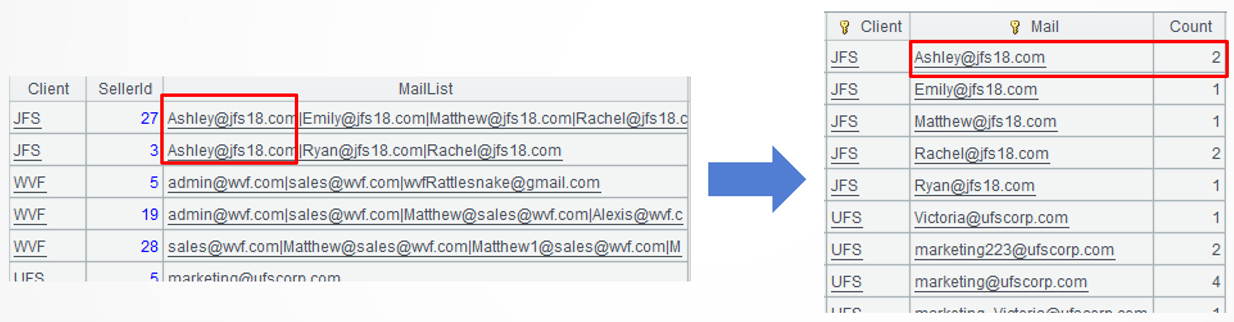
Example 1: Split the mail list and for each mail address find the number of salespeople who collect it
Source data: The client mail table (12/ClientMailFromSeller.txt) stores mail addresses the salespeople collects from the clients. The multiple mail addresses a salesperson collects are separated by “|” and form a mail list. One mail address may be collected by more than one salesperson, which often means this mail address is more frequently used.
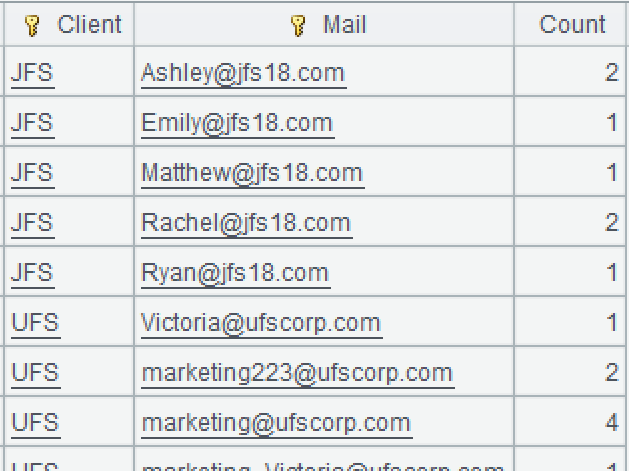
Target: For each mail address per client, find how many salespeople have collected it.
SPL code:
A |
|
1 |
$select * from 12/ClientMailFromSeller.txt |
2 |
=A1.news(MailList.split("|");Client,~:Mail) |
3 |
=A2.groups(Client,Mail;count(1):Count) |
A1: Load data.
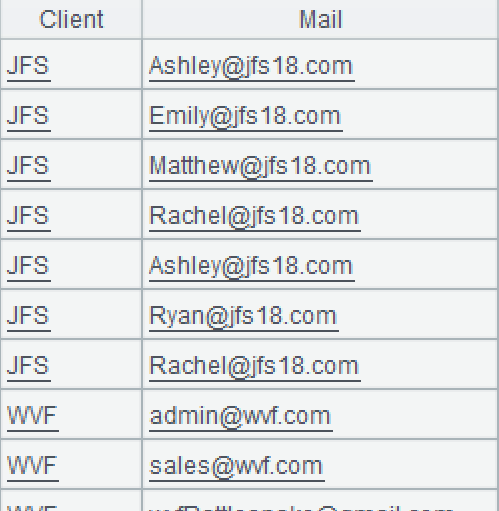
A2: Loop through each record in A1 to expand them and concatenate the result records. First, split the mail list into a set by the vertical bar, where each mail address is a member. Then, expand the current record into a new two‑field table sequence based on members of the set. Values of theClientfield come from the original record andthose of the Mail fieldcome from the current member (represented by ~) of the set. The news() functionexpands a single record into multiple records.
l Learning point: Record expansion
In SPL, thenews()function can expand a single record into multiple records and concatenate them into a new table sequence. It conforms to a series of rules. The original record can be computed and converted into a sequence according to any rule, where each member corresponds to a new record; it can also be expanded based on an external sequence, with each member corresponding to a new record. When the external sequence consists of natural numbers from 1 to N, it can be abbreviated as N. Thenews()function can be constructed through the combination ofconj()andnew(), and it simplifies the syntax for referencing fields and sequences before and after expansion.
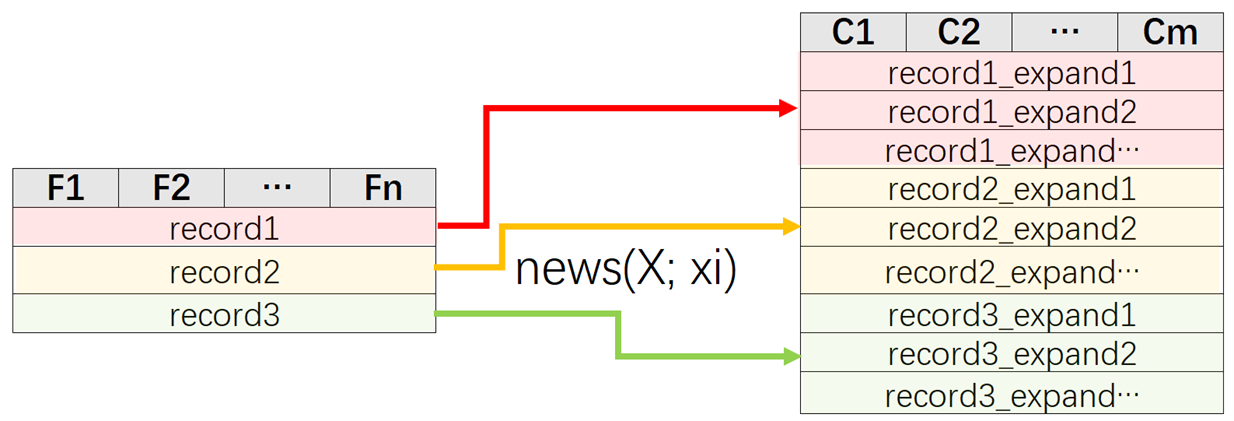
Parameter X: A sequence based on which expansion is performed. Each record in the original table sequence is expanded according to X, generating X.len()new records. X can be a field or expression from the original table sequence, such as MailList.split(“|”) or Client|SellerId; or a specified sequence, such as [“JFS”,“UFS”]; or a natural number, such as 3 (equivalent to [1,2,3]).
Parameter xi: The field(s) after expansion. xi can be written as ~, which is the reference of the current member of X. It can also be a field or an expression, which references a field value from either the expanded table sequence ~ or the original table sequence, such as Client. In this case, it preferentially references the field in ~. If there are duplicate field names, add the name of the original table sequence at the beginning to distinguish them, such as A1.Client.
A3: Group A2’s records by client and mail address and count records in each group.
Example 2: Compute the number of days of after-sales service received by each client per month based on their respective start and end date intervals
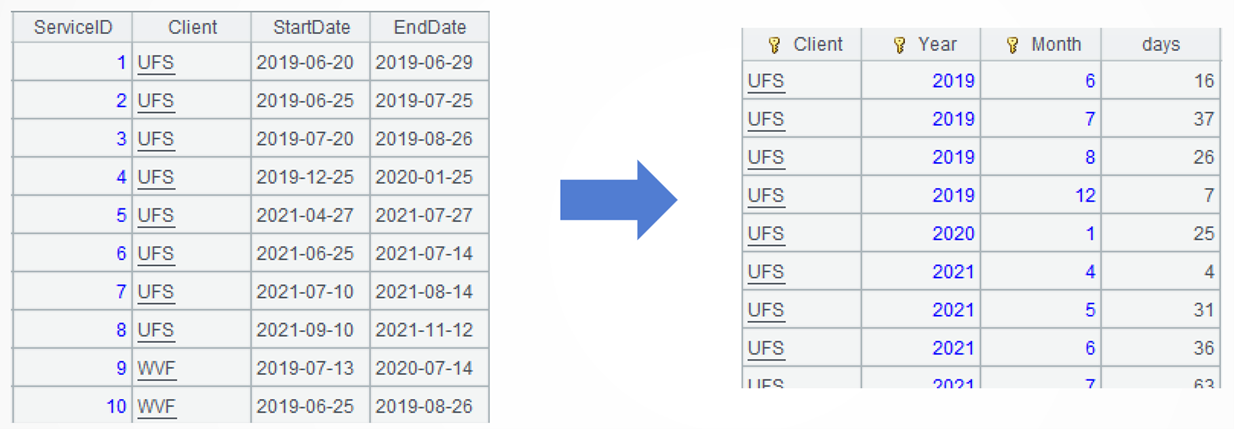
Source data: In the after-sales service table (11/after_sales_service.txt), each client may have multiple after-sales service periods active concurrently, and the corresponding date ranges may overlap.
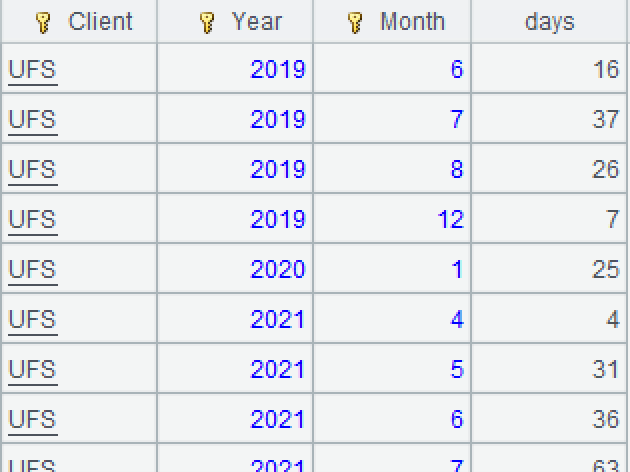
Target: Find the number of days of after-sales service received by each client per month.
SPL code:
A |
|
1 |
$select * from 11/after_sales_service.txt |
2 |
=A1.news(periods(StartDate,EndDate);Client,~:Date) |
3 |
=A2.groups(Client, year(Date):Year,month(Date):Month; count(1):days) |
A1: Load data.
A2: Loop through each record in A1 to expand them and concatenate the result records. First, split the current record into a date sequence based on the start and end dates, and then expand the date sequence into a new two-fields table sequence. TheClientfield obtains values from the original record and the Date fieldgets theirs from the current member (represented by ~) of the data sequence. The news() functionexpands a single record into multiple records.
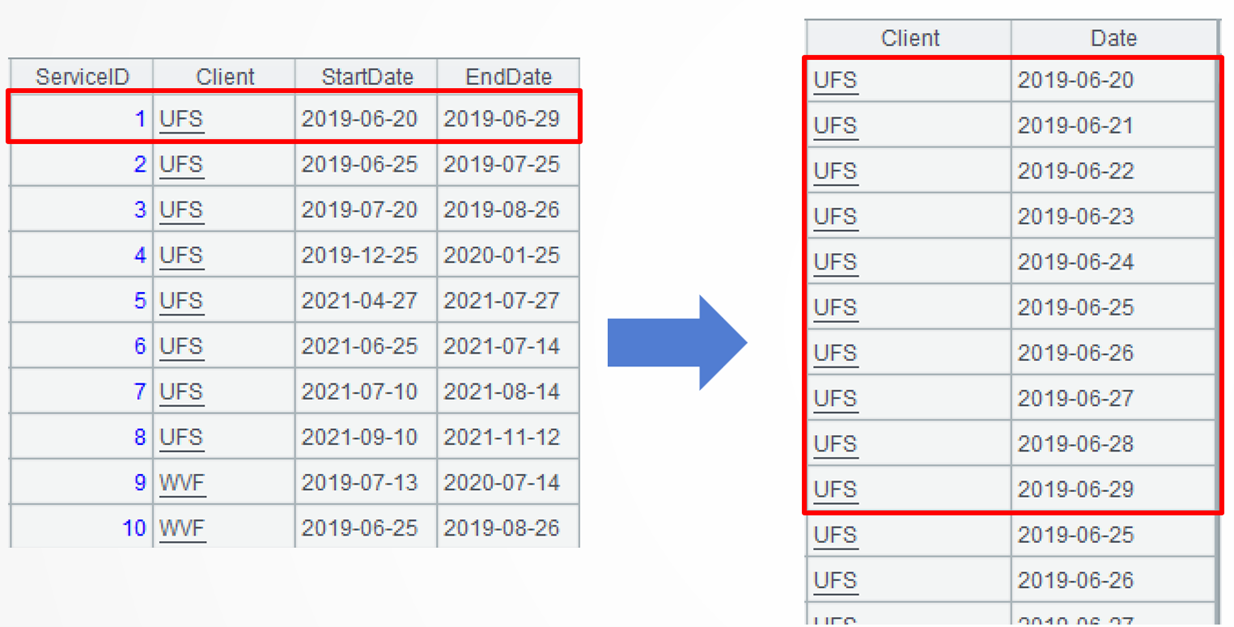
A3: Group A2’s records by client, year and month, and count the days in each group.
Example 3: List each employee’s daily position status based on the current and historical records
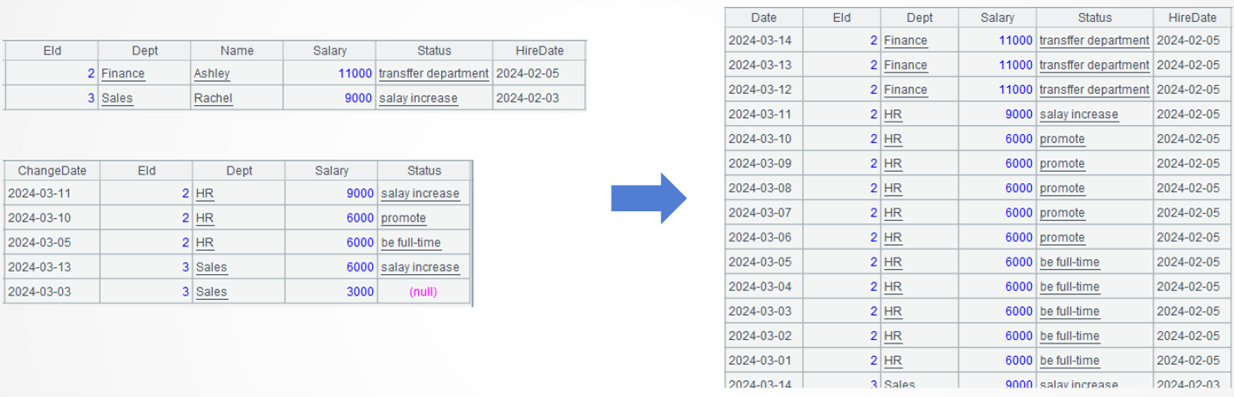
Source data: The employee current position table (Employee_Current.txt) stores each employee’s current department, salary, and the reason for their latest status change.The HireDatefield is the employment start date, which remains unchanged regardless of status changes and which is a special feature in the table. The employee historical position table (12/Employee_History.txt)stores all historical changes in employees’ position status, including the date each change occurred (ChangeDate).
Target: Given a query date (like 2024-03-01), list each employee’s daily position status during the date range from today (2024-03-14) back to the query date. Statuses on dates without changes must be reasonably filled in. For example, the duration from today back to the most recent historical change date need to be filled with thecurrent position status, and the period between the most recent change date and the preceding one will be filled with the status of themost recent historical change date. As a special case, thehire datemust also be filled in accordingly.
SPL code:
A |
|
1 |
$select date('2024-03-14') as Date,EId,Dept,Salary,Status,HireDate from 12/Employee_Current.txt |
2 |
$select ChangeDate as Date,EId,Dept,Salary,Status,null as HireDate from 12/Employee_History.txt order by Date desc |
3 |
=(A1|A2).group(EId) |
4 |
=A3.(~.news(periods@x(~.Date,ifn(~[1].Date,date("2024-02-29")),-1);date(~):Date,EId,Dept,Salary,Status,A3.HireDate)) |
5 |
=A4.conj() |
A1: Load the current status while adding a computed column named Date, whose field is the current date.

A2: Load the historical statuses while renaming ChangeDate field Date, sorting it in the reverse chronological order and adding a new computed column HireDate whose field is null. When the loading is done, the current status table and the historical status table have the same structure.
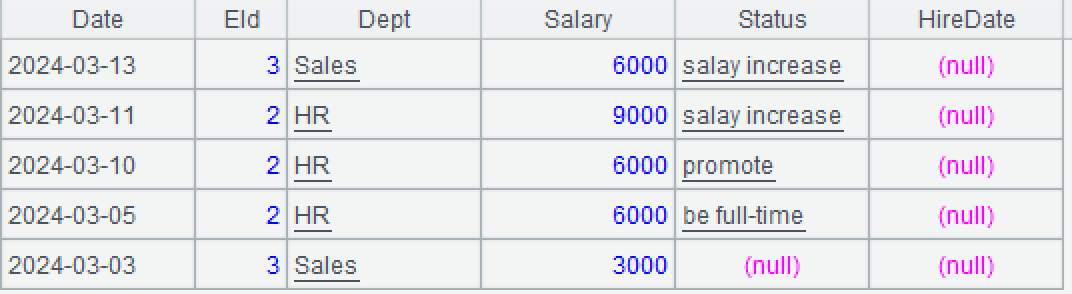
A3: Concatenate the current status table and the historical status table and group records by employee, without aggregation. Each group consists of a set, where members are ordered in descending order. Below shows details in the first group:

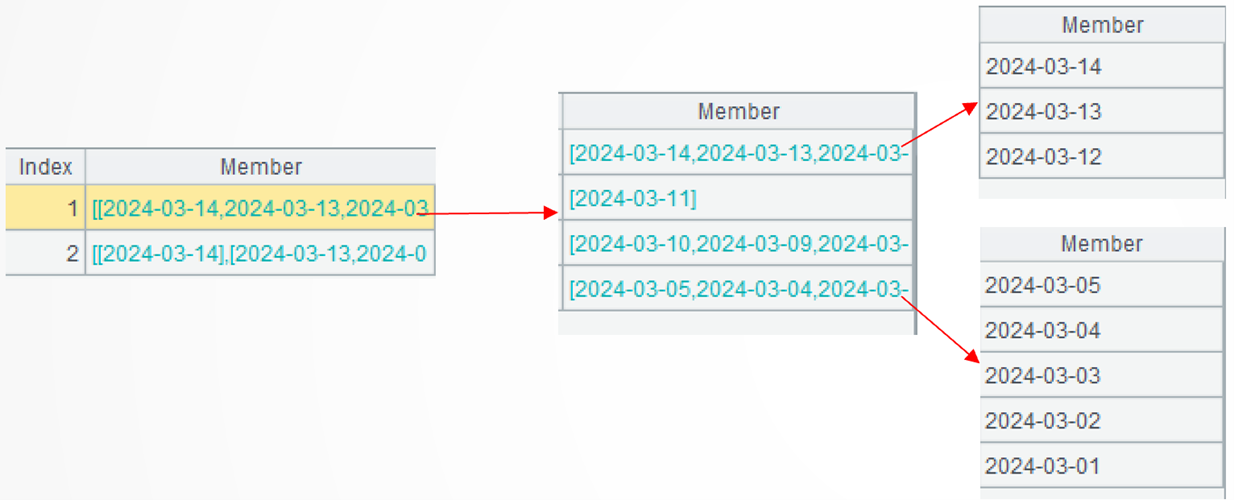
A4: =A3.(~.(periods@x(~.Date,ifn(~[1].Date,date("2024-02-29")),-1)))loops through each employee record in A3 and for each employee loops through each of its record. First, generate a sequence of dates (the date of the previous status is excluded) within the interval based on the current status date and the previous status date.
Since the records are ordered in reverse chronological order, the previous status change corresponds to the current’s next record. For the last record, the date sequence should be generated using the specified query date. The periods()function computes a date sequence based on the start-end interval, whose unit can be negative. @x option indicates that the endpoints are excluded. The ifn() function returns the first non null member. Here are the first employee’s first and last date sequences:
=A3.(~.news(…;~:Date,EId,Dept,Salary,Status,A3.HireDate)) continues the computation to process the current employee. The news()function expands each date sequence into multiple records and concatenate the result records. The Date field gets values from the date sequence’s current member represented by ~; the HireDate field gets values from the current employee (group); and values of the other fields come from the current record of the current employee (the record before expansion)
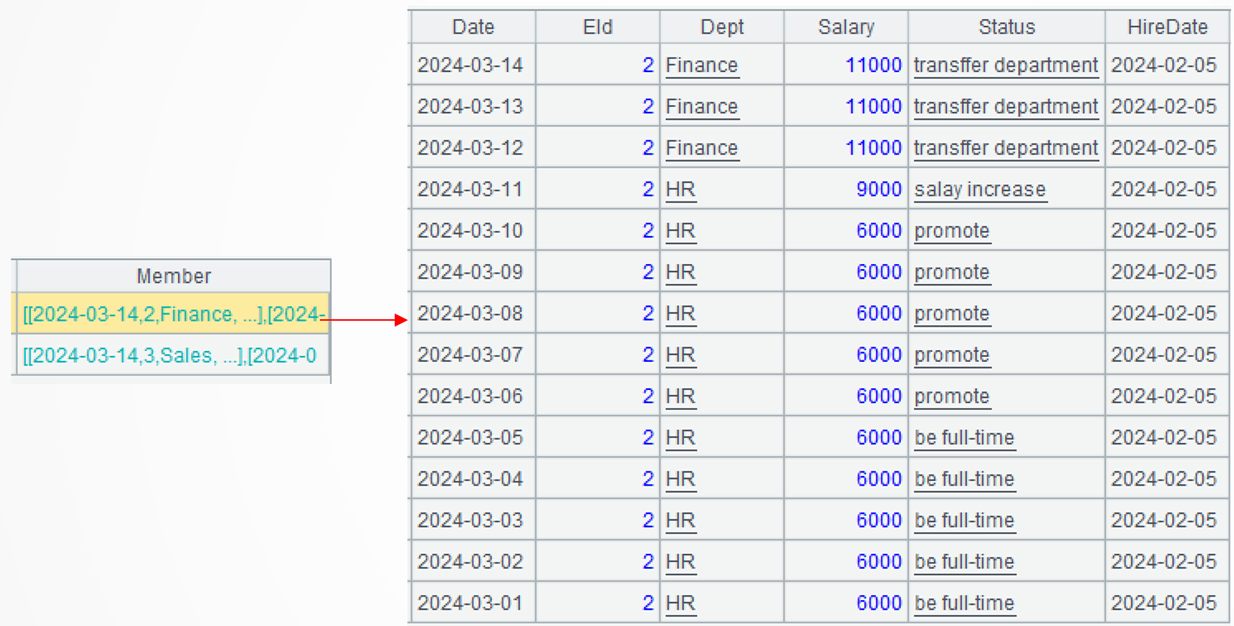
A5: Concatenate records of all groups.
Extended reading
https://c.raqsoft.com.cn/article/1620815256603
From SQL to SPL: Count date ranges per year
From SQL to SPL: Fetch values from previous non-null value rows
SPL Official Website 👉 https://www.esproc.com
SPL Feedback and Help 👉 https://www.reddit.com/r/esProcSPL
SPL Learning Material 👉 https://c.esproc.com
SPL Source Code and Package 👉 https://github.com/SPLWare/esProc
Discord 👉 https://discord.gg/sxd59A8F2W
Youtube 👉 https://www.youtube.com/@esProc_SPL