

A Field Guide to Querying and Report Computations with SPL - 7 Row-to-column/column-to-row transposition
7 Row-to-column/column-to-row transposition
This type of operations is often involved for report layout, and the challenge is that column names after transposition are dynamic and unknown. Most SQL pivoting operations require explicitly specifying column names, often necessitating the use of stored procedures to dynamically generate column names, and then executing the SQL dynamically. As a result, the code structure becomes very complex.
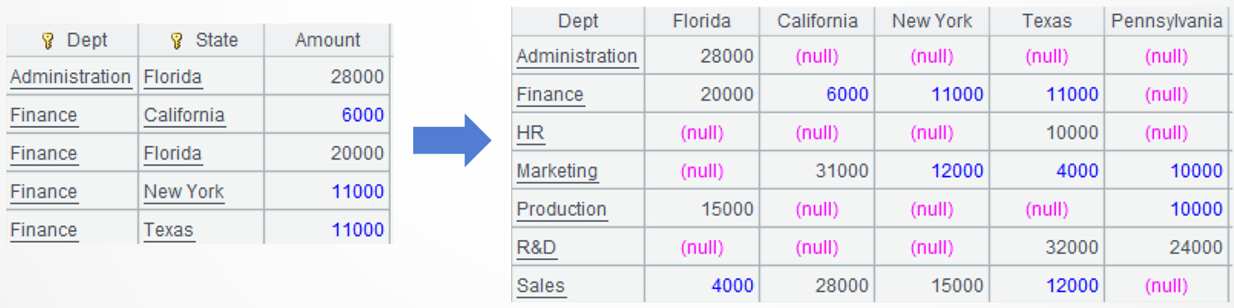
Example 1: Keep grouped department column unchanged and transpose row-wise states to column names
Source data: A summary table storing department salaries in all states.
Target: Keep grouped department column unchanged and transpose the state names, which are row values, to column names. State names and counts vary with employee onboarding and offboarding, but they cannot be known in advance.
SPL code:
A |
|
1 |
$select Dept,State,sum(Salary) Amount from Employee.txt group by Dept,State |
2 |
=A1.pivot(Dept;State,Amount) |
A1: Load data.
A2: Keep the department column unchanged and transpose the row-wise states to column names. The pivot() function performs the transpose operation.
l Learning point: transpose operation – pivot() function
SPL pivot() function is used to perform transposition and the inverse transpose operation, without specifying column names.
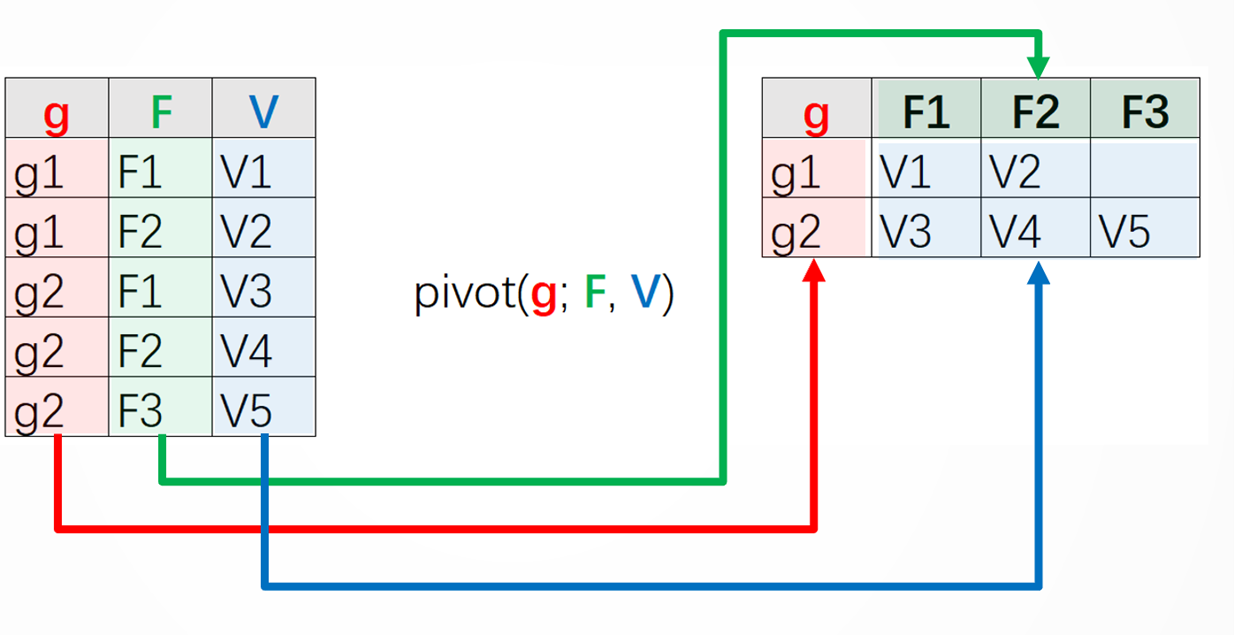
Parameter g: The grouping field name/expression in the original table.
Parameter F: Name of the detailed data field in the original table, whose values will be transposed to new column names.
Parameter V: Name of the detailed data field in the original table, whose values will be transposed to values of the new columns.
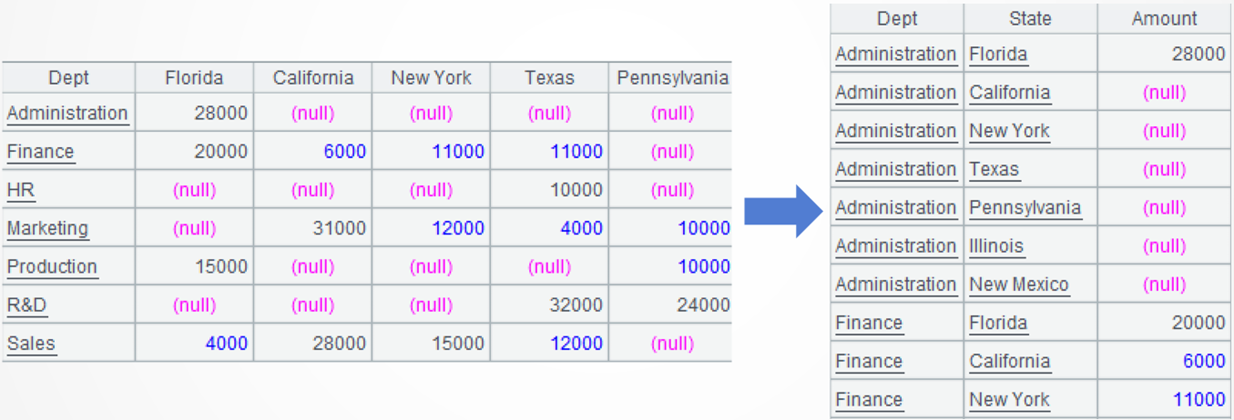
Example 2: (Inverse transpose) Keep grouped department column unchanged and transpose the column name states to row values
Source data: An automatically generated crosstab where the row headers are departments and the column headers are states.
Target: Keep grouped department column unchanged and transpose the state names, which are column names, to row values. State names and counts are unknown in advance.
SPL code:
A |
|
1 |
$select Dept,State,sum(Salary) Amount from Employee.txt group by Dept,State |
2 |
=A1.pivot(Dept;State,Amount) |
3 |
|
4 |
=A2.pivot@r(Dept;State,Amount) |
A1-A2: Simulate the data source.
A3: Keep the department column unchaged and transpose the state names back to row values. The pivot()@r function performs the inverse transpose operation.
l Learning point: inverse transpose operation – pivot@r() function
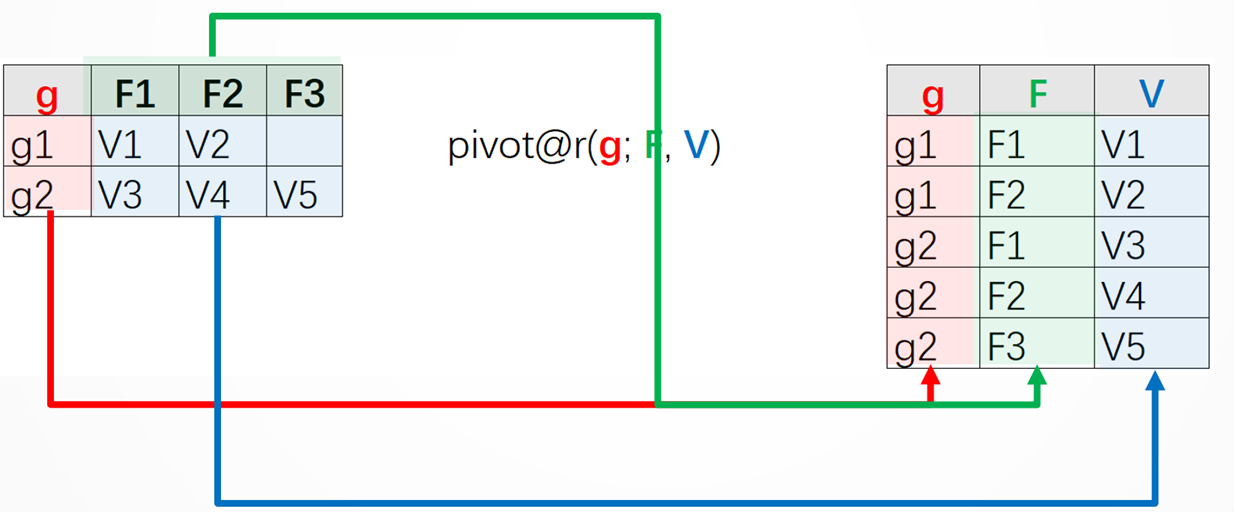
Parameter g: The grouping field name/expression in the original table.
Parameter F: Name of the detailed data field in the new table, whose values are all field names in the original table except for the grouping field name.
Parameter V: Name of the detailed data field in the new table, whose values are values of field F in the original table.
Example 3: Rotate a crosstab made up of client, contract statuses, and dates 90 degrees
Source data: There is a client contract status table, where the row headers are clients, the column headers are three statuses – signed, delivered and refunded, and the cross cells contain dates when statuses are achieved.
Target: To rotate the crosstab 90 degrees clockwise, convert clients originally at the row headers to column headers, the statuses originally at column headers to cross cell values and dates originally in cross cells to row headers, while sorting records in chronological order.

SPL code:
A |
|
1 |
$select * from 7\3.txt |
2 |
=A1.pivot@r(Client;State,Date) |
3 |
=A2.select(Date) |
4 |
=A3.pivot(Date;Client,State) |
A1: Load data.
A2: Keep the client column unchanged, and convert statuses from column names to row values.
A3: Remove records where statuses are all nulls.
A4: Keep the date column unchanged, and convert clients from row values to column names.
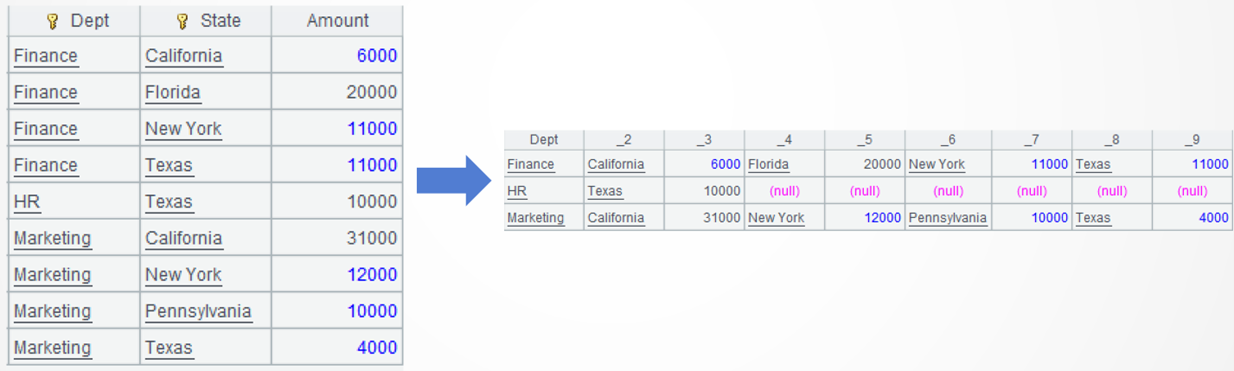
Example 4: Keep grouped department column unchanged and rotate states and salaries from a horizontal to a vertical arrangement
Source data: The summary table storing salaries of three departments in every department.
Target: Keep the department column unchanged and transform state names and salary amounts from row value to column names. Both state names and state counts are unknown in advance.
SPL code:
A |
|
1 |
$select Dept,State,sum(Salary) Amount from Employee.txt where Dept in ('Finance','Marketing','HR') group by Dept,State |
2 |
=A1.groupc(Dept;State,Amount) |
A1: Load data.
A2: Keep department column unchanged and transform state names and salary amounts from row value to column names, during which new field names are automatically generated. The groupc() function transforms values under multiple new column names.

Learning point: multi-column transposition – groupc() function

Parameter g: The grouping field name/expression in the original table.
Parameters F,F2…Fn: Multiple columns/detailed data fields in the original table, whose values will be filled in the new table horizontally according to the order of fields.
The new field names will be automatically generated in the natural order of sequence numbers, like _2_3…. You can also define your own field names.
You can manually specify field names in A2:
=A1.groupc(Dept;State,Amount;S1,A1,S2,A2,S3,A3,S4,A4)
Computing result:

Those field name can also be generated using dynamic code:
A |
|
6 |
=A1.group(Dept).max(~.len()).conj(["S"/~,"A"/~]).concat@c() |
7 |
=A1.groupc(Dept;State,Amount;${A6}) |
Extended reading
From SQL to SPL:Create columns from distinct values of a column
From SQL to SPL: Summarize row counts by dynamic columns into json
From SQL to SPL: Convert cross cell to row header, row header to column
From SQL to SPL: Uncertain number but regular column to row conversion
From SQL to SPL: Row to column conversion involving uncertain columns
SPL Official Website 👉 https://www.esproc.com
SPL Feedback and Help 👉 https://www.reddit.com/r/esProcSPL
SPL Learning Material 👉 https://c.esproc.com
SPL Source Code and Package 👉 https://github.com/SPLWare/esProc
Discord 👉 https://discord.gg/sxd59A8F2W
Youtube 👉 https://www.youtube.com/@esProc_SPL